When sending out automated emails to your list, how personalized are they?
I’m not talking about things like $firstname, or order by $date for free shipping – but actual personalization based on their behavior.
According to MarketingSherpa, 39% of marketers found that sending emails automatically based on user behavior was their most effective email marketing strategy. At the same time, DMA reports that emails triggered by behavior were responsible for 30% of revenues in 2014, up from 17% in 2013, and that 77% of ROI comes from segmented, targeted and triggered campaigns.
Let those numbers sink in a minute.
The potential for making the most of behavioral email marketing is wide open, and yet, according to eConsultancy, only 20% of marketers are using behavioral targeting.
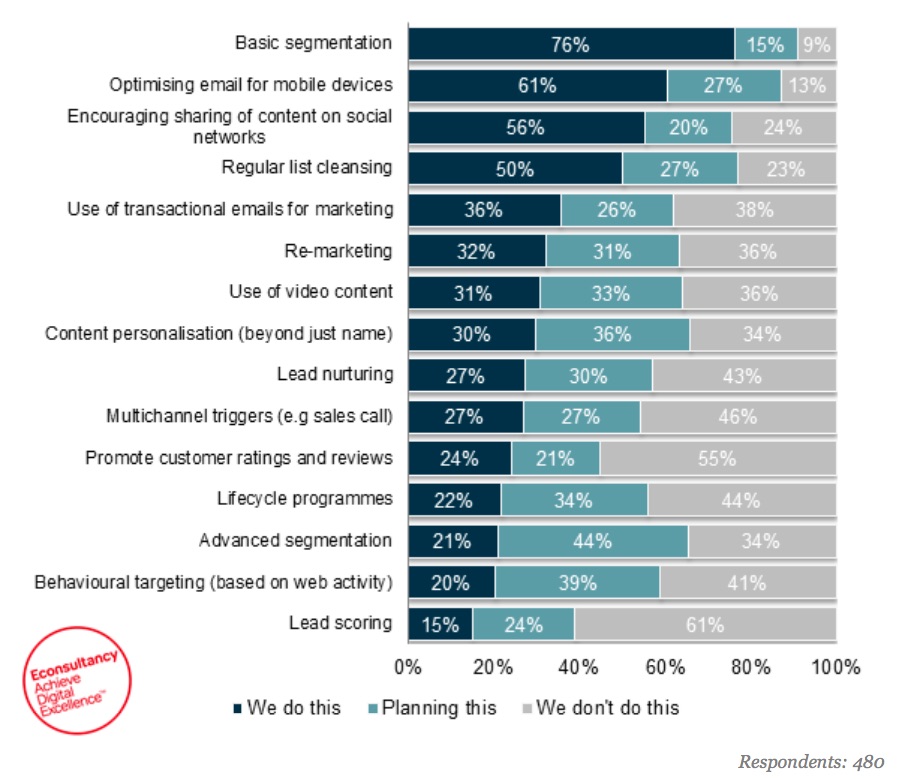
Only 20% of marketers surveyed use behavioral targeting (Image Source)
Why is that? Let’s take a closer look at the core issues and learn how to get started with behavioral email marketing.
Getting the Big Picture with Behavioral Tracking
Oftentimes, marketers want to start behavioral targeting, but they have no idea how or where to start. The first step, if you haven’t done so already, is to monitor how people are interacting with your brand.
Kissmetrics can deliver this kind of invaluable behavioral analytics data. Like the brain of your behavioral marketing outreach, it seeks out and stores details about your visitors, including:
- Who they are, and when they converted
- What they viewed, where they clicked on your website, and when they purchased
- Group visitors based on shared criteria
- Identifies where people are dropping off before converting
- Whether or not they submitted any forms, conducted any live chats, and so on
Because of this powerful people-based analytics platform, you can tailor your behavioral email triggers to suit precisely what your audience is looking for.
Decide Which Customer Actions Warrant an Email
Now, not all of these points will be email “action-worthy”, so it’s up to you to figure out what actions the user takes (or doesn’t take) that are worth sending an email. You may have even seen this kind of behavioral targeting at work when you sign up for a service, but don’t complete your profile or don’t verify your email address. If the company is smart, they’ll send you an automated email reminding you to do so.
But re-targeting the user in this way isn’t the only way to leverage behaviorally targeted emails. You can also send out targeted messages, for example, when a customer:
- Submits a form to download your white paper, video, case study or other free item
- Views certain content on your web page. If they spent some time browsing the FAQ, you can set up a behaviorally targeted email to check in and see if they have any specific questions
- Leaves an item in their cart without checking out. You could send them a reminder email with a small discount, remind them of limited stock (or that their cart will expire) and so on
Remember, with behavioral email marketing, it’s the customer at the wheel — not you. They’re making choices while interacting with your content. Behavioral marketing is designed to act on those choices with the kind of engagement that increases conversion rates, grows profits and vastly improves customer retention.
Unearthing More Behavioral Email Trigger Opportunities
Once you start collecting and analyzing the information that you gather on your customers, new opportunities for behaviorally targeted emails will percolate to the surface. You’ll start getting all kinds of great ideas on how to guide users back into your service. To help get you started, however, here are some of my favorites:
The “Getting Started” Email
Also known as an “onboarding” email, this message is usually sent after you create an account or register for a service. It’s designed to get you clicking and interacting with the service as quickly and fluidly as possible. Here’s an awesome example from Stocksy, a stock photography site:
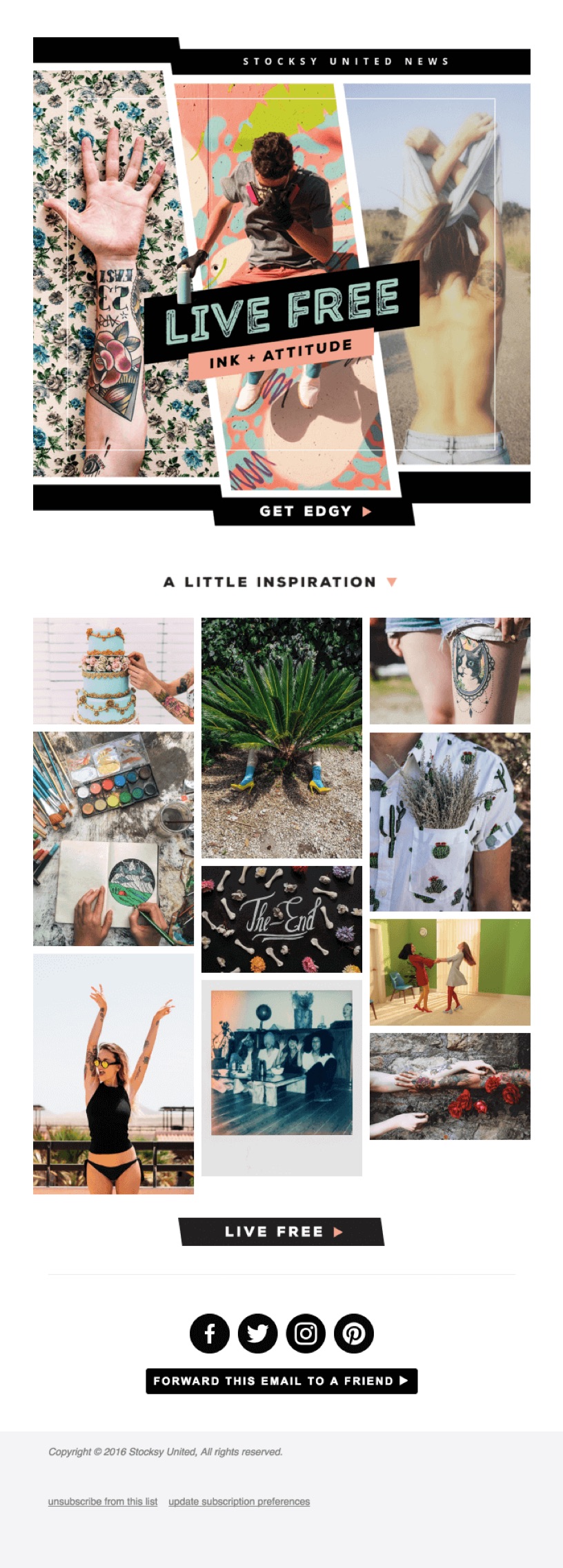
Image Source
Notice how they’ve carefully curated images on a specific theme – then encourage you to click through and check them out for more design inspiration. Here’s another example from Airbnb:

Image Source
If you’ve been browsing trips to wine country, this targeted email can help make your tour much more palatable through the offer if discounts, local guides, special attractions and more.
The Notification Email
The notification email is generally just a canned response from your account or user management software that tells people their username and password, and maybe has a link to some documentation to get started. That’s where most of the getting started process ends — which results in a lot of confused or frustrated users.
Instead, encourage them to take the first step toward trying out your product by offering more of a guided, hands-on tour. If you have a SaaS, walk them through using it by helping them to create their very first _____ — such as a website, playlist or campaign. This sort of guided, pop-up tour will help them feel more at ease, and can also give you even more valuable data for your behavioral targeting goals.
The Icing on the Cake Email
These are the unexpected but highly welcomed emails that encourage better customer retention. Here’s a great example from Shopify that lets users extend their free trial of the service:
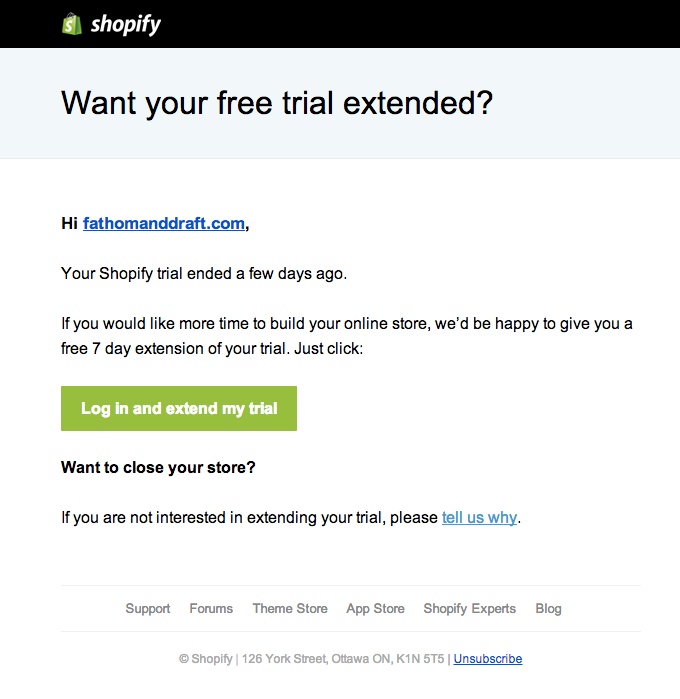
Image Source
Another example comes from TurboTax, which is designed to pique the user’s curiosity about how much their tax refund could be, before they ever see a check in the mail:
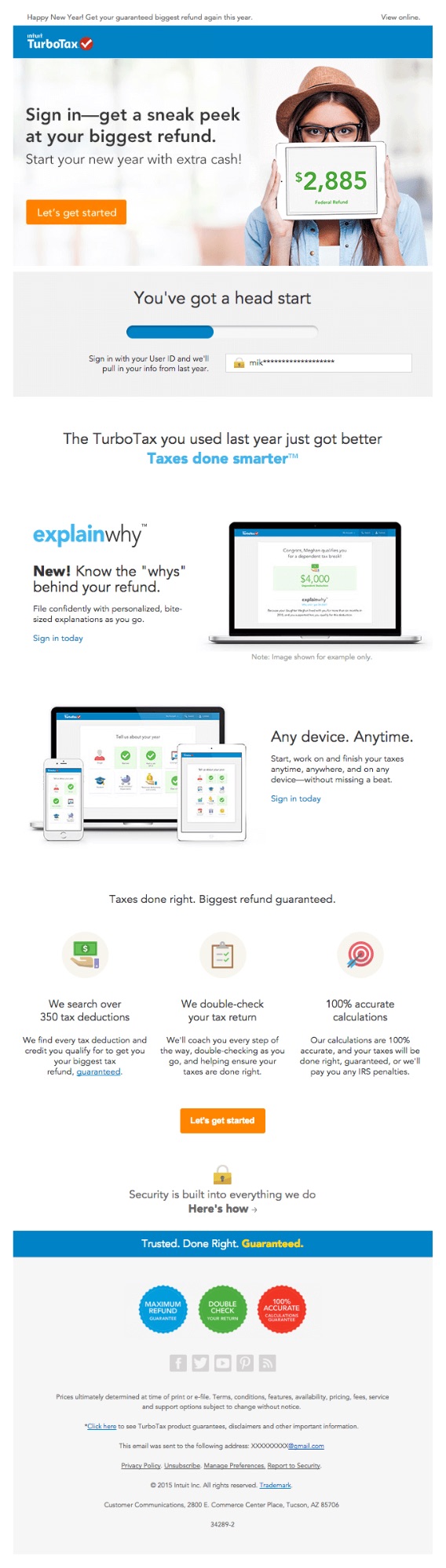
Image Source
It also promotes the benefits of using the TurboTax service, but without being overly “sales-y” or pushy. Rather it shifts the focus onto the customer and their end goals – which revolve around getting the biggest refund possible at tax time.
The Reward Email
Everyone loves getting an unexpected reward — even if it’s a digital “good job!” Here’s an example of an email from Withings, which is a Fitbit-style product that helps inspire healthy habits by tracking your activity. Here, you can see a user has won a badge for taking 8,000 steps in a day, and unlocked the Marathon reward. They can also share their progress on Twitter or Facebook.
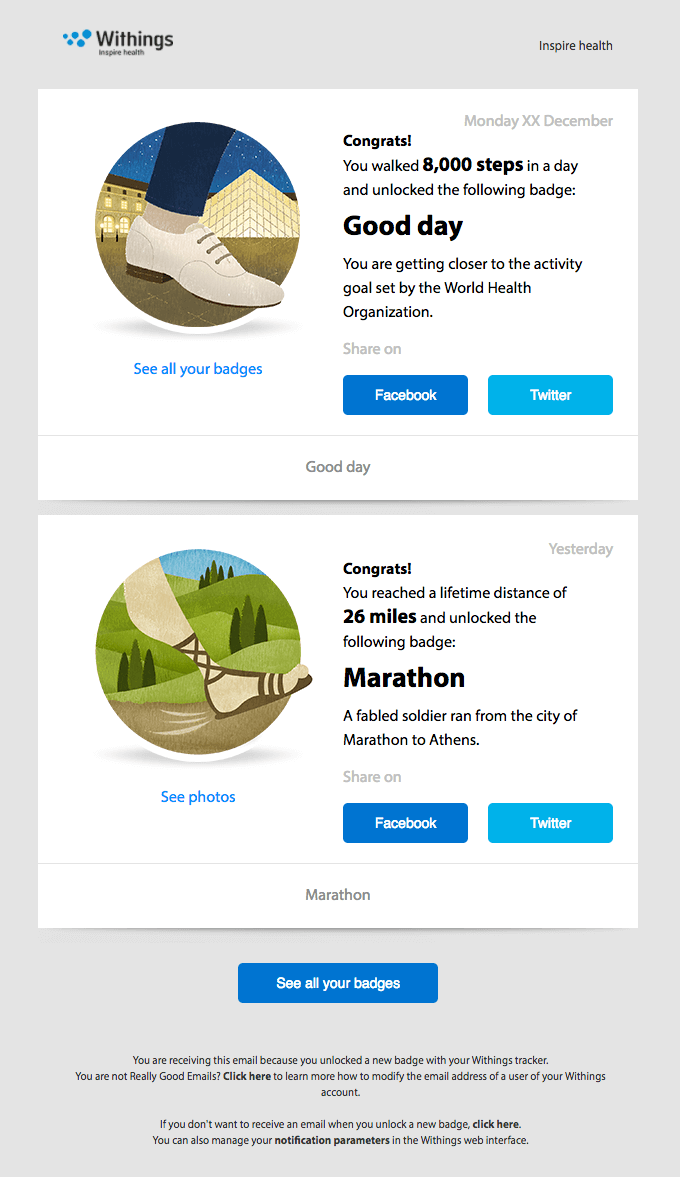
Image Source
The Recommendation Email
Oftentimes, great customer service from a company is enough to get you to recommend them. But what if the brand sweetened the deal? Bombas, which sells socks online, provides free socks, with no limit, to people who tell their friends about them. Those friends get a discount on socks, and the referrer gets more socks. And we all know you can never have enough socks.
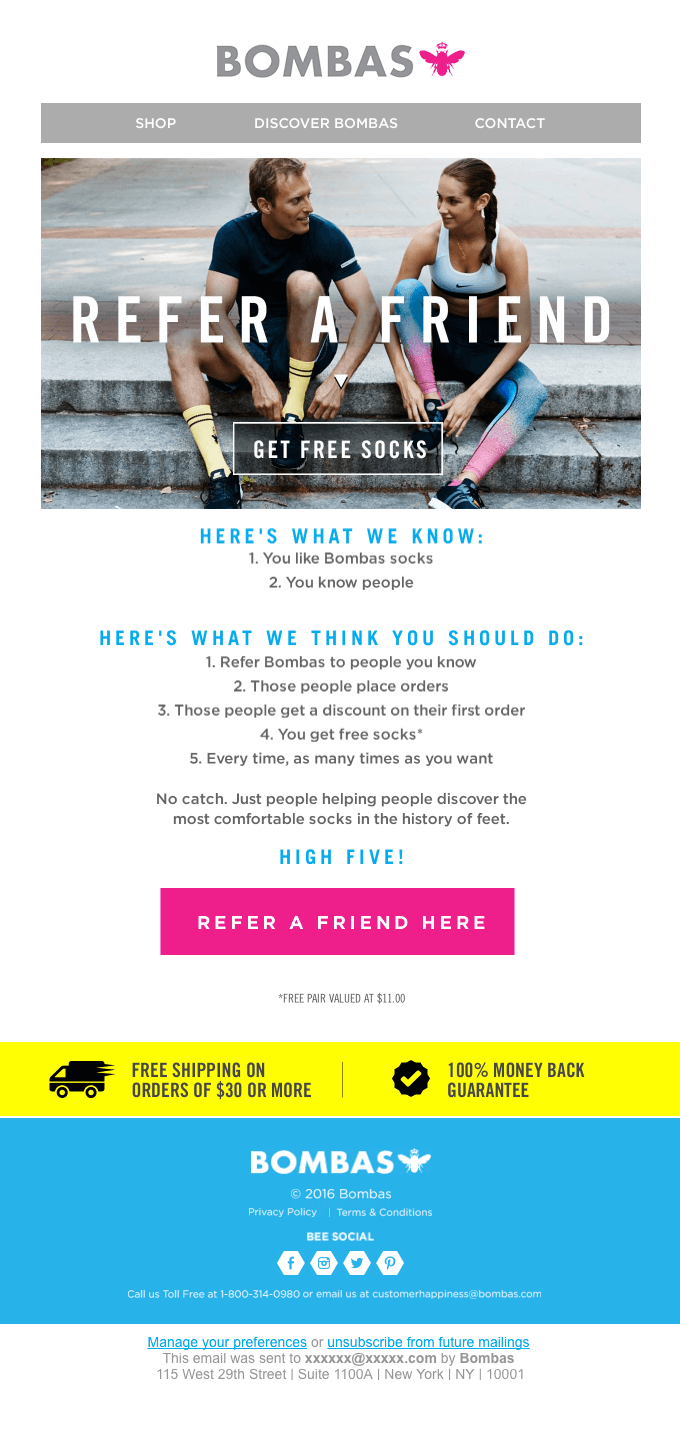
Image Source
Transactional Emails
Did you know that transactional emails (receipts, shipping notifications, etc.) are opened up at 8x the rate of regular emails? With this in mind, it’s worth going through the ones your company sends and doing away with those dusty old “order confirmed” messages, to make every note you send one that not only thanks the customer for their order, but does so in a way that’s more akin to having a conversation than making a statement.
So Just How Do I Set All This Up?
Until now, behavioral email targeting was difficult to set up because so many pieces of technology had to communicate with each other. With the new Kissmetrics Campaigns, behavioral targeting via email (and other channels) is built right in, so you can customize precisely when automated emails are sent to your customers, based on their behaviors. It’s better targeting, discovery, engagement and retention all rolled into one.
Be sure to check out the detailed article link above to learn how to use this new feature to the fullest, and be sure to share your behavioral targeting email success stories with us in the comments below!
About the Author: Sherice Jacob helps business owners improve website design and increase conversion rates through compelling copywriting, user-friendly design and smart analytics analysis. Learn more at iElectrify.com and download your free web copy tune-up and conversion checklist today!

source
https://blog.kissmetrics.com/behavioral-email-marketing/
 Here are the must-read stats about what’s happening with Internet adoption, smartphones, ads, ecommerce, entertainment, gaming, enterprise healthcare, China, India, and startups. We’ve picked the most important slides from legendary Kleiner Perkins partner Mary Meeker’s massive 355-page 2017 Internet Trends report, deciphered the complex data, and explained why… Read More

 This is the best way to get up to speed on everything going on in tech. Kleiner Perkins venture partner Mary Meeker’s annual Internet Trends report is essentially the state of the union for the technology industry. The widely anticipated slide deck compiles the most informative research on what’s getting funded, how Internet adoption is progressing, which interfaces are resonating,…


 Move over duckface. Shove off rainbow spew. There’s a new selfie game in town and it wants to turn your 2D visage into uncannily accurate 3D — then splice that axiomatic piece of you into animated cartoon suits that rock out, strut their disco stuff, skateboard, look coy, relaxed or laugh manically.
 Reddit is continuing its march towards becoming a social network after it added location tagging to its mobile app. The service is famously known as “the front page of the internet,” but this year it has rolled out features that make it much more like Twitter or Facebook. Back in March, Reddit introduced user profile pages and the option to follow others, so location tagging…