Monday, 10 December 2018

Pew: Social media for the first time tops newspapers as a news source for U.S. adults

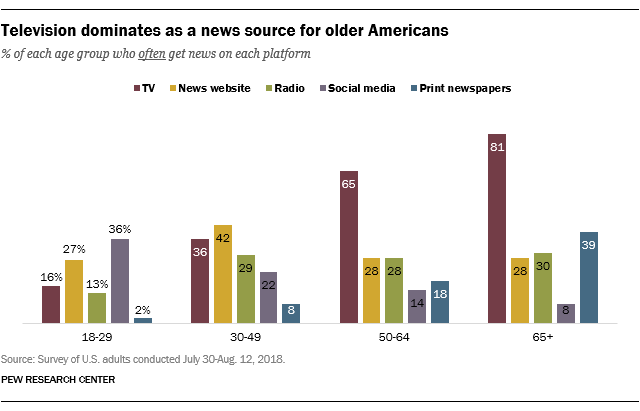
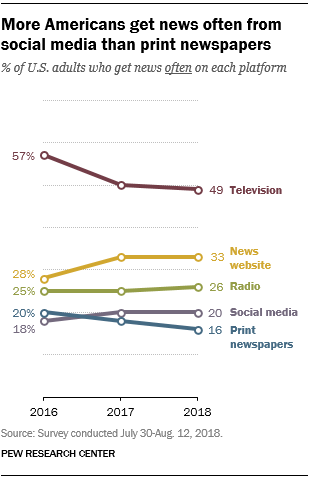
It’s not true that everyone gets their news from Facebook and Twitter. But is now true that more U.S. adults get their news from social media than from print newspapers. According to a new report from Pew Research Center out today, social media has for the first time surpassed newspapers as a preferred source of news for American adults. However, social media is still far behind other traditional news sources, like TV and radio, for example.

Last year, the portion of those who got their news from social media was around equal to those who got their news from print newspapers, Pew says. But in its more recent survey conducted from July 30 through August 12, 2018, that had changed.

Now, one-in-five U.S. adults (20%) are getting news from social media, compared with just 16 percent of those who get news from newspapers, the report found. (Pew had asked respondents if they got their news “often” from the various platforms.)

The change comes at a time when newspaper circulation is on the decline, and its popularity as a news medium is being phased out – particularly with younger generations. In fact, the report noted that print only remains popular today with the 65 and up crowd, where 39 percent get their news from newspapers. By comparison, no more than 18 percent of any other age group does.

While the decline of print has now given social media a slight edge, it’s nowhere near dominating other formats.

Instead, TV is still the most popular destination for getting the news, even though that’s been dropping over the past couple of years. TV is then followed by news websites, radio, and then social media and newspapers.

But “TV news” doesn’t necessarily mean cable news networks, Pew clarifies.

In reality, local news is the most popular, with 37 percent getting their news there often. Meanwhile, 30 percent get cable TV news often and 25 percent watch the national evening news shows often.

However, if you look at the combination of news websites and social media together, a trend towards increasing news consumption from the web is apparent. Together, 43 percent of U.S. adults get their news from the web in some way, compared to 49 percent from TV.

There’s a growing age gap between TV and the web, too.

A huge majority (81%) of those 65 and older get news from TV, and so does 65 percent of those ages 50 to 64. Meanwhile, only 16 percent of the youngest consumers – those ages 18 to 29 – get their news from TV. This is the group pushing forward the cord cutting trend, too – or more specifically, many of them are the “cord-nevers,” as they’re never signing up for pay TV subscriptions in the first place. So it’s not surprising they’re not watching TV news.

Plus, a meager 2 percent get their news from newspapers in this group.

This young demographic greatly prefers digital consumption, with 27 percent getting news from news websites and 36 percent from social media. That is to say, they’re four times as likely than those 65 and up to get news from social media.

Meanwhile, online news websites are the most popular with the 30 to 49-year old crowd, with 42 percent saying they get their news often from this source.

Despite their preference for digital, younger Americans’ news consumption is better spread out across mediums, Pew points out.

“Younger Americans are also unique in that they don’t rely on one platform in the way that the majority of their elders rely on TV,” Pew researcher Elisa Shearer writes. “No more than half of those ages 18 to 29 and 30 to 49 get news often from any one news platform,” she says.


source https://techcrunch.com/2018/12/10/pew-social-media-for-the-first-time-tops-newspapers-as-a-news-source-for-u-s-adults/

Instagram launches walkie-talkie voice messaging

You’d think Facebook would be faster at copying itself. Five years after Facebook Messenger took a cue from WhatsApp and Voxer to launch voice messaging, and four months after TechCrunch reported Instagram was testing its own walkie talkie feature, voice messaging is rolling out globally on Instagram Direct today.

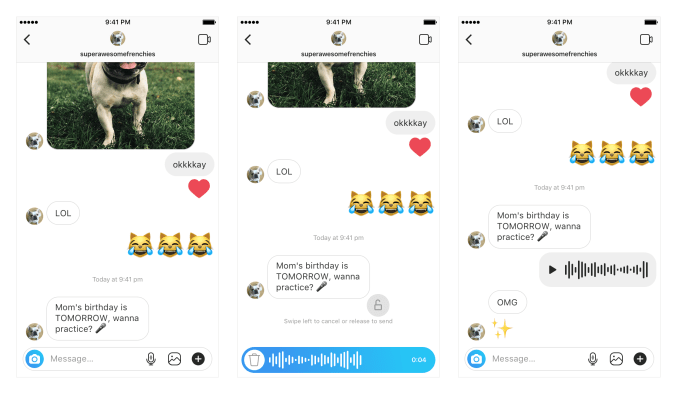
Users can hold down the microphone button to record a short voice message that appears in the chat as an audio wave form that recipients can then listen to at their leisure.  Voice messages are up to one-minute long, stay permanently listenable rather than disappearing, and work in one-on-one and group chats on iOS and Android. The feature offers an off-camera asynchronous alternative to the video calling feature Instagram released in June. It will have to compete with Viber, Zello, and Telegram as well as Facebook Messenger and WhatsApp for the use case.

Hands-free Direct messaging could make Instagram a more appealing chat app for drivers, people on the move with their hands full, or users in the developing world who want a more intimate connection without having to pay for the data for long audio or video calls. It could also be a win for users in countries with less popular languages or ones that aren’t easily compatible with smartphone keyboards, as they could talk to friends instead of typing.


The launch deepens Facebook’s entry into the voice market. From its first voice messaging and VOIP features back in 2013 to its new voice control system Aloha that works on its recently launched Portal video chat screen, Facebook has long taken an interest in the accessibility of voice but only got serious about building it across its products in 2018. Along with Instagram video calling, today launch raises the question of whether Portal and Instagram will team up. That could make Portal more useful…but also risks making Instagram less cool by tightening its ties to Facebook.


source https://techcrunch.com/2018/12/10/instagram-voice-messaging/

Friday, 7 December 2018

Content Comprehensiveness - Whiteboard Friday

Posted by KameronJenkins

When Google says they prefer comprehensive, complete content, what does that really mean? In this week's episode of Whiteboard Friday, Kameron Jenkins explores actionable ways to translate the demands of the search engines into valuable, quality content that should help you rank.

Click on the whiteboard image above to open a high-resolution version in a new tab!

Video Transcription

Hey, guys. Welcome to this week's edition of Whiteboard Friday. My name is Kameron Jenkins, and I work here at Moz.

Today we're going to be talking about the quality of content comprehensiveness and what that means and why sometimes it can be confusing. I want to use an example scenario of a conversation that tends to go on between SEOs and Google. So here we go.

An SEO usually says something like, "Okay, Google, you say you want to rank high-quality content. But what does that really mean? What is high quality, because we need more specifics than that."

Then Google goes, "Okay, high quality is something that's comprehensive and complete. Yeah, it's really comprehensive." SEOs go, "Well, wait. What does that even mean?"

That's kind of what this was born out of. Just kind of an explanation of what is comprehensive, what does Google mean when they say that, and how that differs depending on the query.

Here we have an example page, and I'll kind of walk you through it. It's just going to serve to demonstrate why when Google says "comprehensive," that can mean something different for an e-commerce page than it would for a history of soccer page. It's really going to differ depending on the query, because people want all sorts of different kinds of things. Their intent is going to be different depending on what they're searching in Google. So the criteria is going to be different for comprehensiveness. So hopefully, by way of example, we'll be able to kind of walk you through what comprehensiveness looks like for this one particular query. So let's just dive in.

1. Intent

All right. So first I'm going to talk about intent. I have here a Complete Guide to Buying a House. This is the query I used as an example. Before we dive in, even before we look into keyword research tools or anything like that, I think it's really important to just like let the query sit with you for a little bit. So "guide to buying a house," okay, I'm going to think about that and think about what the searcher probably wanted based on the query.

So first of all, I noticed "guide." The word "guide" to me makes it sound like someone wants something very complete, very thorough. They don't just want quick tips. They don't want a quick bullet list. This can be longer, because someone is searching for a comprehensive guide.

"To buying a house," that's a process. That's not like an add-to-cart like Amazon. It's a step-by-step. There are multiple phases to that type of process. It's really important to realize here that they're probably looking for something a little lengthier and something that is maybe a step-by-step process.

And too, you just look at the query, "guide to buying a house," people are probably searching that if they've never bought a house before. So if they've never bought a house before, it's just good to remember that your audience is in a phase where they have no idea what they're doing. It's important to understand your audience and understand that this is something that they're going to need very, very comprehensive, start-to-finish information on it.

2. Implications

Two, implications. This is again also before we get into any keyword research tools. By implications, I mean what is going to be the effect on someone after reading this? So the implications here, a guide to buying a house, that is a big financial decision. That's a big financial purchase. It's going to affect people's finances and happiness and well-being, and Google actually has a name for that. In their Quality Rater Guidelines, they call that YMYL. So that stands for "your money, your life."

Those types of pages are held to a really high standard, and rightfully so. If someone reads this, they're going to get advice about how to spend their money. It's important for us, as SEOs and writers crafting these types of pages, to understand that these are going to be held to a really high standard. I think what that could look like on the page is, because they're making a big purchase like this, it might be a good sign of trustworthiness to maybe have some expert quotes in here. Maybe you kind of sprinkle those throughout your page. Maybe you actually have it written by an expert author instead of just Joe Schmoe blogger. Those are just some ideas for making a page really trustworthy, and I think that's a key to comprehensiveness.

3. Subtopics

Number three here we have subtopics. There are two ways that I'll walk you through finding subtopics to fit within your umbrella topic. I'm going to use Moz Keyword Explorer as an example of this.

Use Keyword Explorer to reveal subtopics

In Moz Keyword Explorer, you can search for different keywords and related keywords two different ways. You can type in a query. So you can type in something like "buy a house" or "home buying" or something like that. You start with your main topic, and what you'll get as a result is a bunch of suggested keywords that you can also incorporate on your page, terms that are related to the term that you searched. This is going to be really great, because you're going to start to notice themes emerge. Some of the themes I noticed were people tend to search for "home buying calculator," like a can-I-afford-it type of calculator. A lot of people search financial-related things obviously, bad credit. I filed for bankruptcy, can I still buy a house? You'll start to see subthemes emerge.

Then I also wanted to mention that, in Moz Keyword Explorer, you can also search by URL. What I might do is query my term that I'm trying to target on my page. I'm going to pick the top three URLs that are ranking. You pop them into Keyword Explorer, and you can compare them and you can see the areas of most overlap. So what you'll get essentially is a list of keywords that the top ranking pages for that term also rank for. That's going to be a really good way to mine some extra keyword ideas for your page to make it more comprehensive.

4. Questions

Then here we go. We have step four. After we've come up with some subtopics, I think it's also a really good idea to mine questions and try to find what questions our audience is actually asking. So, for these, I like to use Answer the Public and Keywords Everywhere. Those are two really great tools that I kind of like to use in tandem.

Use Answer the Public to mine questions

Answer the Public, if you've never used it, is a really fun tool. You can put in a keyword, and you get a huge list. Depending on how vague your query is, you might get a ton of ideas. If your query is really specific, you might not get as many keyword ideas back. But it's a really great way to type in a keyword, like "buying a house" or "buy a house" or "home buying" or something like that, and get a whole, big, long list of questions that your audience is asking. People that want to know how to buy a house, they're also asking these questions.

I think a comprehensive page will answer those questions. But it can be a little bit overwhelming. There's going to be probably a lot of questions potentially to answer. So how do you prioritize and choose which questions are the best to address on your page?

Use Keywords Everywhere to highlight keywords on a page

That's where the Keywords Everywhere plug-in comes in handy. I use it in Chrome. You can have it highlight the keywords on the page. I think I have mine set to highlight anything that's searched 50 or more times a month. That's a really good way to gauge, just right off the bat you can see, okay, now there are these 10 instead of these 100 questions to potentially answer on my page.

So examples of questions here, I have questions like: Can I afford this? Is now the right time to buy? So you can kind of fit those into your page and answer those questions.

5. Trends

Then finally here I have trends. I think this is a really commonly missed step. It's important to remember that a lot of terms have seasonality attached to them. So what I did with this query, I queried "buy a house," and I wanted to see if there were any trends for home buying-type of research queries in Google Trends. I zoomed out to five years to see if I could see year-over-year if there were any trends that emerged.

That was totally the case. When people are searching "buy a house," it's at its peak kind of around January into spring, and then in the summer it starts to dive, and then it's at its lowest during the holidays. That kind of shows you that people are researching at the beginning of the year. They're kind of probably moving into their house during the summertime, and then during the holidays they've had all the time to move in and now they're just enjoying the holidays. That's kind of the trend flow that it follows. That's really key information, if you're going to build a comprehensive page, to kind of understand that there's seasonality attached with your term.

Because I know now that there's seasonality with my term, I can incorporate information like what are the pros and cons of buying in peak season versus off-season for buying a house. Maybe what's the best time of year to buy. Those are, again, other ideas for things that you can incorporate on your page to make it more comprehensive.

This page is not comprehensive. I didn't have enough room to fit some things. So you don't just stop at this phase. If you're really building a comprehensive page on this topic, don't stop where I stopped. But this is kind of just an example of how to go about thinking through what Google means when they say make a page comprehensive. It's going to mean something different depending on your query and just keep that in mind. Just think about the query, think about what your audience wanted based on what they searched, and you'll be off to a great start building a comprehensive page.

I hope that was helpful. If you have any ideas for building your own comprehensive page, how you do that, maybe how it differs in different industries that you've worked in, pop it in the comments. That would be really good for us to share that information. Come back again next week for another edition of Whiteboard Friday.

Video transcription by Speechpad.com


Sign up for The Moz Top 10, a semimonthly mailer updating you on the top ten hottest pieces of SEO news, tips, and rad links uncovered by the Moz team. Think of it as your exclusive digest of stuff you don't have time to hunt down but want to read!


source https://moz.com/blog/content-comprehensiveness

Thursday, 6 December 2018

FB QVC? Facebook tries Live video shopping

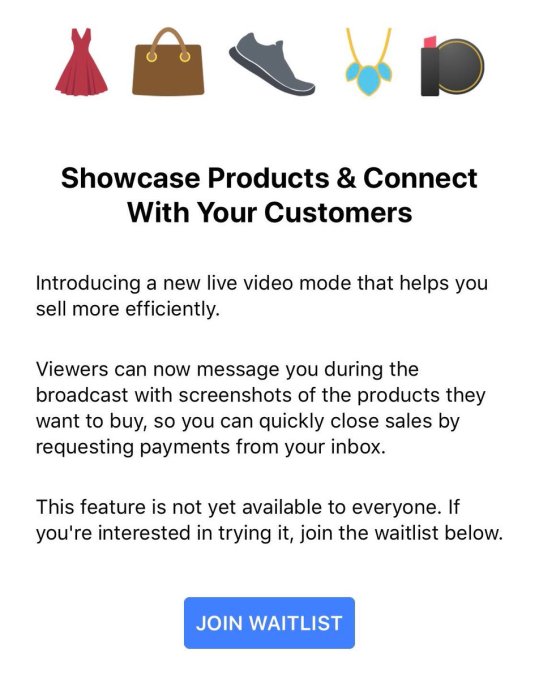
Want to run your own home shopping network? Facebook is now testing a Live video feature for merchants that lets them demo and describe their items for viewers. Customers can screenshot something they want to buy and use Messenger to send it to the seller, who can then request payment right through the chat app.

Facebook confirms the new shopping feature is currently in testing with a limited set of Pages in Thailand, which has been a testbed for shopping features. The option was first spotted by social media and reputation manager Jeff Higgins, and re-shared by Matt Navarra and Social Media Today. But now Facebook is confirming the test’s existence and providing additional details.

The company tells me it had heard feedback from the community in Thailand that Live video helped sellers demonstrate how items could be used or worn, and provided richer understanding than just using photos. Users also told Facebook that Live’s interactivity let customers instantly ask questions and get answers about product specifications and details. Facebook has looked to Thailand to test new commerce experiences like home rentals in Marketplace, as the country’s citizens were quick to prove how Facebook Groups could be used for peer-to-peer shopping. “Thailand is one of our most active Marketplace communities” says Mayank Yadav, Facebook Product Manager for Marketplace.

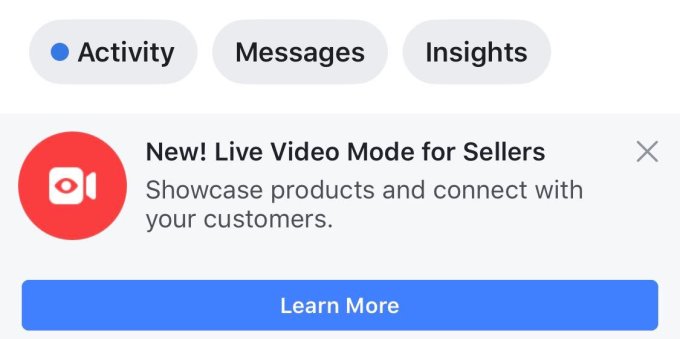
Now it’s running the Live shopping test, which allows Pages to notify fans that they’re going broadcasting to “showcase products and connect with your customers”. Merchants can take reservations and request payments through Messenger.  Facebook tells me it doesn’t currently have plans to add new partners or expand the feature. But some sellers without access are being invited to join a waitlist for the feature. It also says it’s working closely with its test partners to gather feedback and iterate on the live video shopping experience, which would seem to indicate it’s interested in opening the feature more widely if it performs well.

Facebook doesn’t take a cut of payments through Messenger, but the feature could still help earn the company money at a time when it’s seeking revenue streams beyond News Feed ads as it runs out of space their, Stories take over as the top media form, and user growth plateaus. Hooking people on video viewing helps Facebook show lucrative video ads. The more that Facebook can train users to buy and sell things on its app, the better the conversion rates will be for businesses, and the more they’ll be willing to spend on ads. Facebook could also convince sellers who broadcast Live to buy its new Marketplace ad units to promote their wares. And Facebook is happy to snatch any use case from the rest of the internet, whether it’s long-form video viewing or job applications or shopping to boost time on site and subsequent ad views.

Increasingly, Facebook is setting its sights on Craigslist, Etsy, and eBay. Those commerce platforms have failed to keep up with new technologies like video and lack the trust generated by Facebook’s real name policy and social graph. A few years ago, selling something online meant typing up a generic description and maybe uploading a photo. Soon it could mean starring in your own infomercial.

[Postcript: And a Facebook home shopping network could work perfectly on its new countertop smart display Portal.]


source https://techcrunch.com/2018/12/06/facebook-live-shopping/

The Guide to Building Linked Unstructured Citations for Local SEO

Posted by MiriamEllis

This article was written jointly in partnership with Kameron Jenkins. You can enjoy her previous articles here.


When you’ve accomplished step one in your local search marketing, how do you take step two?

You already know that any local business you market has to have the table stakes of accurate structured citations on major platforms like Facebook, Yelp, Infogroup, Acxiom, and YP.

But what can local SEO practitioners do once they’ve got these formal listings created and a system in place for managing them? Our customers often come to us once they’ve gotten well underway with Moz Local and ask, “What’s next? What can I do to move the needle?” This blog post will give you the actionable strategy and a complete step-by-step tutorial to answer this important question.

A quick refresher on citations

Listings on formal directories are called “structured citations.” When other types of platforms (like online news, blogs, best-of lists, etc.) reference a local business’ complete or partial contact information, that’s called an “unstructured citation.” And the best unstructured citations of all include links, of course!

For example, the San Francisco branch of a natural foods grocery store gets a linked unstructured citation from a major medical center in their city via a blog post about stocking a pantry with the right ingredients for healthier eating. Google and consumers encounter this reference and understand that trust and authority are being conveyed and earned.

The more often websites that are relevant to your location or industry link to you within their own content, the better your chances of ranking well in Google’s organic and local search engine results.

Why linked unstructured citations are growing in importance right now

Link building is as old as organic SEO. Structured citation building is as old as local SEO. Both practices have long sought to influence Google rankings. But a close read of the local search marketing community these days points up an increasing emphasis on the value of unstructured citations. In fact, local links were one of the top three takeaways from the 2018 Local Search Ranking Factors survey. Why is this?

  1. Google has become the dominant force in local consumer experiences, keeping as many actions as possible within their own interface instead of sending searchers to company websites. Because links influence rank within that interface, most local businesses enterprises will need to move beyond traditional structured citations to impress Google with mentions on a diverse variety of relevant websites. While structured citations are rightly referred to as “table stakes” for all local businesses, it’s the unstructured ones that can be competitive difference-makers in tough markets.
  2. Meanwhile, Google is increasingly monetizing local search results. A prime example of this is their Local Service Ads (LSA) program which acts as lead gen between Google and service area businesses like plumbing and housekeeping companies. Savvy local brands (including brick-and-mortar models) will see the way the wind is blowing with this and work to form non-Google-dependent sources of traffic and lead generation. A good linked unstructured citation on a highly relevant publication can drive business without having to pay Google a dime.

Your goal with linked unstructured citations is to build your community footprint and your authority simultaneously. All you need is the right tools for the research phase!

Fishing for opportunities with Link Intersect

For the sake of this tutorial, let’s choose at random a small B&B in Albuquerque — Bottger.com — as our hypothetical client. Let’s say that the innkeeper wants to know how the big Tribal resort casinos are earning publicity and links, in the hopes of finding opportunities for a smaller hospitality business, too. *Note that these aren’t absolutely direct competitors, but they share a city and an overall industry.

We’re going to use Moz’s Link Intersect tool to do this research for Bottger Mansion. This tool could help Bottger uncover all kinds of links and unstructured linked citation opportunities, depending on how it’s used. For example, the tool could surface:

  • Links that direct or near-direct competitors have, but that Bottger doesn’t
  • Locally relevant links from domains/pages about Bottger’s locale
  • Industry-relevant links from domains/pages about the hospitality industry

Step 1: Find the "big fish"

A client may already know who the “big fish” in their community are, or you can cast a net by identifying popular local events and seeing which businesses sponsor them. Sponsorships can be pricey, depending on the event, so if a local company sponsors a big event, it’s an indication that they're a larger enterprise with the budget to pursue a wide array of creative PR ideas. Larger enterprises can serve as models for small business emulation, at scale.

In our case study, we know that Bottger is located in Albuquerque, so we decided to locate sponsors of the famous Albuquerque International Balloon Fiesta. Right away, we spotted two lavish Albuquerque resort-casinos — Isleta and Sandia. These are the “big fish” we want our smaller client to look to for inspiration.

Step 2: Input domains in Link Intersect

We’re going to compare Bottger’s domain to Isleta and Sandia’s domains. In Moz Pro, navigate to “Link Explorer” and then select “Link Intersect” from the left navigation. Input your domain in the top and the domains you want to mine link ideas from in the fields beneath, as depicted below.

Open Link Explorer in a new tab

Next to Bottger’s domain, we've selected “root domain” as that will show us all competitor links who haven’t linked to us at all. We’re also going to select “root domain” on the resort domains, so we can see all of their backlinks, rather than just links to particular pages on their sites.

Moz’s Link Intersect tool will let you compare your site with up to 5 competitors. It’s totally up to you how many sites you want to evaluate at once. If you’re just getting started with link building, you may want to start with just one domain, as this should yield plenty of link opportunities to start with. If you’ve already been doing some link building, you have more time to dedicate to link building, or you’d just generally rather have more options to work with, go ahead and put in multiple domains to compare.

Step 3: Find link opportunities

Once you’ve input your domain and your competitor(s) domains, click “Find Opportunities.” That will yield a list of sites that link to your competitors, but do not link to you.

In this example, we’re comparing our client’s domain against two other domains: A (Isleta) and B (Sandia). In the “Sites that intersect” column, you will see whether Site A has the link, Site B has it, or if they both have it.

Step 4: The link selection process

Now that we have a list of link ideas from Isleta and Sandia’s backlink profiles, it’s time to decide which ones might yield good opportunities for our B&B. That’s right — just because something is in a competitor’s link profile doesn’t necessarily mean you want it!

View the referring pages

The first step is to drill down and get more detail about links the big resorts have. Select the arrow to expand this section and view the exact page the link is coming from.

In this example, both Sandia and Isleta have links from the root domain marriott.com. By using the “expand” feature, we can see the exact pages those links are located on.

Identify follow or no-follow

You can use the MozBar Chrome plugin to view whether your competitor’s link is no-followed or followed. Since only followed links pass authority, you may want to prioritize those, but no-followed links can also have value in the form of generating traffic to your site and could get picked up by others who do eventually link to your site with a follow link.

Select the MozBar icon from your browser and click the pencil icon. If you want to see Followed links, select “Followed” and the MozBar will highlight these links on the page in green. To find No-Followed links, click “No-Followed” and MozBar will highlight these links on the page in pink.

Common types of links you’ll see in the profiles of local business websites

If this is your first foray into link building for local businesses, you may be unfamiliar with the types of sites you’ll see in Link Intersect. While no two link profiles are exactly the same, many local businesses use similar methods for building links, so there are some common categories to be aware of. Knowing these will help you decipher the results Link Intersect will show you.

Types of links and what you can do with them:

Press releases

Press release sites like PRweb.com and PRnewsire.com are fairly common among local businesses that want to spread the word about their initiatives. Whether someone at the business won an award or they started a new community outreach program, local businesses often pay companies like PRweb.com to distribute this news on their platform and to their partners. These are no-followed links (don’t pass link authority aka “SEO value”) but they can offer valuable traffic and could even get picked up by sites that do link with a follow link.

If your competitor is utilizing press releases, you may want to consider distributing your newsworthy information this way!

Structured citations / directories

One of the primary types of domains you’ll see in a local business’ backlink profile is directories — structured citation websites like yellowpages.com that list a business’ name, address, and phone number (NAP) with a link back to the business’ website. Because they’re self-created and not editorially given, like Press Releases, they are often no-followed. However, having consistent and accurate citations across major directory websites is a key foundational step in local search performance.

If you see these types of sites in Link Intersect, it may indicate your need for a listings management solution like Moz Local that can ensure your NAP is accurate and available across major directories. Typically, you’ll want to have these table stakes before focusing on unstructured linked citations.

News coverage

Another favorite among local businesses is local media coverage (or just media coverage in general — it’s not always local). HARO (Help a Reporter Out) is a popular service for connecting journalists to subject matter experts who may be valuable sources for their articles. The journalists will typically link your quote back to your website. Aside from services like HARO, local businesses would do well to make media contacts, such as forming relationships with local news correspondents. As news surfaces, they’ll start reaching out to you for comment!

If you see news coverage in your competitor’s backlink profile, you can get ideas of what types of publications want content and information that you can provide.

Local / industry coverage

Blogs, hobby sites, DIY sites, and other platforms can feature content that depicts city life or interest in a topic. For example, a chef might author a popular blog covering their dining experiences in San Francisco. For a local restaurant, being cited by this publication could be valuable.

If you see popular local or industry sites in your competitor’s backlink profile, it’s a good signal of opportunity for your business to build a relationship with the authors in hopes of gaining links.

Trade organizations

Most local businesses are affiliated with some type of governing/regulating body, trade organization, award organization, etc. Many of these organizations have websites themselves, and they often list the businesses they’re affiliated with.

If your competitor is involved with an organization, that means your business is likely suited to be involved as well! Use these links to get ideas of which organizations to join.

Community organizations

Community organizations are a great local validator for search engines, and many local businesses have taken notice. You’ll likely find these types of organizations’ websites in your competitor’s backlink profile, such as Chamber of Commerce websites or the local YMCA.

As a local business, your competitors are in the same locale as you, so take note of these community organizations and consider joining them. You’ll not only get the benefit of better community involvement, but you can get a link out of it too!

Sponsorships / event participation

Local businesses can sponsor, donate to, host or participate in community events, teams, and other cherished local resources, which can lead to both online and offline publicity.

Local businesses can earn great links from online press surrounding these groups and happening. If an event/team page highlights you, but doesn’t actually link to benefactors/participants, don’t be shy about politely requesting a link.

Scholarships / .edu sites

A popular strategy used by many local businesses and non-local businesses alike is scholarship link building. Businesses figured out that if they offered a scholarship, they could get a link back to their site on education websites, such as .edu domains. Everyone seemed to catch on — so much so that many schools stopped featuring these scholarships on their site. It’s also important to note that .edu domains don’t inherently have more value than domains on any other TLD.

If your business wants to offer a scholarship, that is a great thing! We encourage you to pursue this for the benefit it could offer students, rather than primarily for the purpose of gaining links. Scholarship link building has become very saturated, and could be a strategy with diminishing returns, so don’t put all your eggs in this basket, and do it first and foremost for students instead of links.

Other businesses

Businesses may sometimes partner with each other for mutually beneficial link opportunities. Co-marketing opportunities that are a byproduct of genuine relationships can present valuable link opportunities, but link exchanges are against Google’s quality guidelines.

Stay away from “you link to me, I’ll link to you” opportunities as Google can see it as an attempt to manipulate your site’s ranking in search, but don’t be afraid to pursue genuine connections with other businesses that can turn into linking opportunities.

Spam

Just because your competitor has that link doesn’t mean you want it too! In Link Intersect, pay attention to the domain’s Spam Score and DA. A high spam score and/or low DA can indicate that the link wouldn’t be valuable for your site, and may even harm it.

Also watch out for links generated from comments. If your competitor has links in their backlink profile coming from comments, you can safely ignore these as they do not present real opportunities for earning links that will move the needle in the right direction.

Now that you’re familiar with popular types of local backlinks and what you can do with them, let’s actually dig into Isleta and Sandia’s backlinks to see which might be good prospects for us.

Step 5: Imitation is the sincerest form of flattery

Both the Albuquerque Marriott and Hilton Garden Inn link to Isleta and Sandia on their “Local Things to Do” pages. This could be a great prospect for Bottger! In many cases, “things to do” pages will include lists of local restaurants, historic sites, attractions, shops, and more. Note how their addresses are included on the following pages, making them powerful linked unstructured citations. Bottger hosts fancy tea parties in a lovely setting, which could be a fun thing for tourists to do.

Isleta and Sandia also have links from a wedding website. If Bottger uses their property as a wedding venue, offers special wedding or engagement packages, or something similar, this could be a great prospect as well.

Link Intersect also yielded links to various travel guide websites. There are plenty of links on websites like these to local attractions. In the following example, you can see an Albuquerque travel guide that's broken up by category, “hotels” being one of them:

Isleta and Sandia also have been featured in the Albuquerque Journal. In this example, a local reporter covered news that Isleta was opening expanded bingo and poker rooms. This seems to be a journalist who covers local businesses, so she could be a great connection to make!

Many other links in Isleta and Sandia’s backlink profiles came from sources like events websites, since these resorts are large enough to serve as the venue for major events like concerts and MMA matches. Although Bottger isn’t large enough to host an event of that magnitude, it could spark good ideas for link building opportunities in the future. Maybe Bottger could host a small community tea tasting event featuring locally sourced herbal teas and get in touch with a local reporter to promote it. Even competitor links that you can’t directly pursue can spark your creativity for related link building opportunities.

And let’s not forget how we found out about Isleta and Sandia in the first place: the Albuquerque International Balloon Fiesta! Event sponsors are featured on an “official sponsors” page with links to their websites. This is a classic, locally relevant opportunity for any Albuquerque business.

Step 6: Compile your link prospects in Link Tracking Lists<<br>
source https://moz.com/blog/linked-unstructured-citations

Wednesday, 5 December 2018

Seized cache of Facebook docs raise competition and consent questions

A UK parliamentary committee has published the cache of Facebook documents it dramatically seized last week.

The documents were obtained by a legal discovery process by a startup that’s suing the social network in a California court in a case related to Facebook changing data access permissions back in 2014/15.

The court had sealed the documents but the DCMS committee used rarely deployed parliamentary powers to obtain them from the Six4Three founder, during a business trip to London.

You can read the redacted documents here — all 250 pages of them.

In a series of tweets regarding the publication, committee chair Damian Collins says he believes there is “considerable public interest” in releasing them.

“They raise important questions about how Facebook treats users data, their policies for working with app developers, and how they exercise their dominant position in the social media market,” he writes.

“We don’t feel we have had straight answers from Facebook on these important issues, which is why we are releasing the documents. We need a more public debate about the rights of social media users and the smaller businesses who are required to work with the tech giants. I hope that our committee investigation can stand up for them.”

The committee has been investigating online disinformation and election interference for the best part of this year, and has been repeatedly frustrated in its attempts to extract answers from Facebook.

But it is protected by parliamentary privilege — hence it’s now published the Six4Three files, having waited a week in order to redact certain pieces of personal information.

Collins has included a summary of key issues, as the committee sees them after reviewing the documents, in which he draws attention to six issues.

Here is his summary of the key issues:

  1. White Lists Facebook have clearly entered into whitelisting agreements with certain companies, which meant that after the platform changes in 2014/15 they maintained full access to friends data. It is not clear that there was any user consent for this, nor how Facebook decided which companies should be whitelisted or not.
  2. Value of friends data It is clear that increasing revenues from major app developers was one of the key drivers behind the Platform 3.0 changes at Facebook. The idea of linking access to friends data to the financial value of the developers relationship with Facebook is a recurring feature of the documents.
  3. Reciprocity Data reciprocity between Facebook and app developers was a central feature in the discussions about the launch of Platform 3.0.
  4. Android Facebook knew that the changes to its policies on the Android mobile phone system, which enabled the Facebook app to collect a record of calls and texts sent by the user would be controversial. To mitigate any bad PR, Facebook planned to make it as hard of possible for users to know that this was one of the underlying features of the upgrade of their app.
  5. Onavo Facebook used Onavo to conduct global surveys of the usage of mobile apps by customers, and apparently without their knowledge. They used this data to assess not just how many people had downloaded apps, but how often they used them. This knowledge helped them to decide which companies to acquire, and which to treat as a threat.
  6. Targeting competitor Apps The files show evidence of Facebook taking aggressive positions against apps, with the consequence that denying them access to data led to the failure of that business

The publication of the files comes at an awkward moment for Facebook — which remains on the back foot after a string of data and security scandals, and has just announced a major policy change — ending a long-running ban on apps copying its own platform features.

Albeit the timing of Facebook’s policy shift announcement hardly looks incidental — given Collins said last week the committee would publish the files this week.

The policy in question has been used by Facebook to close down competitors in the past, such as — two years ago — when it cut off style transfer app Prisma’s access to its live-streaming Live API when the startup tried to launch a livestreaming art filter (Facebook subsequently launched its own style transfer filters for Live).

So its policy reversal now looks intended to diffuse regulatory scrutiny around potential antitrust concerns.

But emails in the Six4Three files suggesting that Facebook took “aggressive positions” against competing apps could spark fresh competition concerns.

In one email dated January 24, 2013, a Facebook staffer, Justin Osofsky, discusses Twitter’s launch of its short video clip app, Vine, and says Facebook’s response will be to close off its API access.

“As part of their NUX, you can find friends via FB. Unless anyone raises objections, we will shut down their friends API access today. We’ve prepared reactive PR, and I will let Jana know our decision,” he writes. 

Osofsky’s email is followed by what looks like a big thumbs up from Zuckerberg, who replies: “Yup, go for it.”

Also of concern on the competition front is Facebook’s use of a VPN startup it acquired, Onavo, to gather intelligence on competing apps — either for acquisition purposes or to target as a threat to its business.

The files show various Onavo industry charts detailing reach and usage of mobile apps and social networks — with each of these graphs stamped ‘highly confidential’.

Facebook bought Onavo back in October 2013. Shortly after it shelled out $19BN to acquire rival messaging app WhatsApp — which one Onavo chart in the cache indicates was beasting Facebook on mobile, accounting for well over double the daily message sends at that time.

Tuesday, 4 December 2018

Facebook ends platform policy banning apps that copy its features

Facebook will now freely allow developers to build competitors to its features upon its own platform. Today Facebook announced it will drop Platform Policy section 4.1 which stipulates “Add something unique to the community. Don’t replicate core functionality that Facebook already provides.”

Facebook had previously enforced that policy selectively to hurt competitors that had used its Find Friends or viral distribution features. Apps like Vine, Voxer, MessageMe, Phhhoto and more had been cut off from Facebook’s platform for too closely replicating its video, messaging, or GIF creation tools. Find Friends is a vital API that lets users find their Facebook friends within other apps.

The move will significantly reduce the platform risk of building on the Facebook platform. It could also cast it in a better light in the eyes of regulators. Anyone seeking ways Facebook abuses its dominance will lose a talking point. And by creating a more fair and open platform where developers can build without fear of straying too close to Facebook’s history or roadmap, it could reinvigorate its developer ecosystem.

A Facebook spokesperson provided this statement to TechCrunch:

“We built our developer platform years ago to pave the way for innovation in social apps and services. At that time we made the decision to restrict apps built on top of our platform that replicated our core functionality. These kind of restrictions are common across the tech industry with different platforms having their own variant including YouTube, Twitter, Snap and Apple. We regularly review our policies to ensure they are both protecting people’s data and enabling useful services to be built on our platform for the benefit of the Facebook community. As part of our ongoing review we have decided that we will remove this out of date policy so that our platform remains as open as possible. We think this is the right thing to do as platforms and technology develop and grow.”

The change comes after Facebook locked down parts of its platform in April for privacy and security reasons in the wake of the Cambridge Analytica scandal. Diplomatically, Facebook said it didn’t expect the change to impact its standing with regulators but it’s open to answering their questions.

Earlier in April, I wrote a report on how Facebook used Policy 4.1 to attack competitors it saw gaining traction. The article “Facebook shouldn’t block you from finding friends on competitors” advocated for Facebook to make its social graph more portable and interoperable so users could decamp to competitors if they felt they weren’t treated right in order for to coerce Facebook to act better.

The policy change will apply retroactively. Old apps that lost Find Friends or other functionality will be able to submit their app for review and once approved, will regain access.

Friend lists still can’t be exported in a truly interoperable way. But at least now Facebook has enacted the spirit of that call to action. Developers won’t be in danger of losing access to that Find Friends Facebook API for treading in its path.


Below is an excerpt from our previous reporting on how Facebook has previously enforced Platform Policy 4.1 that before today’s change was used to hamper competitors:

  • Voxer was one of the hottest messaging apps of 2012, climbing the charts and raising a $30 million round with its walkie-talkie-style functionality. In early January 2013, Facebook copied Voxer by adding voice messaging into Messenger. Two weeks later, Facebook cut off Voxer’s Find Friends access. Voxer CEO Tom Katis told me at the time that Facebook stated his app with tens of millions of users was a “competitive social network” and wasn’t sharing content back to Facebook. Katis told us he thought that was hypocritical. By June, Voxer had pivoted toward business communications, tumbling down the app charts and leaving Facebook Messenger to thrive.
  • MessageMe had a well-built chat app that was growing quickly after launching in 2013, posing a threat to Facebook Messenger. Shortly before reaching 1 million users, Facebook cut off MessageMe‘s Find Friends access. The app ended up selling for a paltry double-digit millions price tag to Yahoo before disintegrating.
  • Phhhoto and its fate show how Facebook’s data protectionism encompasses Instagram. Phhhoto’s app that let you shoot animated GIFs was growing popular. But soon after it hit 1 million users, it got cut off from Instagram’s social graph in April 2015. Six months later, Instagram launched Boomerang, a blatant clone of Phhhoto. Within two years, Phhhoto shut down its app, blaming Facebook and Instagram. “We watched [Instagram CEO Kevin] Systrom and his product team quietly using PHHHOTO almost a year before Boomerang was released. So it wasn’t a surprise at all . . . I’m not sure Instagram has a creative bone in their entire body.”
  • Vine had a real shot at being the future of short-form video. The day the Twitter-owned app launched, though, Facebook shut off Vine’s Find Friends access. Vine let you share back to Facebook, and its six-second loops you shot in the app were a far cry from Facebook’s heavyweight video file uploader. Still, Facebook cut it off, and by late 2016, Twitter announced it was shutting down Vine.


source https://techcrunch.com/2018/12/04/facebook-allows-competitors/