Thursday, 29 October 2020

Best Ecommerce Website Builder

Disclosure: This content is reader-supported, which means if you click on some of our links that we may earn a commission.

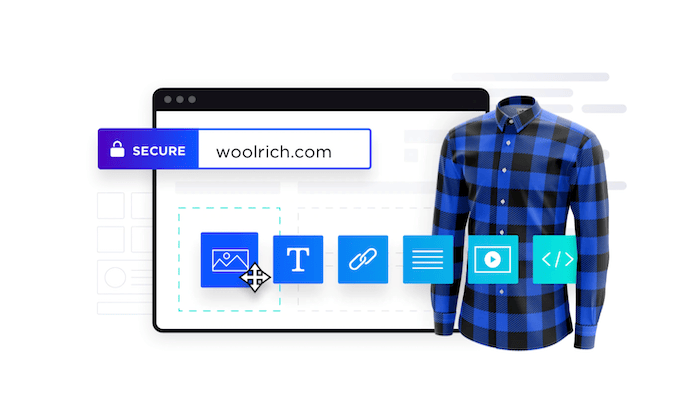
Every great online store starts from the same place—with an ecommerce website builder. These tools make it easy for anyone to launch an ecommerce business by building a website from scratch.

So if you’re interested in selling products or services on the web, you’ll need to find an ecommerce builder to create your online store. 

But as you’ll soon discover, ecommerce website builders come in all different shapes in sizes. Which one is the best? Continue below to view my buying guide and top recommendations. 

The Top 7 Options For Ecommerce Website Builders

  1. Shopify
  2. Wix
  3. BigCommerce
  4. Squarespace
  5. 3DCart
  6. Square Online
  7. WooCommerce

How to Choose the Best Ecommerce Website Builder For You

Before you start searching for different ecommerce site builders, you must understand how to evaluate these options. There are certain factors that must be taken into consideration as you’re shopping around and narrowing down your top picks. I’ll explain each one in greater detail below:

Technical Skill Level

What is your technical background?

Some ecommerce website builders are designed for beginners, others are made for advanced users and developers, and the rest fall somewhere in between. If you’re a DIY-type person, then your technical abilities will play a significant factor in choosing the right platform.

Beginners should aim for platforms that don’t require coding. These website builders will let you put everything together with simple drag-and-drop functionality.

Advanced users and developers may want the ability to access the site’s backend code for advanced customizations. Businesses should consult with their tech team or whoever will ultimately be working on the site before finalizing a decision.

Business Stage and Size

New business and rapidly scaling startups won’t necessarily have the same needs in an ecommerce website builder. Some of you might even be looking to sell a handful of products online as a small side project or part-time job. 

If you already have an existing website, you might not need a complete site builder. There are other tools out there that can add shopping cart functionality to your current site (more on this shortly).

Do you still need to register your domain name? Have you picked a web hosting plan yet?

There are website builders out there that provide you with all of these capabilities out of the box from a single platform. In other instances, you’ll need to get your domain and hosting plan separately. 

Dropshipping

Dropshipping makes it possible to run an ecommerce website without having to buy, store, or ship inventory to your customers. When someone purchases something from your website, the supplier handles fulfillment and ships the product directly to those customers. 

If you’re interested in running an ecommerce site that follows this business model, you need to make sure that your site builder supports dropshipping. 

While not every website builder will come with dropshipping functionality out of the box, the best ones will seamlessly integrate with dropshipping software and third-party tools.

Design and Templates

Start to think about the visual aesthetics of your ecommerce site. The best ecommerce website builders will make it possible for you to create a beautiful site without having to hire a designer. 

The easiest way to do this is by starting with a pre-built template and customizing it with your content. You should be able to choose a theme or template that fits with your brand image and industry. 

As you start browsing and evaluating different platforms, you’ll quickly realize that the templates and design tools aren’t equal across the board—some are undoubtedly better than others.  

Built-in Functionality

Not every ecommerce website builder comes standard with a long list of functions. In some cases, you’ll have to customize your site’s functionality by adding features from a marketplace or app store. Depending on the functionality you’re looking for, you might even need to integrate your site with a third-party tool or platform. 

With that said, other site builders will provide you with all of the functions you could possibly need out of the box (with some restrictions).

There’s really no right or wrong answer here; it’s all about personal preference. Would you rather have every feature at your disposal as soon as you create an account? Or do you prefer adding functionality as needed?

The answer to these questions will help you narrow down your choices. 

Limitations

Your ecommerce website builder might restrict how many products you can sell on the site. Some platforms will even charge you extra fees based on your traffic volume.

This usually isn’t a concern for new websites, but as your site scales, this can definitely become a problem. 

Look beyond the rock-bottom prices and entry-level plans offered by different platforms. See how much it will cost you if your product list doubles, triples, or quadruples. Will you incur extra fees? 

Some ecommerce site builders are better for selling just a dozen products or so as opposed to managing extensive product catalogs in the hundreds or thousands. 

The Different Types of Ecommerce Website Builders

Ecommerce website builders fall into a handful of different categories. I want to quickly explain the different types of ecommerce site builders before we continue. This will make it much easier to find the best option for you.

Traditional Website Builders

There are lots of great site builders out there that allow you to create any website from scratch. Some of the most popular platforms will also have plans for ecommerce sites. 

These are great options for beginners. You can create a new website using one of the world’s most popular site builders without having to write a single line of code. You’ll benefit from tools like drag-and-drop functionality and the ability to bundle domain registration and hosting into a single plan. Essentially, you’ll get everything you need from one place. 

Just make sure you choose an ecommerce plan offered by the traditional site builder you’re evaluating. Otherwise, you won’t be able to sell online.

WordPress Plugins

WordPress is a great option for people who want complete control of their ecommerce site. As a free and open-source CMS, the capabilities and customizations are virtually endless. 

For those of you with an existing WordPress website, you can add ecommerce functionality by installing a WordPress plugin. These plugins will give you the ability to start selling online.

Even if you’re starting a new ecommerce website from scratch, WordPress is still a viable option to consider. Some ecommerce WordPress plugins can even help you with the design and layout of your site, as opposed to just adding a shopping cart. 

Ecommerce Platforms

This is pretty self-explanatory. Ecommerce platforms are built specifically for ecommerce websites. 

Unlike a traditional website builder, these tools will have product catalogs and shopping cart functionality built into every plan. So you won’t have to worry about upgrading or choosing an ecommerce-specific plan to sell online. 

Ecommerce platforms are also great for SEO. The themes and templates are built to help your site and products rank organically in SERPs. 

Shopping Cart Extensions

Shopping cart extensions are perfect for people who already have a site that’s live on the web. Rather than building the whole site over from scratch, these tools simply add shopping cart functionality to your existing website. 

They aren’t always ideal for selling at scale, but they can be great for managing a handful of products.

For example, let’s say you’re a blogger that wants to start selling t-shirts, hats, or mugs. A shopping cart extension would be a quick and easy way to add ecommerce functionality to your blog. 

#1 – Shopify Review — Best Out-of-the-Box Ecommerce Functions

Shopify is king in the ecommerce space. Trusted by 1+ million websites in 175 countries, it’s one of the most popular ecommerce platforms available on the market today.

More than $200 billion in online sales have been facilitated via Shopify.
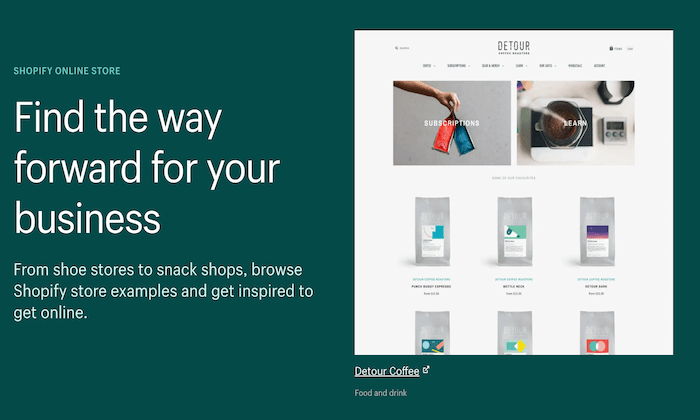
The platform is extremely versatile. Whether you’re starting a new ecommerce business from scratch or expanding your physical presence to an online store, Shopify can accommodate your needs. It comes with everything you need to build your website and start selling online:

  • Industry-specific templates
  • Supports multiple sales channels (point-of-sale, social media, online marketplaces, etc.)
  • Drag-and-drop store builder
  • 70+ templates
  • Custom domains
  • Secure checkout
  • Gift cards
  • 24/7 support
  • Unlimited products
  • Built-in payment processing
  • Shipping discounts
  • Marketing tools
  • Business insights

Regardless of your business size or industry, Shopify’s ecommerce platform is versatile enough to support your site.

Plans start at just $29 per month. You can try Shopify for free with a 14-day trial. 

#2 – Wix Review — Best Drag-and-Drop Ecommerce Builder

Wix is one of the best overall site builders on the market today. The platform can be used to create any website—including ecommerce sites. 

More than 160 million people across the globe have used Wix to create a website from scratch.
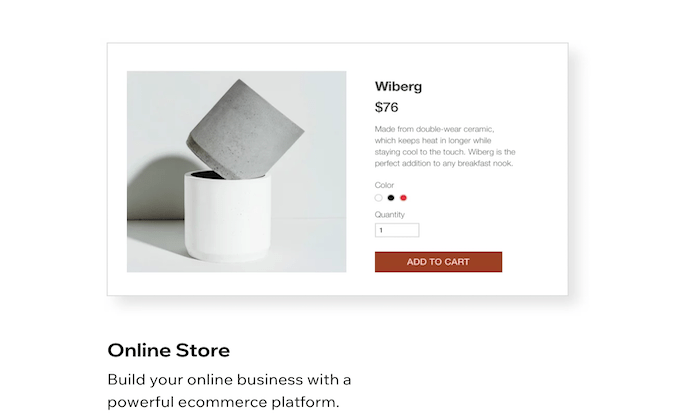
Wix is a great option for beginners. Anyone can use this platform to build an ecommerce site, regardless of technical skill level. Here’s what makes Wix so great:

  • Intuitive drag-and-drop site builder
  • 500+ stunning templates
  • Optimized for SEO
  • App marketplace for custom functions
  • Advanced design features like video backgrounds, animations, and scroll effects
  • Mobile-optimized ecommerce site
  • Custom domain, free hosting, and free SSL certificate
  • Supports multiple payment methods
  • Product pages and store manager tools
  • $300 in advertising vouchers
  • 24/7 customer care
  • Unlimited products

Ecommerce plans from Wix start at $23. But I recommend starting with the Business Unlimited plan, at a minimum. It’s just $4 more per month and comes with enhanced features. 

You can start building your Wix site for free to try out the drag-and-drop builder. Then take advantage of a 14-day free trial to access premium features. 

#3 – BigCommerce Review — Best For Large Ecommerce Sites

BigCommerce is another industry leader in the ecommerce world. For more than a decade, this platform has served ecommerce sites in 120+ countries.

Over $25 billion in merchant sales have been powered by BigCommerce.

This platform is great for wholesalers, international ecommerce sites, B2B sellers, and multi-channel sales. For selling at scale, look no further than BigCommerce.

  • Easy to use and secure platform
  • Powerful ecommerce analytics and customer insights
  • Drag-and-drop building tools with no coding required
  • WordPress integration
  • Custom checkout capabilities with checkout API and SDK
  • Built-in Javascript, HTML, and CSS for full theme customization
  • Optimized for mobile and SEO
  • Built-in faceted search
  • Cross-channel sales support (brick & mortar, social, marketplaces, etc.)
  • Multiple currency support
  • Global CDN
  • Cross-border fulfillment
  • Built-in payment processing

Overall, BigCommerce is my top recommendation for large ecommerce websites. If you want to sell online without restrictions, this will be a top option to consider. 

Plans start at $29.95 per month. Try BigCommerce free for 15 days. 

#4 – Squarespace Review — Best Beautiful Ecommerce Designs

Squarespace is another all-in-one website builder that can be used to create any type of website. 

But unlike other traditional site builders out there, Squarespace is optimized for businesses. With the exception of the personal plan, all Squarespace subscriptions come with built-in ecommerce functionality.

Squarespace is a popular choice for creative professionals who want to showcase their portfolios and sell online. It comes with features like:

  • Award-winning design templates
  • Built-in tax tools
  • Supports sales for subscriptions and digital content 
  • Discount codes and gift cards
  • Secured checkout process from any device
  • Abandoned cart recovery tools
  • Ecommerce integrations for shipping and payment processing
  • 24/7 customer support

You’ll need to connect your own payment processor to run an online store with Squarespace. Ecommerce plans start at $18 per month. Upgrade to the Basic Commerce plan ($26 per month) to avoid 3% transaction fees.

If creating a visually appealing ecommerce site with stunning designs is your top priority, Squarespace should definitely be on your shortlist. 

#5 – 3DCart Review — Best Developer-Friendly Ecommerce Software

If you have unique needs and you’re working with a developer or designer, 3DCart might be the solution for you.

3DCart isn’t quite as popular as some of the other ecommerce website builders on our list. But with that said, it’s not for everyone.
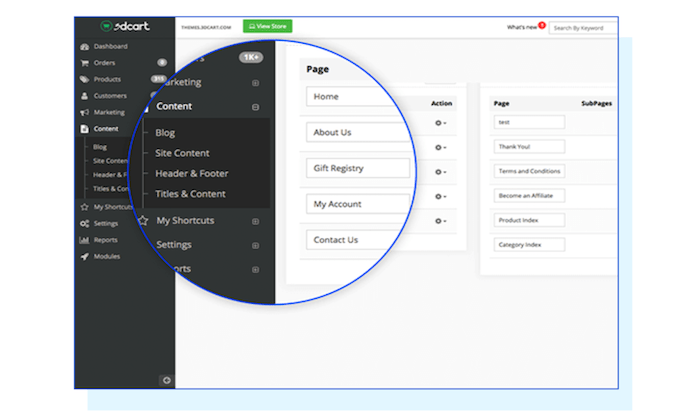
While 3DCart does have drag-and-drop building tools to accommodate beginners, the software is powerful enough to support the needs of developers and design experts. So it can essentially be as simple or complex as you want it to be.

Other top features and noteworthy highlights of 3DCart include:

  • 200+ built-in features
  • 200+ ways to accept payments
  • 50+ free themes
  • Simple and versatile shipping setups
  • Robust security
  • Supports dropshipping
  • Supports subscriptions, tickets, events, and print-on-demand sales
  • Powerful CMS
  • Optimized for SEO

All plans come with secure hosting, unlimited orders, 24/7 support, and no transaction fees. Pricing starts at just $8.55 per month. 

Subscriptions are backed by a 30-day money-back guarantee. Try it free for 15 days.

#6 – Square Online Review — Best For Small Businesses with Physical Retail Space

Square is best known for its payment processing and POS solutions. But the platform also provides business owners with the ability to create a free online store.

If you’re a brick and mortar retailer that’s currently selling with Square POS, you can easily expand your online presence by building an ecommerce site using Square Online.
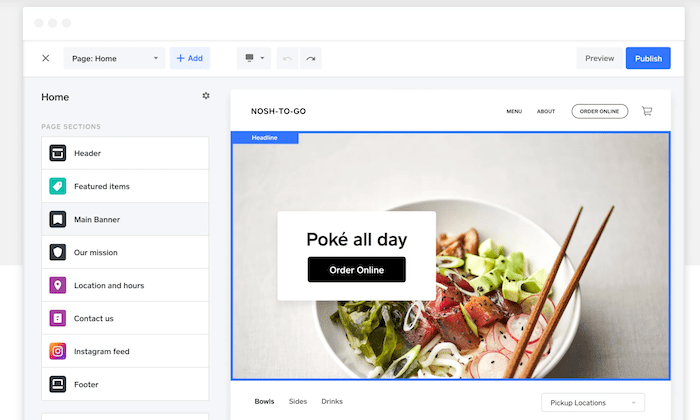
Let’s take a closer look at some of the features and benefits that you’ll get with Square Online:

  • Fast setup with no coding required
  • Built-in payment processing
  • Automatic sync with your Square POS system
  • Supports in-house and on-demand delivery
  • Instagram integration
  • Inventory management tools
  • Accept gift cards, Google Pay, and Apple Pay

Launching an ecommerce site with Square Online is free; you’ll only pay the transactional fees (starting at 2.9% + $0.30). For advanced features, paid plans start at $12 per month. 

#7 – WooCommerce Review — Best Ecommerce WordPress Plugin

If you currently have a WordPress website and need to add shopping cart functionality to it, WooCommerce will be the best option for you. 

This plugin is built specifically for WordPress, and it’s one of the most popular WordPress plugins on the market today.
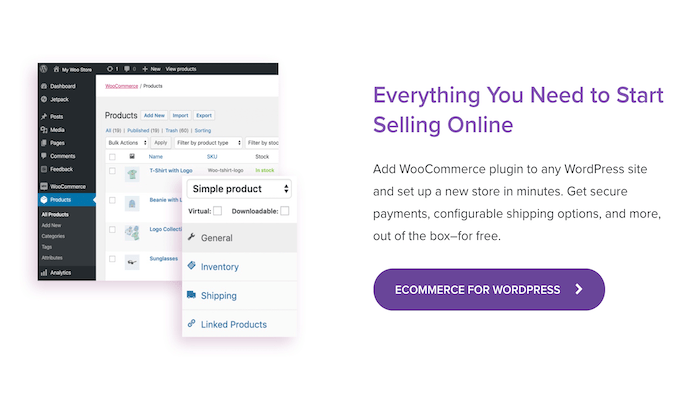
What makes WooCommerce so great? Let’s take a closer look:

  • Fully customizable with features that can extend its functionality
  • Flexible and open-source
  • 140+ gateways and payment integrations
  • Ability to manage orders on the go
  • Supports physical products, digital products, and subscriptions</<br>
    source https://neilpatel.com/blog/best-ecommerce-website-builders/

How to Boost Domain Authority: Checking and Improving This Key Site Metric

How to Boost Domain Authority: Checking and Improving This Key Site Metric

Knowing your domain authority may help you create or improve your marketing plan. But how do you know what your domain authority is?

Let’s dive into what this metric is and some tips for picking the perfect domain authority checker for your business.

What is Domain Authority?

Domain authority (DA) refers to the number of relevant backlinks—links to your website from other reputable sites—your site has. The relevance of those backlinks also contributes to your score.

Moz created the Domain Authority metric to help businesses figure out where they may rank on search engine results pages (SERPs). They estimate a page’s possible ranking via several channels, “including linking root domains and the number of total links, into a single DA score. This score can compare websites or track the ‘ranking strength’ of a website over time.”

Some brands are authoritative without even seeming to try. This is because the keywords that naturally exist on their websites will carry some weight.

For example, movie site IMDB has a high DA because relevant keywords are naturally integrated throughout the site. Secondary related keywords are also prevalent.

When you have a better idea about the terms for which you’re deemed authoritative, you’re able to optimize your site better.

But it’s not just keywords—the better your backlinks are, the better your chances are at increasing in DA.

Domain authority is determined on a logarithmic scale. This means solo metrics won’t always increase or decrease the score to the same degree. The more important a metric is, the greater effect it’s likely to have.

Why Should I Care About Domain Authority? 

Although Google doesn’t use domain authority in their rankings, but a study by Ahrefs found a correlation between DA and SERP ranking.

The results of this study suggest DA may be a useful metric by which to gauge how much organic traffic you may receive from Google.

If you want to grow your SEO rankings, consider ramping up your domain authority strategy. However, it can take a while to develop authority, so don’t worry if you don’t see results right away.

What is a Good Domain Authority Score?

Domain authority scores range from one to 100. When you have a greater domain authority score, it’s more likely you’ll see increases in web traffic and SERP rankings.

When you debut a new website, its domain authority is one. Moz points outsites with many external links are usually higher when it comes to DA, while small business sites and those with fewer inbound links generally have a lower DA score.

A strong gauge for your site is to measure it against other comparable or similar sites. Your DA can fluctuate over time and, with so many moving parts, identifying why it changed can be challenging. But don’t give up.

Moz highlights several factors that can influence your score.

One could simply be that your link profile growth hasn’t been seen by their index yet.

Another occurs when higher-authority sites experience massive growth in link numbers, which may skew the scaling process. This kind of fluctuation may more significantly impact domain authorities on the lower end.

You may also have earned links from sites that don’t contribute to ranking on Google. If Moz crawls a different amount of link domains than it did last time it went through your site, results may be affected.

How Can You Raise Your Domain Authority Score?

Raising your DA is a long-term process, but there are several ways to go about it.

First, conduct a link audit. This process involves making sure that links to your website are valid and don’t include black-hat SEO tactics. TryUbersuggest to get insight into your domain score, the current number of backlinks, and referring domains.

Backlinks, which are links from other websites to yours, affect SEO rankings—thoughbacklinks aren’t all created equal.

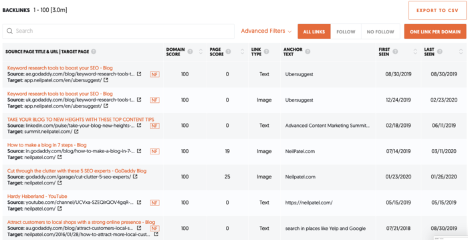
Do you know how to go about getting high-quality links? Try ourfree backlink tool, Backlinks, to get started. Among other things, it’ll show you which sites are linking to your competitors rather than to you.

Domain Authority Checker Ubersuggest free backlink tool

Various filters make it easy to assess which opportunities are best suited to your needs.

It’s also beneficial to search for local directories or “best-of” lists that could feature your business. These sites are often adding new businesses.

How Do You Check Your Domain Authority?

There are several link authority tools out there. How do you know which one is right for you?

SEO Review Tools has a basic domain authority checker. It looks at authority (based on backlink quantity and quality) and content.

Other metrics measured by this tool include website age and social media score. Your social media score relates to how active your social profiles are and how many shares your content receives.

Page authority is also measured. This metric is like DA, except it looks at a specific page rather than entire sites. Page authority is also calculated on a one to 100 logarithmic scale.  

If you want to check several sites at once,Linkgraph’s Free Bulk DA Checker may be the perfect option. This tool allows you to check DA and spam metrics for up to 10 URLs at a time.

If you want to check even more domains, Rankz’s SEO Rank Tracker lets you check hundreds at once. They also offer a backlinks checker, backlinks monitor, and domain availability checker.

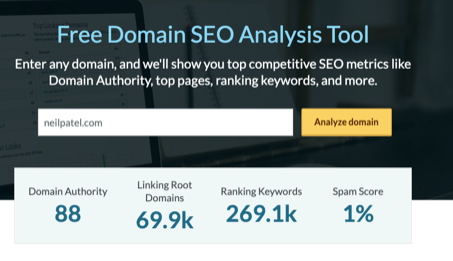
Moz has a comprehensive free domain SEO analysis tool. It showcases top pages by links, discovered and lost links, top linking domains, and keywords by estimated clicks. Of course, you can also find some of this information using Ubersuggest as well.

For example, when you search for the DA of neilpatel.com on Moz, it’s revealed it is 88, and there are 69,900 linking domains (i.e., backlinks). There are also over 269,000 keywords for which the site ranks, and the spam score just 1%.

Domain Authority Checker Moz Domain SEO Analysis

The tool then breaks down the site’s most important pages based on page authority and other top-linking domains. You can also find metrics like top-ranking keywords, keywords by estimated clicks, top featured snippets, branded keywords, and more.

You can also see a breakdown of competitors using your keywords. You can then take the competing domains and plug them into a bulk checker like the ones noted above.

How Do You Integrate Your Domain Authority into Your SEO Strategy?

Once you’ve determined your domain authority score and the factors influencing it, what should you do next?

Start with backlinks. You want to give other sites a reason to link to yours.

If you specialize in something unique or offer a new option for a product or service, that could be a great start. Work to provide better information on your niche than your competitors do.

It may also be wise to collaborate with small businesses with whom you could forge mutually beneficial partnerships.

Reach out to companies with whom you already have relationships, too. See if there are ways you can support each other’s online presence. Swapping testimonials is just one of the many tactics you could employ.

You should also explore your existing content for opportunities to add links. For example, if you mention a coffee shop, link to their website. If they’re monitoring their web traffic, they’ll see you linked to them and may feel inclined to return the favor.

Of course, you want to make sure all the backlinks you receive are of high quality.It’s better to have a few quality backlinks than a ton of ineffective ones.    

Guest posting on other sites may also help get your name and site out there. However, some sites are better suited for this than others.

When assessing which blogs to guest for, check if their links are “follow” or “nofollow.” This may impact how much value the link has, though all links will help users get to your website, so also think of links as a branding and referral traffic tool as well.

You should also look at their DA and PA for target pages, how long their posts are, and who their audience is. If their goals aren’t similar to yours, guest posting may not be worth the time.

This aspect of growing your domain authority overlaps with your content marketing strategy. Most companies now have blogs or similar outlets on their websites—so, if you don’t, consider starting something like this.

The more content you create regularly, the more likely you are to rank.

Conclusion

Domain authority may seem complicated at first. Many factors contribute to your ranking, and analyzing them all may seem daunting.

Nevertheless, once you get the hang of DA, it’s worth monitoring and optimizing for it.

Adding this to your SEO toolbox may allow you to have a more comprehensive understanding of your overall digital presence and website health.

Have you had success in improving your domain authority? Tell us in the comments.

The post How to Boost Domain Authority: Checking and Improving This Key Site Metric appeared first on Neil Patel.


source https://neilpatel.com/blog/boost-your-domain-authority/

Wednesday, 28 October 2020

Best Dropshipping Companies

Disclosure: This content is reader-supported, which means if you click on some of our links that we may earn a commission.

It’s no secret that the ecommerce industry has been booming. As those trends continue to climb, the dropshipping market is following the same trajectory. 

Dropshipping makes it possible for anyone to run an ecommerce shop without having to purchase, store, or ship inventory. Essentially, you can operate an ecommerce site from your couch without ever touching the products you’re selling. 

But in order to do this successfully, you’ll need to find a dropshipping company to handle the logistics of fulfilling orders. 

Whether you have an existing ecommerce business or you’re new to selling online, this guide will help you find the best dropshipping company for your unique needs. Continue below to learn more about my top recommendations and strategy for evaluating different options. 

The Top 7 Options For Dropshipping Companies

  1. Doba
  2. Wholesale2b
  3. Oberlo
  4. Megagoods
  5. SaleHoo
  6. Dropified
  7. Inventory Source

How to Choose the Best Dropshipping Company For You

There are hundreds, if not thousands of different dropshipping companies on the market today. Without a buying guide to follow, narrowing down your options can seem like an insurmountable task. To make your life easier, follow the methodology that I’ve outlined below. 

These are the factors that you should take into consideration as you’re researching and evaluating different dropshipping solutions:

Type of Dropshipping Company

Dropshipping companies come in all different shapes and sizes. So the first thing you need to do is determine what type of company will meet the requirements for your business.

Do you need a manufacturer? Wholesale supplier? Supplier directory? In some instances, you might just be looking for dropshipping software to facilitate your existing supplier relationship. 

We’ll cover the types of dropshipping companies in greater detail shortly. This will give you a more detailed explanation of your options. 

Ecommerce Platform

Next, you need to make sure that the company you’re considering supports your sales platform. It’s worth noting that not all dropshipping solutions are compatible with every ecommerce website. 

For example, online stores using Shopify won’t necessarily be using the same dropshipping company as a business selling via eBay or Amazon. A brick-and-mortar retailer that wants to add an online sales channel won’t have the same needs as new business selling via Wix or WooCommerce. 

So verifying the compatibility between your online sales channel and the dropshipping company’s logistics will be a great way to narrow down your choices. 

Wholesale Pricing

In addition to the logistical benefits of dropshipping, you’ll also have access to wholesale rates. But like any type of inventory, those prices will vary from supplier to supplier. 

Some dropshipping companies force you to pay a monthly or annual membership for access to wholesale pricing. In many cases, these membership fees are well-worth the discounts you’ll get as a result. But usually, the manufacturers will offer the best rates if you buy directly through them. 

You’ll have to walk the line between what makes sense for your convenience vs. profit margins. 

Industry and Products

What products are you selling? What are you planning to sell online?

The answer to these questions will definitely impact the dropshipping company you choose. If you’re selling shirts and hats, you probably won’t have the same dropshipping needs as an online store that sells computers, headphones, and other electronics. 

Are you selling brand name products? Or will you be putting your own logo on inventory? 

These are other questions to consider as you’re evaluating prospective solutions. 

Process Automation

The best dropshipping companies leverage automation, which allows you to be as hands-off as possible. 

You need to understand the logistics between how orders get processed from company to company. What happens after a customer buys something online? How does that order ultimately end up at their doorstep? The answer varies depending on the solution you choose.

In some cases, you’ll have to manually enter those order details from your own website to the dropshipping platform. But with an automated process, you won’t have to do anything. An online order will automatically be sent to the supplier without any extra steps on your end. 

For those of you who already have relationships with suppliers, you can leverage dropshipping software to automate your fulfillment process. 

Quality and Speed

Even though you’re not touching the products with dropshipping, your company is still responsible for the product itself. 

The customer doesn’t care where the product came from or who shipped it. They expect high-quality products delivered quickly. If the dropshipping company you’re using takes weeks to ship and delivers defective products, it’s going to be a poor reflection of your company—not theirs.  

So choose a company with an established reputation in this space. You might have to pay a little extra for the inventory, but it’s worth it to keep your customers satisfied. 

The Different Types of Dropshipping Companies

As previously mentioned, there are different categories within the dropshipping space. Here’s a quick overview that explains each type of dropshipping company. This will make it easier for you to determine which type addresses what your business is looking for. 

Dropshipping Marketplaces

A dropshipping marketplace is an online platform with a network of different dropshipping companies. You’ll be able to facilitate your entire operation and manage the relationships between different dropshippers from a single place. 

This is a great option for ecommerce shops that plan to sell products in different categories sourced from multiple suppliers. It’s also a great way to shop around and evaluate different companies from a single source of truth. 

Manufacturers

Going straight to the manufacturer is one of the best ways to get the lowest possible whole inventory prices—you won’t be going through a third-party.

However, not every manufacturer will be set up to facilitate dropshipping out of the gate. So you might need to use dropshipping software to manage this relationship. Another downside of using a manufacturer is that you’ll be limited to what that manufacturer produces. If you want to sell products that they don’t make, you’ll need to source them from a different manufacturer. At scale, this can be tough to manage. 

Wholesale Suppliers

A wholesale supplier doesn’t necessarily manufacture products. But they operate warehouses with inventory from various manufacturers. 

The prices from a wholesale supplier will still be low, but definitely not as low compared to coming directly from the manufacturer (the wholesaler has to take a cut). These dropshipping companies are great for businesses that want to sell a wide range of different products in various categories. 

Supplier Directories

Supplier directories don’t actually handle dropshipping. Similar to an online marketplace, it’s a single location for you to find various suppliers. 

But to access information about these suppliers and prices, you usually have to pay a membership fee to the directory. 

Dropshipping Software

Dropshipping software is a great way for online stores to automate order fulfillment with their suppliers and manufacturers. These tools eliminate the need for ecommerce shops to manually enter order details after something is purchased through their online sales channels.

With dropshipping software, the order information gets sent directly to the supplier for fulfillment. This is faster, more efficient, reduces human error, and allows the site operators to stay more hands-off. 

#1 – Doba Review — The Most Versatile Dropshipping Company

Doba is one of the most popular dropshipping services on the market today. Its popularity is largely due to the fact that it can accommodate such a wide range of ecommerce shops with varying needs.

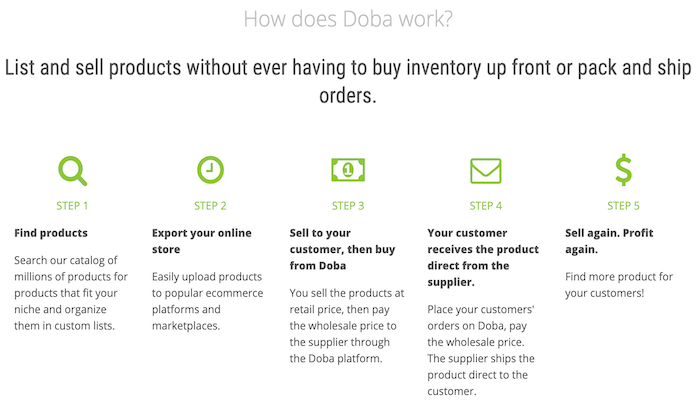
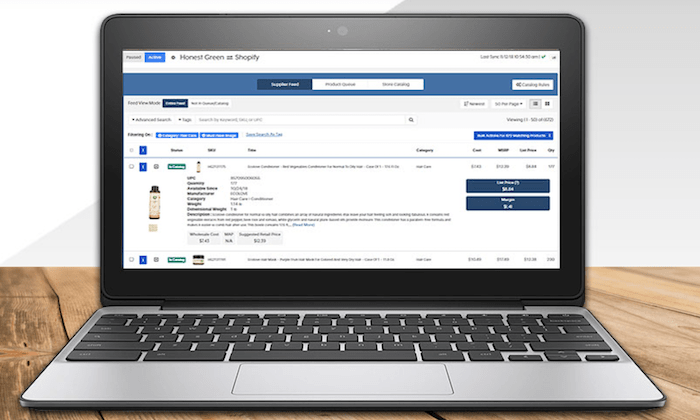
With Doba, you’ll have access to millions of products from hundreds of suppliers in a single online catalog. Here’s how it works:

Other noteworthy highlights of Doba include:

  • Compatible with 100+ ecommerce platforms including Shopify, Magento, BigCommerce, Volusion, eBay, Amazon, etc.
  • Information on each supplier (average processing time, fulfillment rates, cost, etc.)
  • Manage product lists and discover trending products
  • Advanced search and filtering
  • Data exports in a wide range of formats
  • Inventory management tools
  • Proactive inventory and price change alerts

Plans start at $29 per month. If you sign up for an annual subscription, you’ll get two months for free. Try it free for 30 days. 

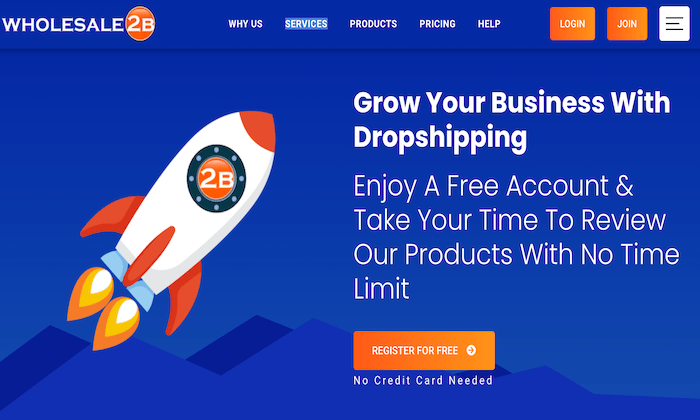
#2 – Wholesale2b Review — Best Free and Simple Dropshipping Company

More than one million products are available on Wholesale2b. The platform makes it easy for anyone to integrate dropshippers to their online store.

Wholesale2b is compatible with multiple sales channels and online marketplaces like Amazon, WooCommerce, Shopify, BigCommerce, Ecwid, eBay, Magento, and more.

Here are some of the top reasons why Wholesale2b ranks so high on my list:

  • Free to sign up; no credit card required
  • Easy to get started
  • Extensive product catalog with options from multiple categories and industries
  • 100+ dropshippers in the Wholesale2b network
  • Automatic order imports and inventory tracking
  • Ability to create a new turnkey ecommerce site from scratch

Whether you have an existing online store you’re planning to start a new ecommerce business, Wholesale2b has you covered. Sign up and try it today—it’s free.  

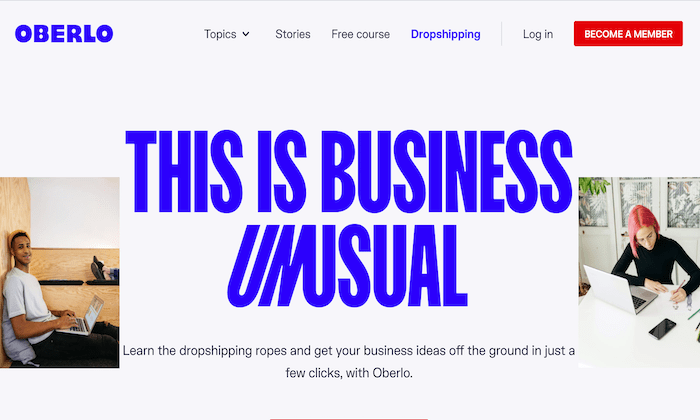
#3 – Oberlo Review — The Best For Shopify Stores

If you’re using Shopify to sell online, look no farther than Oberlo. The platform integrates seamlessly with your Shopify store, so you can start dropshipping with ease.

More than 100 million products have been sold online with Oberlo. 

Oberlo is free for basic use, but you’ll definitely want to upgrade to a paid plan, or you’ll be limited with what you can accomplish. Some of the top features include:

  • Unlimited monthly orders
  • Free Oberlo Chrome extension
  • Bulk orders
  • Real-time order tracking
  • Variant mapping
  • CAPTCHA solver
  • Ebooks, guides, and free learning tools
  • 24/7 customer support
  • Customizable listing information 
  • Powerful product data

Paid plans start at $29.90 per month. This entry-level plan supports up to 10,000 products. You can join Oberlo for free to get started. 

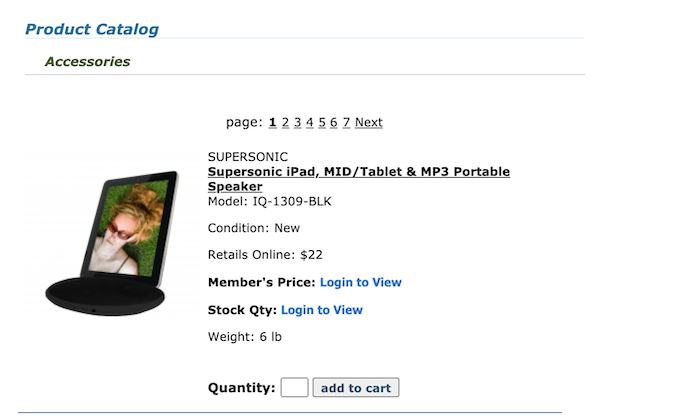
#4 – Megagoods Review — The Best For Consumer Electronics

Megagoods is my top recommendation for online retailers in the consumer electronics space. 

They provide fast shipping, efficient processing, and have a great selection of brand name electronics products. 

Here are some of the most popular product categories offered through the Megagoods platform:

  • Headphones
  • Alarm clocks
  • Car audio
  • Televisions
  • Speakers
  • Home theaters
  • DVD players
  • DJ products
  • Bluetooth products
  • PA systems
  • Portable electronics
  • Gaming products

In addition to the extensive electronics options, Megagoods also supplies items like watches, kitchen appliances, cutlery, cookware sets, and more. 

The interface is a little outdated, but a Megagoods subscription costs just $14.99 per month. This membership fee gives you access to exclusive pricing. Try it free for 30 days. 

#5 – SaleHoo Review — The Best Wholesale Directory

SaleHoo is one of the most popular wholesaler directory platforms on the market today. A membership grants you access to 2.5+ million products from 8,000+ suppliers.

With SaleHoo, you can find products and start selling them online in a matter of minutes.

For 15+ years, more than 137,000 people have used SaleHoo to sell online with dropshipping services. Here are some other reasons why they come so highly recommended:

  • All suppliers have been pre-vetted
  • Unlimited dropshipping training
  • Award-winning customer support
  • Plans are backed by a 60-day money-back guarantee
  • Market research tools for hot products and high profit margins
  • Easy to navigate with a modern interface
  • Ability to automate your online store

Annual pricing for the SaleHoo supplier directory costs $67. Alternatively, you can pay a one-time fee of $127 for lifetime access. Try it risk-free. 

#6 – Dropified Review — The Best For eBay Sourcing

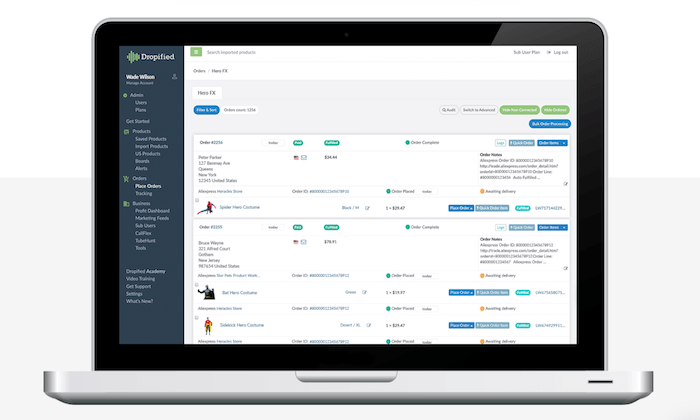
Dropified is another popular dropshipping solution. It seamlessly integrates with ecommerce platforms like Shopify, WooCommerce, BigCommerce, and more.

Unlike other dropshipping tools, Dropfied is also compatible with eBay and AliExpress. 

If you’re using eBay or AliExpress for inventory, Dropfied eliminates the need to copy and paste customer order details. These orders can automatically be shipped to your customers directly from the supplier. 

Other top features and perks of using Dropfied include:

  • Automatic order fulfillment
  • Automatic price change updates
  • Dynamic Facebook feeds
  • Automatic product availability updates
  • Simple product variant setups
  • Easy product filtering
  • Product and inventory sync
  • Add to your ecommerce store with a single click
  • Product customization
  • Automatically import product reviews from vendors
  • Easy to change vendors for different products

This list of features and benefits goes on and on. It’s quite extensive, to say the least. Dropified plans start at $47 per month. The entry-level plan supports 15,000 products and unlimited monthly orders. Try it free for 14 days.

#7 – Inventory Source — Best Dropshipping Automation Software

Inventory Source is a bit unique compared to other dropshipping companies on our list. They provide software to facilitate dropshipping automation.

To improve the logistics with your existing suppliers, Inventory Source will be a great option for you to consider. 

Here’s why I like Inventory Source so much:

  • Integrates with 25+ ecommerce platforms (Shopify, eBay, Amazon, Walmart, Magento, WooCommerce, 3dcart, etc.)
  • Full product data integration
  • Dropship order automation
  • Automatic inventory sync
  • Free directory of 230+ suppliers
  • Ability to add your own suppliers outside of the Inventory Source directory
  • Bulk feed management tools

Overall, the software is really easy to set up. It will benefit you and your suppliers alike. Plans start at $99 per month. You can create an account for free to browse supplier product feeds, automation tools, and integrations.

Summary

The concept of dropshipping is extremely appealing for anyone interested in selling online. But it only works well if you’re using the right dropshipping company. 

Which dropshipping company is the best? It depends on your needs.

Just use the recommendations and buying guide explained in this post to find the best dropshipping services for your online store. 

The post Best Dropshipping C

source
https://neilpatel.com/blog/best-dropshipping-companies/
7 Instagram Analytics Tools to Grow Your Audience

instagram analytics tools guide featured image

Instagram is known mostly for engagement. But how do you track it? Let’s cover some Instagram analytic tools you need to be using.

Here’s the deal: People love interacting with brands and other individuals. Without engagement, social media doesn’t exist, and engagement matters more on Instagram than most other platforms.

In fact, Instagram’s engagement has been measured anywhere from four to twelve times that of other social channels.

So while you can sell on Instagram, this channel is better known for its benefits at the top of your sales funnel.

The problem with that is your marketing efforts don’t always link back to sales.

That means you’ll have to develop other ways to measure performance to justify all of the time and money spent on Instagram.

So, how do you do it? Luckily, there are a few tools that can help.

I’m going to show you some of the best Instagram analytics tools and why they are worth your time.

1. Owlmetrics

Owlmetrics is basically a one-stop-shop for all things Instagram analytics.

This Instagram analytics tool tracks all of your Instagram account’s key data points, such as follower growth, engagement, hashtag activity, competitor accounts, and click-through rates, while giving you real-time insights in an easy-to-use dashboard.

But that’s not all it can do. It offers a wealth of data beyond Instagram Insights’ underwhelming offerings.

When it comes to tracking engagement, everybody knows that it’s the details that matter.

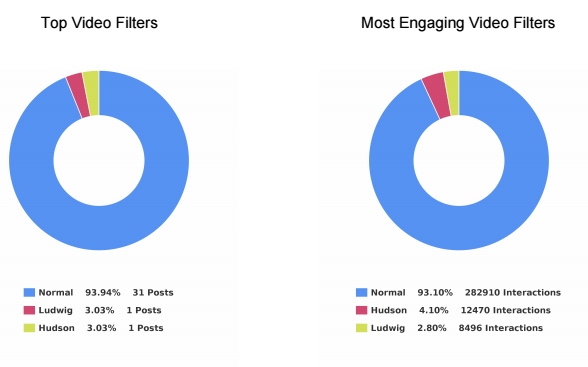
You’ll get insights on things like the most engaging photo and video filters, top tags by interactions, the best time to post, posts that have received the most engagement, sources of the most engagement, and so much more.

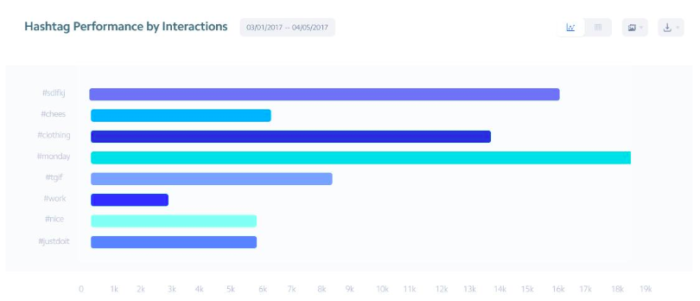
Plus, you’ll be able to keep close tabs on your hashtag performance. Hashtag usage is critical to a good Instagram strategy, so you’ll need to keep a close eye on how they’re benefiting (or hurting) your brand.

instagram analytic tools example

Altogether, their insights generate a goldmine of information for content strategizing. You’ll get daily data regarding your post engagement rates, top posts by engagement rate, and the best-performing types of posts.

With these real-time details at your disposal, you have all the information you need to post dynamite content every day.

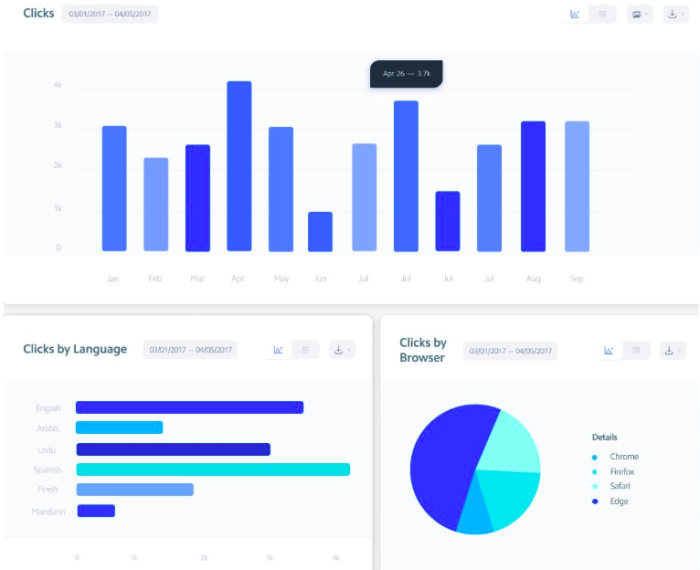
You’ll also know exactly where your followers are spending the most time through click rates. You can find your total clicks, average clicks per post, and your clicks change rate.

Of course, the tool shows you these ultra-useful numbers in easily readable graphs, so if you’re not a numbers person, you’ll still be able to see areas of change.

instagram analytics tool clicks

As you can see from these visuals, there’s no shortage of details for your clicks. You’ll see clicks by language, clicks by browser, clicks that are referred from another source, and clicks by location.

All of this contributes to gaining a better, more complete view of your audience.

And since you need an excellent connection with your audience if you want to make it on Instagram, the Owlmetrics audience insights can help you achieve just that.

It gives you all the details regarding your followers, including their age, gender, language, city of origin, and other basic demographics that paint a clearer picture of your audience to help you form better posts.

You also get definitive numbers that help you set and track goals for follower growth. You’ll see your total followers and the growth of total followers.

There’s also info about the followers you’ve gained and lost, with insights into your top gained followers and top lost followers. This will help you better curate your content to keep your existing followers and attract even more.

instagram analytics tool gained lost

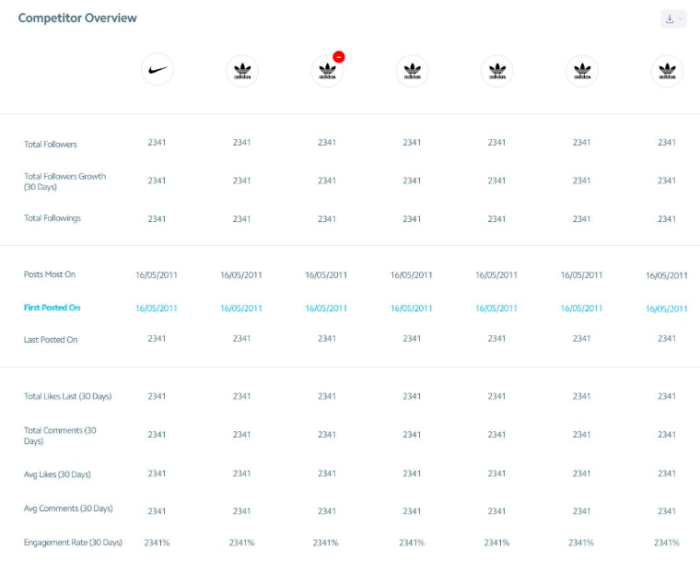
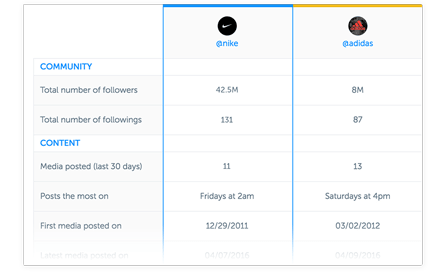
One of the most beloved Owlmetrics’ features is its competitor tracking. You can learn a great deal about executing a quality Instagram marketing strategy by spying on the strengths and weaknesses of multiple competitive Instagram accounts.

Instagram analytics tool competitor overview

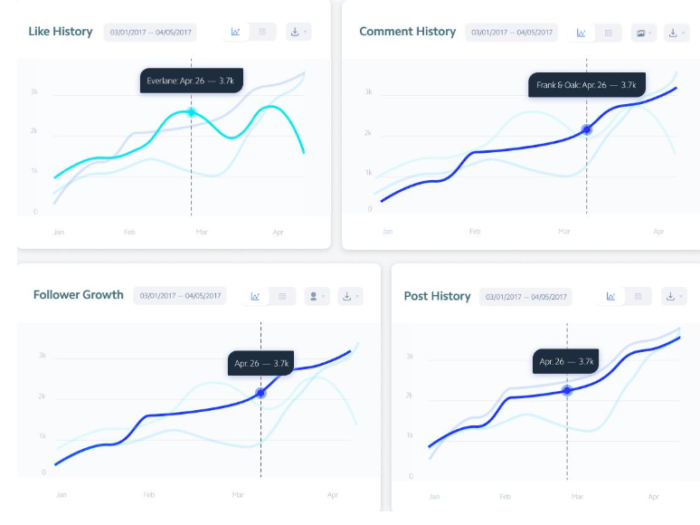
As you can see, it gives you a detailed overview of the Instagram insights for competitors you choose in numbers and graph form.

These insights are updated in real-time, so you’re getting the most accurate numbers for high-performing businesses to compare to your own.

Instagram analytics tool overview graphs

To top it all off, you can schedule exports of any data to CSV, PPTX, and PDF for easier reporting, not to mention it integrates seamlessly into Slack so all your team members can be on the same page.

Your Instagram insights are clear, detailed, collaborative, and always in real-time.

2. Iconosquare

There’s going to be some analytics overlap in a few of these tools.

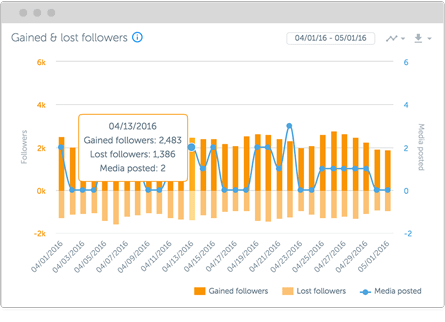
Iconosquare kicks off by helping you understand how your posting frequency relates to or drives either new followers or lost ones daily.

iconosquare instagram analtyics tools

Iconosquare also gives you a Buffer-like tool to manage how you post across several different accounts at one time.

That makes it a perfect tool for freelancers or agencies that want to save time when managing multiple clients (or even multiple departments within the same company) from the same dashboard.

instagram analytics tools

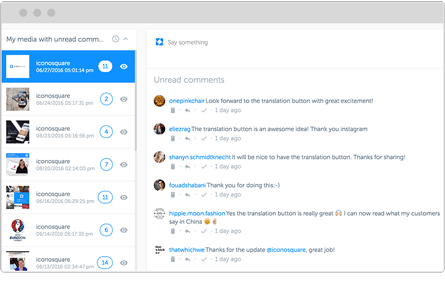
Iconosquare will even show you comments and interactions on each post so you can keep the conversation going without ever leaving.

But that’s not even the best part.

My favorite Iconosquare feature is that they offer a library of awesome content that you can pull from at the ready.

You can quickly search the media library and grab beautiful, high-resolution images to use within seconds.

iconosquare instagram analytics

Iconosquare also features an editorial calendar view so that you can schedule posts out ahead of time. It’s easier to manage social media when you plan out content in advance.

iconosquare instagram analytics editorial view

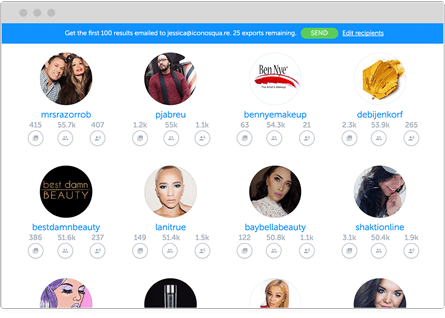
Next, you can use it to search for influencers who might help you get the word out about new campaigns and posts.

It will even let you compare influencers based on their own follower and engagement metrics, so you know what you’re dealing with before reaching out to them.
iconosquare instagram analytics, search for influencers

All of this sounds great, right?

But we haven’t even touched on their Instagram analytics yet.

You can measure tags and mentions and get access to in-depth engagement insights.

You can also see how your individual hashtags are performing, view the best days and times to post, and benchmark your engagement rates against the competition.

pasted image 0 553

Iconosquare has a 14-day, no credit-card-required free trial. Play around with the analytics before you commit to it with your cash.

3. Sprout Social

Sprout Social is similar to Iconosquare in that it combines Instagram analytics with content creation and management tools. They also have a powerful Instagram analytics platform.

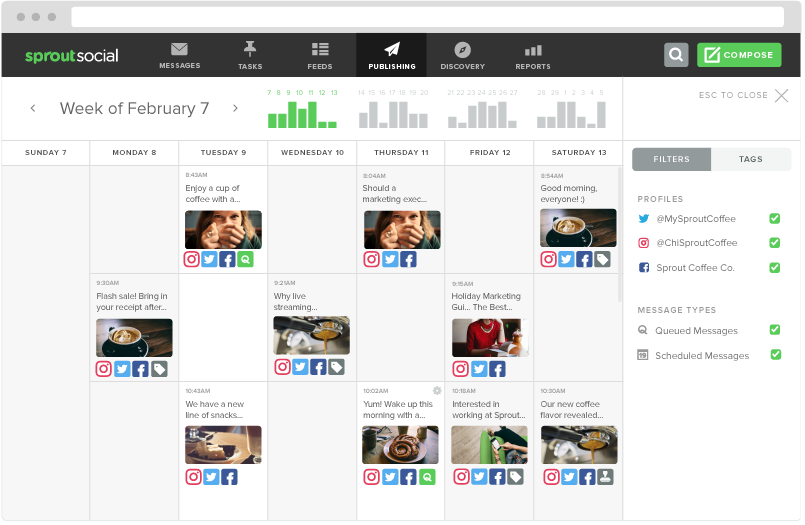
It has a fully-featured editorial calendar for scheduling new content across multiple social account platforms (including Twitter and Facebook).

sprout social instagram calendar instagram analytics tool guide

Sprout Social is perfect for larger organizations with rigid guidelines, too, because it has a centralized media library to manage with built-in editing tools.

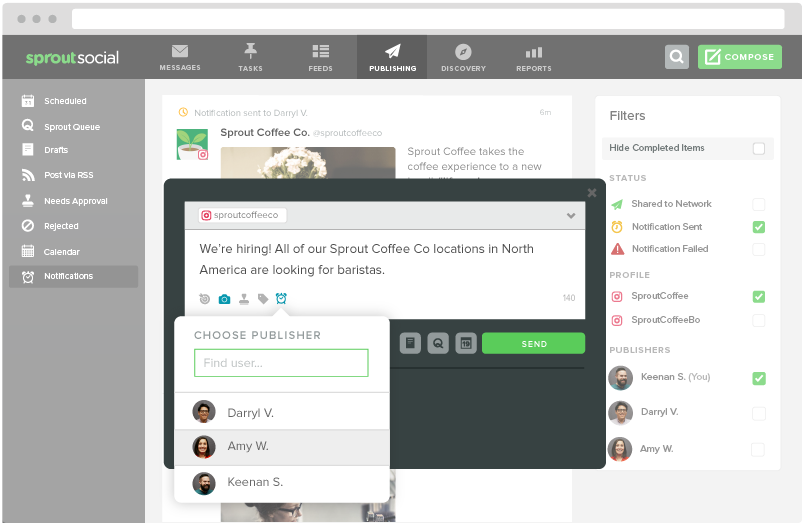
When a piece of content is ready, you can use the push notification tool to update the person responsible for taking the next step (like moving it from draft to preview and from scheduled to published).

pasted image 0 519

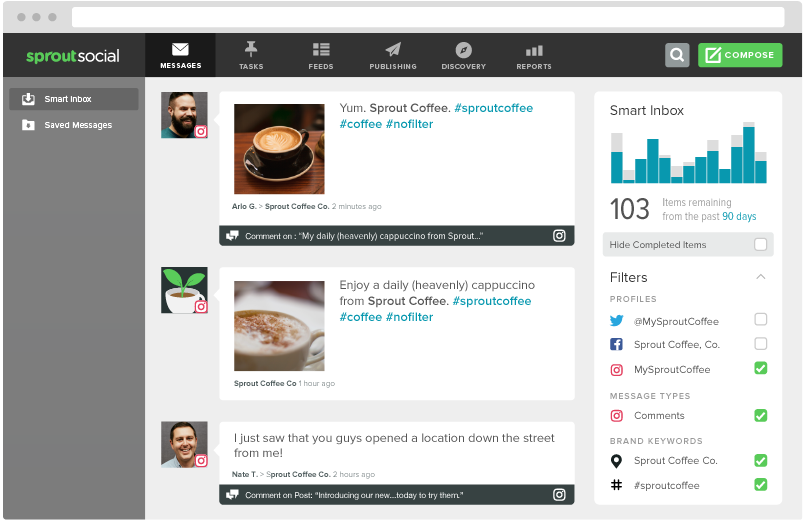
Sprout’s tool set includes a social CRM that will funnel conversations into a central ‘smart’ inbox. Gaining access to this feature can help you boost conversions over time.

You can also dive deeper into individual hashtag performance or even locations that have been geotagged. Pay careful attention to how your performance compares across each.

instagram analytics tool sprout social

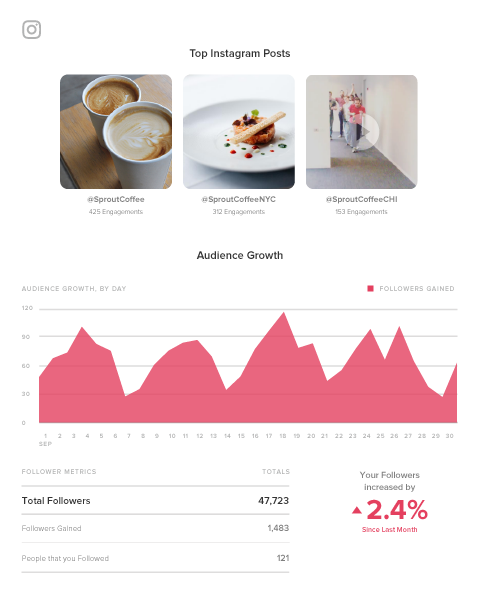
Then you can compile all of this insight into “presentation-ready” reports that can be exported or downloaded by clients and bosses alike.

sprout social instagram analytics reports

You can also take a spin with the free trial to preview all of these features before paying a single cent.

4. Keyhole

Each Instagram analytics tool we’ve looked at so far will give you daily reporting features. You need those metrics to track your progress.

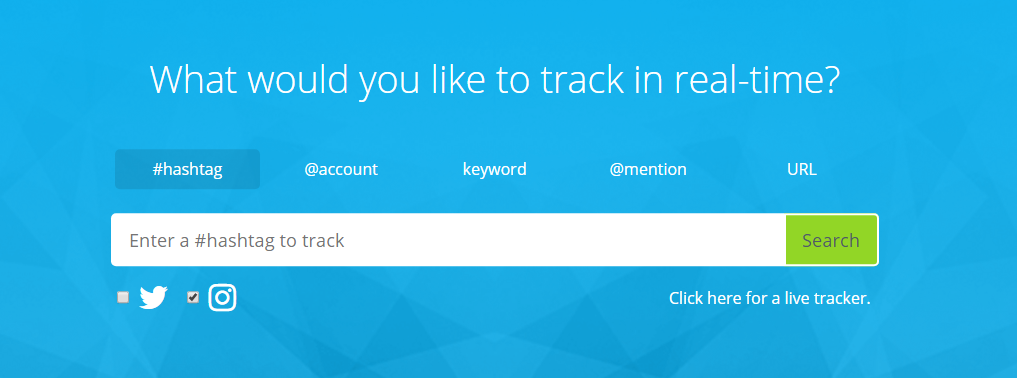
However, Keyhole prides itself on giving customers real-time feedback. For example, you can drop in a specific hashtag, keyword, or account to see what trends are starting to emerge.

instagram analytics tools keyhole

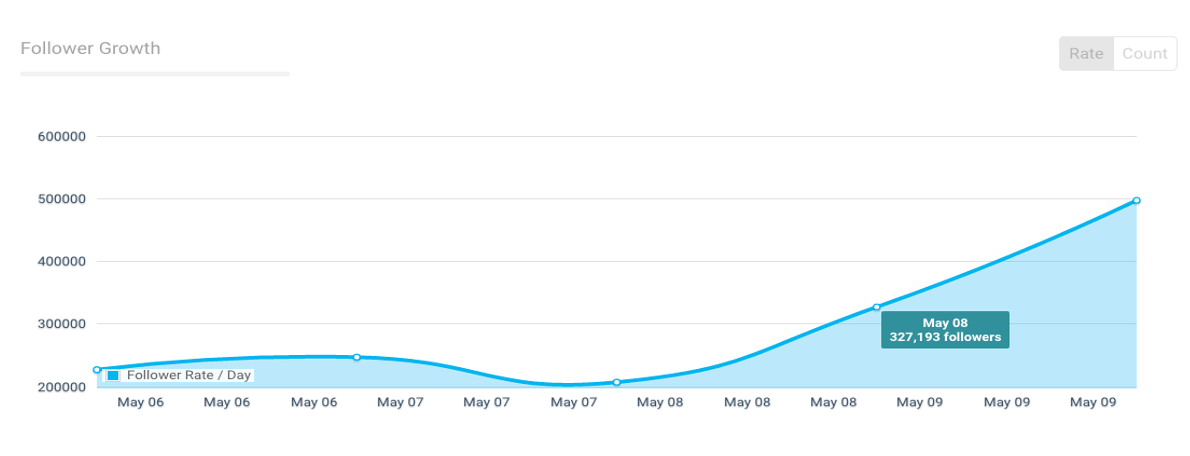
Keyhole will also help you figure out which of your own internal trends provide the best results, giving you at-a-glance data into what activities are driving the most follower growth over time.

instagram analytics tools keyhole

You can also create a feed that will automatically track your competitor’s Instagram accounts to see what’s working for them versus what’s not (then capitalizing on the former while avoiding the latter).

Plus, you can save time by selecting a few predefined KPIs to track. Keyhole will automatically report on those, organizing your data into an easy-to-read dashboard that you can share with team members.

5. SquareLovin

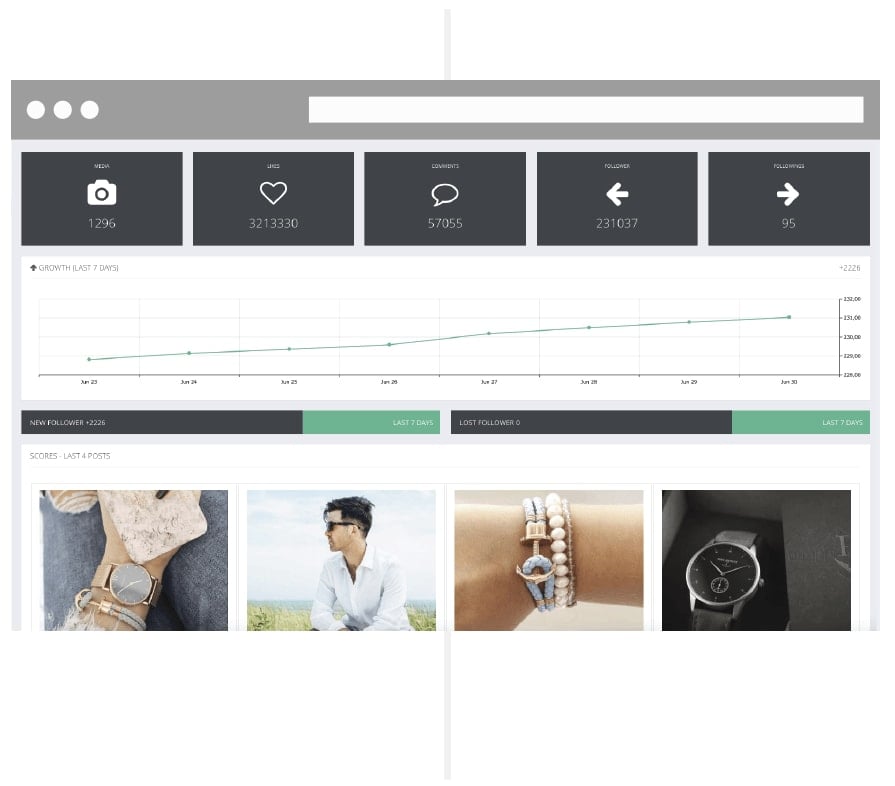
SquareLovin (spelled like McLovin) combines both aggregate data (like overall views and follower counts) with individual metrics on each post (by ‘scoring’ the overall engagement).

squarelovin instagram analytics tools

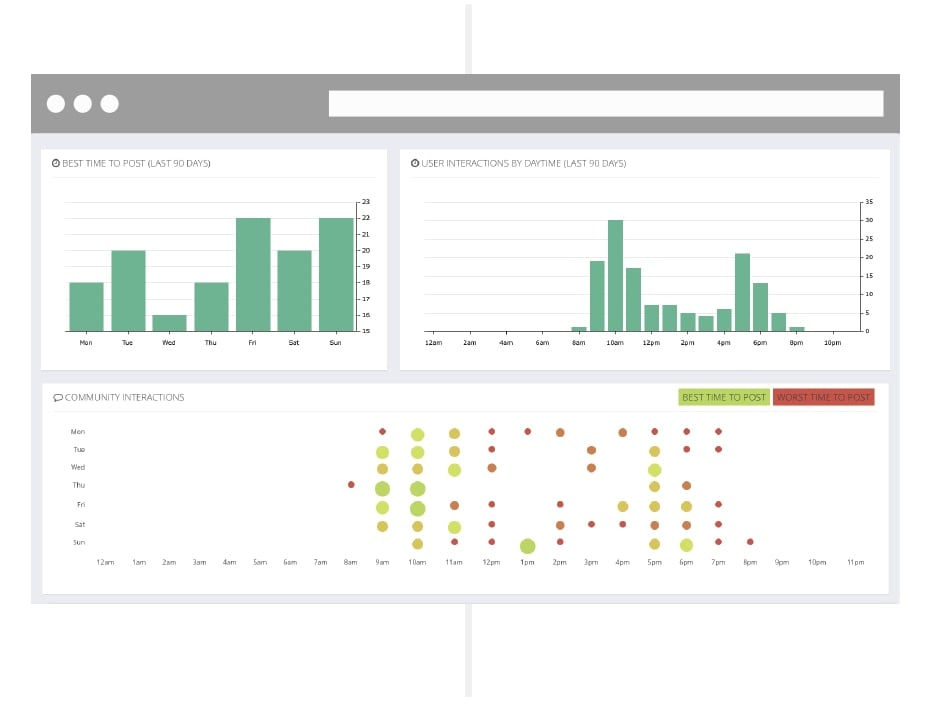
One of my favorite features, though, is the deep dive it gives you into the best-performing times to post.

Like some of the Instagram analytics tools on this list, Keyhole tells you the best time frames for posting based on metrics. However, this tool also explicitly lets you know when you shouldn’t post. This data can be just as valuable, especially if you’re posting all the time.

You might want to constantly test a few of the ‘best’ times to improve performance. However, this way, you’ll always know exactly what hours of the day to avoid like the plague.

instagram analytics tool 03

6. Minter.io

Many of the Instagram analytics tools already featured give you information about how your Instagram account or your individual posts perform based on your specific KPIs.

Minter.io takes the next step by providing tactical insight into the content decisions you’re making.

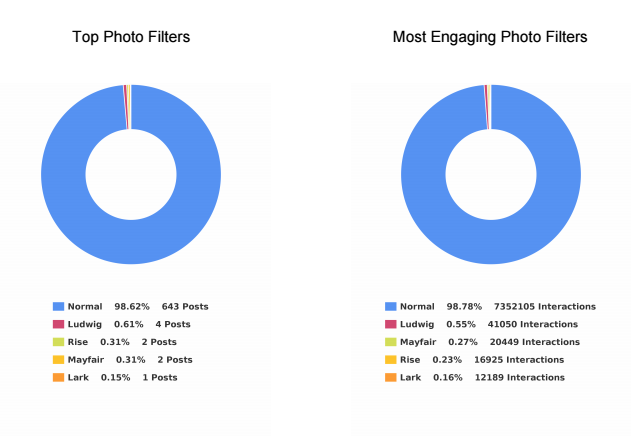
For example, this tool can help you figure out which photo filter performs best among your audience based on a comparison of multiple metrics. Instead of using a single piece of data to decide which filters to use, compare several data points.

pasted image 0 539

pasted image 0 555

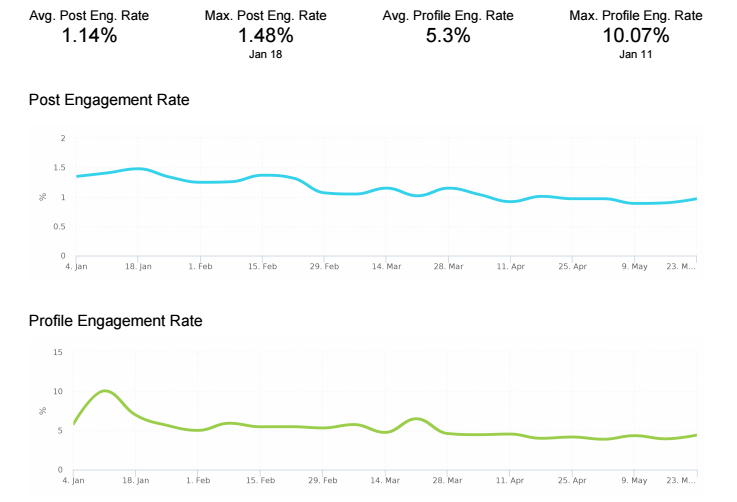
I also love how this tool can break down your post engagement into performance rates.

Here’s what I mean.

If you see that you have 1, 10, or even 100 comments on a post, you’re probably pleased with yourself. But when you stop to think about it, there’s not a lot of actionable insight to draw from comment numbers alone.

Let’s say one account has 100 followers, and another has 1,000 followers. Each account gets 10 comments on a single day.

Now, which one is performing better?

The first one, right? That’s because it’s getting a 10% engagement rate on that post instead of only a 1% engagement rate. That makes a huge difference at the end of the day!

Minter.io helps you track these performance metrics over time and create benchmarks to see if your audience’s quality is growing as quickly as the quantity.

instagram analytics tools engagement rate screenshot

All social platforms use internal algorithms to determine how many of your posts will be seen by your audience.

That means that, if your engagement is low, the social network might artificially ‘restrict’ how many of your own followers end up seeing your content on a given day.

That’s why we constantly talk about the importance of engagement in social media.

Minter.io will also help you pinpoint big players who are already part of your audience. It’s a great way to identify potential influencers who might amplify your brand message.

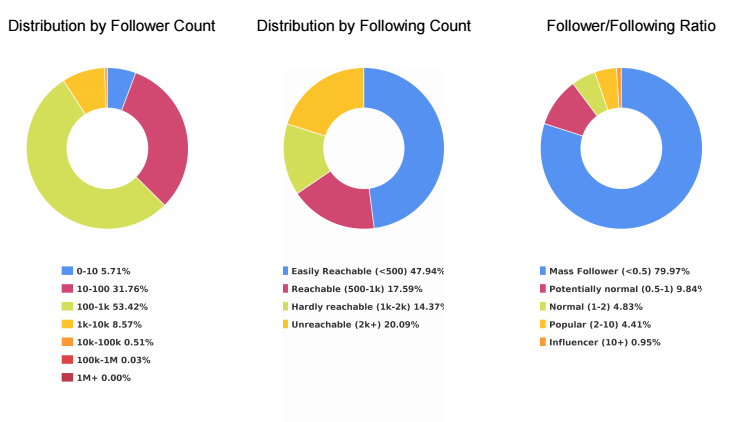
For example, followers are split down into several different ‘buckets,’ including:

  1. Mass Follower
  2. Potentially Normal
  3. Normal
  4. Popular
  5. Influencer

instagram analytics tools

Finally, this Instagram analytics tool also gives you insight into how active your followers are on the platform.

For example, you can see how many posts each of your followers push live each day so that you can mim

source https://neilpatel.com/blog/top-instagram-analytics-tools/
Best Business Intelligence Software

Disclosure: This content is reader-supported, which means if you click on some of our links that we may earn a commission.

Business intelligence software has become a necessary tool in the era of big data.

Your organization collects tons of data about your customers, website, and total health of the company. But without BI software, making sense of that information is nearly impossible. This software exists so you can analyze various data sets and make data-driven decisions. 

For example, you can use BI software to predict consumer buying behavior or project the financial impact of an operations decision. Rather than waiting for a quarterly or annual report, you can leverage BI software for real-time data insights. 

Due to the complexity of business intelligence software, the vast majority of tools in this category are designed for large organizations, SMBs, and enterprises. 

The Top 6 Options For Business Intelligence Software

  1. TIBCO Jaspersoft
  2. Entrinsik Informer
  3. Zoho Analytics
  4. Sisense
  5. Chartio
  6. Tableau

How to Choose the Best Business Intelligence Software For You

Finding the right BI software for your business can be challenging if you don’t know what to look for. I’ve created a simple buying guide with features, factors, and elements that must be taken into consideration as you’re shopping around. Keep an eye out for the following aspects of BI software as you’re comparing solutions and narrowing down your options:

Data Reporting

Remember, the number one reason why companies invest in BI software is to make sense of their data. So it’s only natural that data reporting itself would rank so high on our list of factors to evaluate.

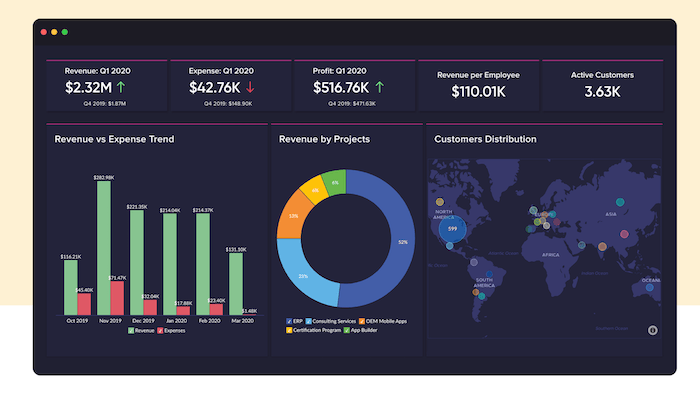
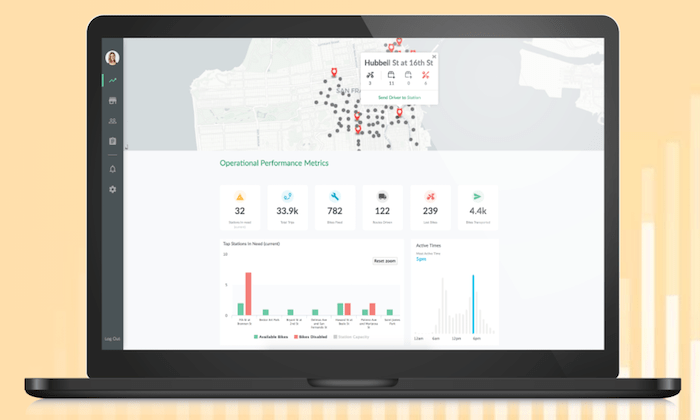
The best BI tools turn complex data into visuals that are easy to understand. You can view this information from real-time dashboards or turn them into individual reports. 

Being able to share these reports with decision-makers, stakeholders, clients, and other members of your team is also something that must be considered. Users that generate the reports won’t always be the people making sense of that information. So the reports must be easy enough to comprehend by the final decision-makers.

Data Sources

How are you going to integrate your existing data with your BI solution? Where is that data located?

Don’t make things more confusing for yourself. Make sure you find a business intelligence tool that makes it easy for you to connect with your existing data sources. It’s worth noting that not every business intelligence software on the market will integrate with specific databases. So don’t make assumptions; always double-check that your data is compatible with the software in question.

Your BI software should seamlessly integrate with help desk tools, CRM, ERP software, advertising networks, and more. The best tools should accommodate cross-platform access to every user as well. 

Development Tools

Some business intelligence software will improve the way you collect data as well. 

Your in-house developers or IT department might want to implement custom application development into your processes. Certain tools will have pre-built analytics apps for you to use. Other solutions offer developers an open API, making things easier for developers to customize apps with unique rules. 

Setup and Deployment

Unlike other types of business software on the market today, BI tools are a bit more complex. Getting started isn’t really as simple as clicking “sign up” and being done. 

These solutions are highly customizable and built specifically for your business. The deployment process could potentially take weeks, depending on the software you choose. You’ll be faced with options for on-premises deployment, hybrid server deployment, desktop software, and cloud software deployment. 

Cloud software is a great option for businesses on a tighter budget. This deployment method makes BI tools more easily accessible to smaller companies. But large organizations with complex data sets and custom needs would likely benefit more from on-site deployment. 

Ease of Use

Again, BI software can be complicated. 

If it’s your first time using this type of software, don’t overwhelm yourself with a solution built for seasoned veterans. 

Think about who will be using the software on a day-to-day basis. Is it your IT team? Sales reps? Product managers? Developers and tech-savvy individuals won’t have as steep of a learning curve as the average user. 

Just make sure you understand the difference between tools that require advanced technical knowledge and software for beginners. Beginners should avoid software that’s built for data engineers. 

The Different Types of Business Intelligence Software

Business intelligence software can be segmented into different categories based on its primary functionality or toolset. Here’s a quick overview and explanation of the most popular types of BI software available on the market today.

Data Visualization Software

As the name implies, data visualization software helps you analyze complex data sheets with visual tools. Visual reporting is arguably the best way to make sense of large sets of data. You can turn huge data sets into meaningful reports in a matter of minutes. This makes it much easier for decision-makers to analyze the insights.

Business Process Management (BPM)

Business process management software is a component of business intelligence. These tools are also a core component of operational management and intelligence. 

BPM software leverages automation and improves the efficiency of day-to-day processes. You can find business process management functionality within BI software.

OLAP (Online Analytical Processing)

OLAP software leverages tools that help analyze data from several sources. These interactive solutions provide a multidimensional view for each user (such as different department heads). OLAP tools will consolidate and aggregate different operational data.

Embedded BI Software

Embedded BI software is exactly what it sounds like. These tools are integrated directly within your applications for process management. They can also be embedded in operations portals, websites, portals, and other types of business-related systems. 

ETL Software

ETL (extract, transform, and load) software combines data from different sources into a single dashboard. Then the software will blend these various data sets and make sense of them in terms that the end-user can understand. 

Data Mining

You can use data mining tools to identify patterns in your data sets. Data mining software typically leverages tools like machine learning and AI to uncover these patterns for data-driven decision making. 

#1 – TIBCO Jaspersoft Review — Best For Embedded Analytics

TIBCO Jaspersoft is a developer-friendly business intelligence solution. The software uses embedded BI, which brings the power of business intelligence directly into your company’s applications.

The dashboards are ultimately displayed within the interface of the application to enhance the end-user experience and improve decision-making in real-time. 

More than 500,000 developers across different industries use TIBCO Jaspersoft to improve applications for millions of users. Here are some of the other reasons why this BI tool ranks so high on my list:

  • Customizable visual reporting
  • Production reporting for high volume distribution to the masses
  • Javascript API for embedding
  • Deploy using any method with an agnostic architecture that’s 100% open
  • Pre-configured multi-tenant support
  • Ad hoc self-service reporting
  • Big data connectivity for native reporting and real-time analytics

The tool is a bit unique in the sense that it’s built for developers but enhances the decision making for end users. If you don’t have a technical background, you won’t really be qualified to deploy this on your own. 

Try TIBCO Jaspersoft free for 30 days to see if it’s right for your business before buying.

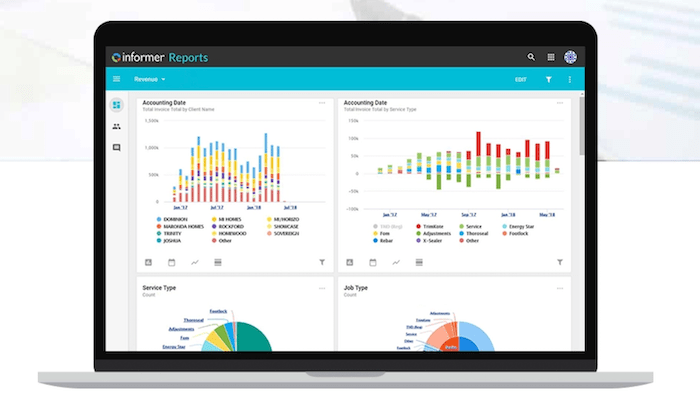
#2 – Entrinsik Informer Review — Best For Analyzing Multiple Departments

Entrinsik Informer is perfect for large organizations that collect data from multiple sources and need to make sense of that information within different departments. 

The software makes it easy for you to connect data from the cloud, spreadsheets, unstructured web data, traditional databases, enterprise applications, and more, and aggregate it within a single source. 

It’s a popular choice for manufacturing, insurance, distribution, education, and government organizations. Noteworthy features and highlights of Entrinsik Informer include:

  • On-demand self-service reporting
  • Powerful data visualizations
  • Ability to evaluate roles of end-users across your organization
  • Streamline data workflows
  • Faster access to data with curated subsets of information
  • Aggregated data flows for higher quality data
  • Robust governance and security features including team roles and custom security levels
  • Flexible architecture for endless extensibility

For businesses seeking a fast and simple way to discover intelligent data, this will be a top choice to consider. 

Users across your entire organization, such as department managers, business users, industry partners, data scientists, executives, database admins, and more, can all see unique information within Entrinsik Informer based on their needs and role. 

Schedule a free demo to learn more. 

#3 – Zoho Analytics Review — The Best For Data Visualization

More than 500,000 companies and 2+ million users rely on Zoho Analytics for business intelligence. It’s trusted by well-known brands like HP, Hyundai, Ikea, and Suzuki.

Compared to other solutions on our list, Zoho Analytics is definitely a bit more user-friendly. If you’re just getting your feet wet with BI software, this tool won’t have as steep of a learning curve. 

My favorite part about Zoho Analytics is the visual reporting. Non-technical users can easily navigate within the platform to create and view custom reports that are easy to comprehend. Other features and benefits include:

  • Ability to embed analytics in your product, website, portal, or application
  • Integrates with 500+ tools out of the box
  • Secure team collaboration features
  • Augmented analytics powered by AI
  • Blend data from multiple sources into single dashboards
  • Assess the health of your entire organization across each department
  • Customize reports with drag-and-drop dashboard
  • White-labeling capabilities with ability to fully re-brand the portal
  • Powerful HTTP-based web APIs for scalability and extensibility

You can even access your BI reports on the go with the Zoho Analytics app, available on iOS and Android. 

Zoho Analytics is the best beginner-friendly BI software on the market today. Plans start at $22 per month, and you can try it free for 15 days.

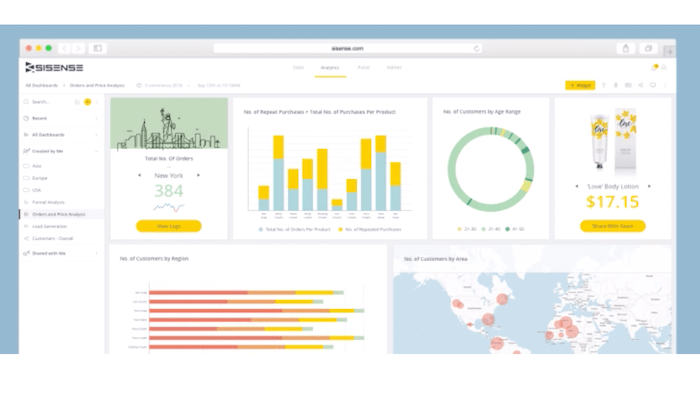
#4 – Sisense Review — The Best BI Software For Complex Data

Sisense is one of the most popular BI tools on the market today. It’s used by developers, business leaders, product managers, and data professionals alike.

The software is trusted by 10,000+ companies, including well-known brands like GE, Verizon, Motorola, Wix, Hewlett Packard, and the Salvation Army. 

Sisense has industry-specific solutions in categories like retail, healthcare, government, manufacturing, marketing, supply chain management, and more. They also have solutions that are tailored toward specific departments within your organization.

Noteworthy highlights of Sisense include:

  • Ability to create powerful analytics applications
  • Self-service analytics for each user
  • Cloud-native data analytics
  • Ability to embed analytics with full customization
  • Deploy on-premises, in the cloud, or hybrid deployment with Windows or Linux
  • Seamlessly integrate Sisense with your existing tools and branding
  • Secure access to information at the object, data, and system levels

Users of any technical skill level can use Sisense to transform complex data sets into interactive dashboards. Watch the demo and request a free quote to get started. 

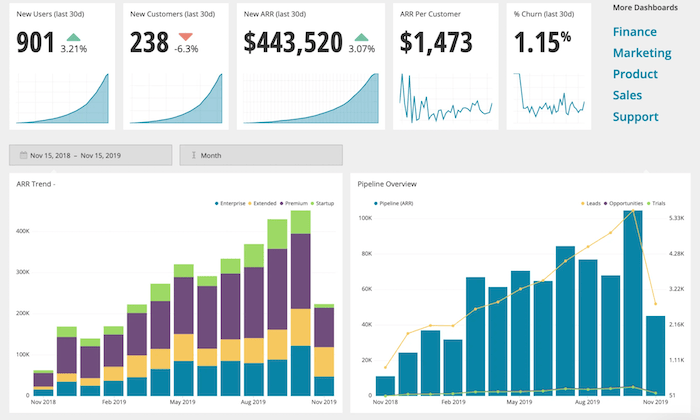
#5 – Chartio Review — Best For Simple Charts and Dashboards

Chartio is a cloud-based BI solution. It empowers users of varying technical backgrounds to analyze data from business applications.

The tool makes it easy for you to simplify data with charts and dashboards for more informed decision making.

Here’s a closer look at some of the top reasons why your business should consider using Chartio for business intelligence:

  • Easy to share visuals in embedded web pages, Slack, PDFs, and more
  • Tools for product managers, sales teams, and customer success
  • Self-service functionality for all users (C-suite, sales reps, etc.)
  • Easy to browse data with visual SQL
  • Connect all data from multiple sources (Google BigQuery, Amazon Redshift, etc.)
  • Create and save custom themes
  • Collaboration and team chat tools

Chartio also provides exceptional support. They view themselves as a strategic partner in your success. So they provide you with live training, extensive documentation, and access to experienced data advisors. 

Plans start at $40 per user per month. You can try Chartio free for 14 days with a no-obligation trial. 

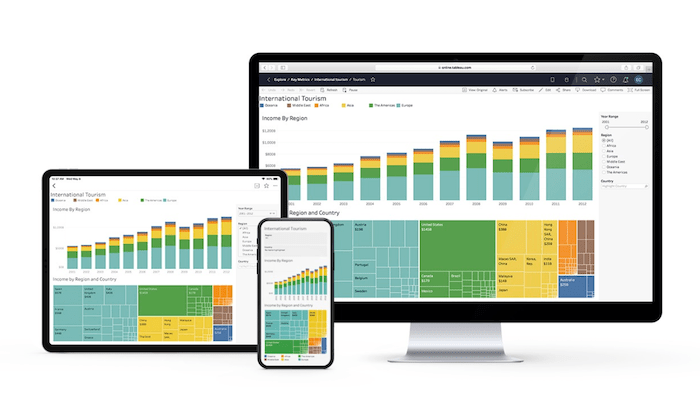
#6 – Tableau Review — Most Versatile BI Software

Tableau is an industry leader in the business intelligence space. The software is trusted by individual analysts, small teams, large organizations, and everything in between.

They offer a wide range of BI tools, including Tableau Desktop, Tableau Online, Tableau Server, Tableau CRM, embedded analytics, server management, data management, and more. The list goes on and on.

In addition to the extensive product offerings and use cases, Tableau also has industry-specific solutions, and tools based on different types of technology, making it the most versatile software in this category.

Top features of Tableau include:

  • Cross-platform support (desktop, browser, mobile) and embedded analytics
  • Team collaboration tools
  • Advanced analytics displayed in powerful visual interface
  • Easy to organize resources and content
  • Centralized data sources and custom permissions
  • Multiple deployment options (cloud, on-premises, hosted, Windows, Linux, Mac, multi-tenant)
  • Actionable insights in real-time
  • Easy to connect with data from multiple sources (Google Analytics, Salesforce, etc.)
  • Ability to map your data

Overall, Tableau is robust and feature-rich. The only real downside is that it can be tough to figure out with so many capabilities. But it can still be used by developers and non-technical users alike.

You can try Tableau for free with a 14-day trial.

Summary

Business intelligence software has rapidly gained popularity over the past few years. If your organization is ready to take your data analysis to the next level, I strongly suggest investing in a BI solution.

Which business intelligence tool is the best?

Just use the buying guide I outlined at the beginning of this article to help narrow down your options. Then start by exploring the top picks reviewed above. 

The post Best Business Intelligence Software appeared first on Neil Patel.