Shareholders have repeatedly tried to oust Facebook’s chairman Mark Zuckerberg. The board has repeatedly rejected that demand. Outside investors are unlikely to get much help with that push from Facebook’s newest board member: Dropbox co-founder and CEO Drew Houston.
The addition of Houston is the first since the departure of Dr. Susan Desmond-Hellmann from the board in October. She was the lead independent director; that role remains empty. While the “independent” status relates to financial ties, business aside, Houston and Zuckerberg’s personal relationship might have complicated the storage startup leader assuming that position.
Zuckerberg and Houston have been close for eight years, appearing in photos together since at least 2012 when they rode around the exclusive Allen & Co Sun Valley conference together (seen above). A less flattering moment saw Zuckerberg and ex-Uber CEO Travis Kalanick celebrating Houston’s birthday at a “Babes & Balls” themed party at ping-pong bar Spin in San Francisco.
Mark Zuckerberg plays ping-pong at SPiN in San Francisco while Drew Houston (to his right) watches on. Image by via Ryan Soule of SPiN via USA Today
Houston has also found a mentor in Zuckerberg, who went through the trials of an initial public offering with Facebook a few years before Dropbox made the journey. Houston told Bloomberg in 2015 that “[Zuckerberg’s] given me a lot of advice just on company scaling, how do you organize people, how do you set up these systems.”
Houston is an accomplished technologist, graduating in computer science from MIT where he came up with the idea for Dropbox. As Facebook undertakes an integration of its messaging apps to expand end-to-end encryption, Houston’s guidance could serve the company well.
But given Dropbox has come under less scrutiny for its content moderation and impact on society, two issues constantly facing Zuckerberg and Facebook, he may have less to add on the topics than Desmond-Hellmann. She had been the CEO of the Bill & Melinda Gates Foundation philanthropy and the chancellor of University of California, San Francisco.
Facebook’s shareholders have multiple times proposed removing Zuckerberg from his role as chairman of the board, including in late 2018 and mid 2019. But the rest of the board have continued to support Zuckerberg, who has accepted blame for failing to emphasize safety earlier and warned of the current profit slowdown as Facebook invests in security and content moderation. Despite constant backlash and a rough reaction to its earnings last week, Facebook’s share price remains near its all-time high.
Facebook’s board now includes Zuckerberg, Peggy Alford of PayPal, Marc Andreessen of Andreessen Horowitz, Kenneth I. Chenault of General Catalyst, Sheryl K. Sandberg of Facebook, Peter A. Thiel of Founders Fund, Jeffrey D. Zients of the Cranemere Group and Houston.
Those hoping for board members who will put more pressure on Zuckerberg may need to look toward who eventually fills the independent board director spot. Netflix CEO Reed Hastings, who was known to push back at Zuckerberg more than other members, left the board last year.
Facebook would benefit greatly from an independent board director with a healthy level of skepticism about how the social network impacts democracy, human rights and people’s attention. Zuckerberg and his inner circle are known as optimists who see the potential of technology to improve our lives. But Facebook has done a better job at fulfilling that opportunity than safeguarding against the side effects of connecting everyone — particularly those happy to exploit or degrade others out of greed for wealth or power. Facebook’s 2.5 billion users would gain more if its next board member had more perspective on the consequences of technology and the upheaval it can cause in developing nations around the world.
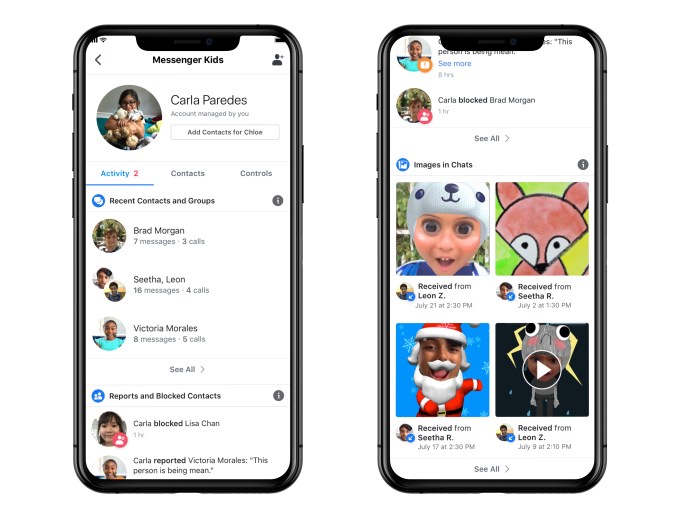
Facebook’s messaging app for families with children, Messenger Kids, is being updated today with new tools and features to give parents more oversight and control over their kids’ chats. Now, parents will be able to see who a child is chatting with and how often, view recent photos and videos sent through chat, access the child’s reported and block list, remotely log out of the app on other devices, and download the child’s chats, images and videos, both sent and received. The company is also introducing a new blocking mechanism and is updated the app’s Privacy Policy to include additional information about data collection, use and deletion practices.
The Messenger Kids app was first introduced in late 2017, as a way to give kids a way to message friends and family with parental oversight. It arrived at a time when kids were already embracing messaging — but were often doing so on less controlled platforms, like Kik, which attracted predators. Messenger Kids instead allows the child’s parents to determine who the child can chat with and when, through built-in parental controls.
In our household, for example, it became a convenient tool for chatting with relatives, like grandparents, aunts, uncles, and cousins, as well as few trusted friends, whose parents I knew well.
But when it came time to review the chats, a lot of scrolling back was involved.
The new Messenger Kids features will help with the oversight aspects for those parents who allow their kids to online chat. That decision, of course, is a personal one. Some parents don’t want their kids to have smartphones and outright ban apps, particularly ones that allow interactions. Others, myself included, believe that teaching kids to navigate the online world is part of your parental responsibility. And despite Facebook’s reputation, there aren’t other chat apps offering these sort of parental controls — or the convenience of being able to add everyone in your family to a child’s chat list with ease. (After all, Grandma and grandpa are already on Facebook and Messenger, but getting them to download new apps remains difficult.)
In the updated app, parents will be able to see who a child has been chatting with, and whether that’s text or video chat, over the past 30 days. This can save parents’ time, as they may not feel the need to review chat with trusted family members, for instance, so can redirect their focus their energy on reviewing the chats with friends. A log of images will help parents to see if all images and videos being sent and received are appropriate, and remove them or block them if not.
Parents can also now see if a child has blocked or reported a user in the app, or if they’ve unblocked them. This could be useful for identifying those problematic friends — the kind who sometimes cause trouble, but are later forgiven, then unblocked. (Anyone who’s dealt with tween-age drama can attest to the fact that there’s always one in every group!) By gaining access to this information, parents can sit down with te child to talk about when to take that step and block someone, and when a disagreement with a friend can instead be worked out. These are decisions that a child will have to make on their own one day, so being able to use this as a teaching moment is useful.
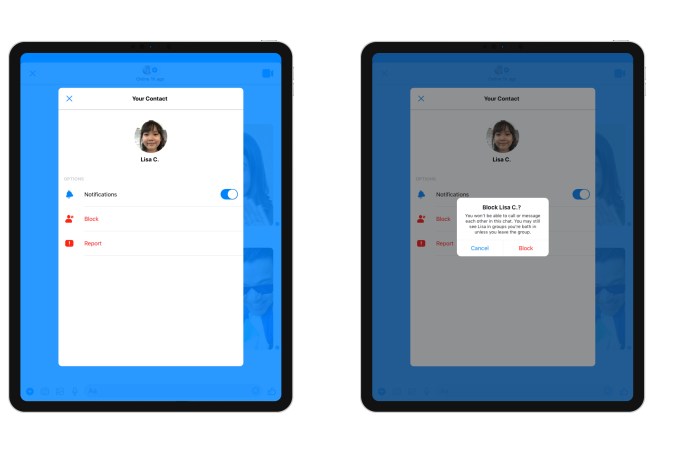
With the update, unblocking is supported and parents are still able to review chats with blocked contacts. However, blocked contacts will remain visible to one another and will stay in shared group chats. They just aren’t able to message one-on-one. Kids are warned if they return to or are added to chats with blocked contacts. (If parents want a full block, they can just remove the blocked contact from the child’s contact list, as before.)
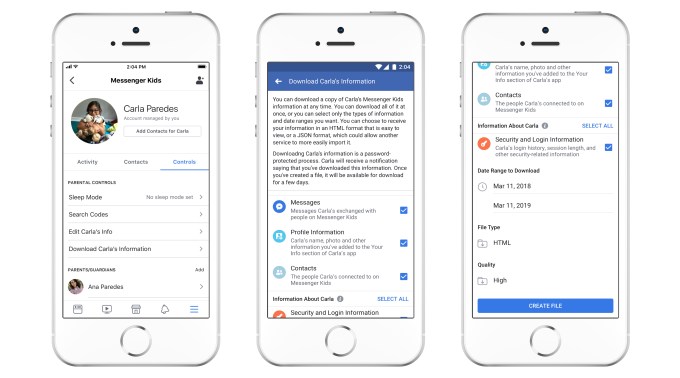
Remote device logout lets you make sure the child is logged out of Messenger Kids on devices you can’t physically access and control — like a misplaced phone. And the option to download the child’s information, similar to Facebook’s feature, lets you download a copy of everything — messages, images, and videos. This could be a way to preserve their chat history when the child outgrows the app.
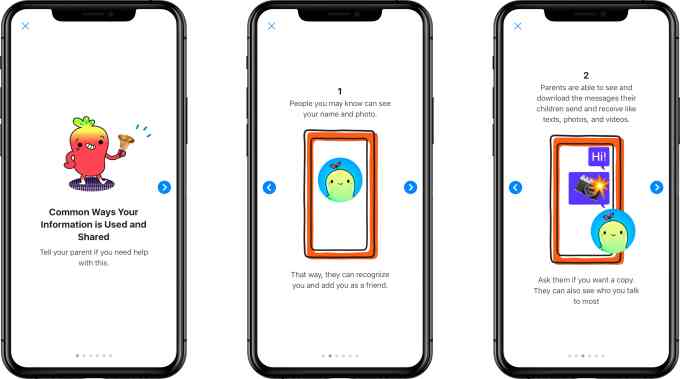
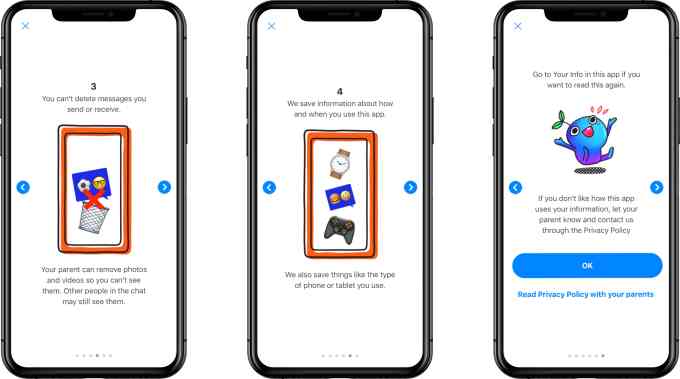
The Messenger Kids’ privacy policy was updated, as well, to better detail the information being collected. The app also attempts to explain this in plain language to the kids, using cute photos. In reality, parents should read the policy for themselves and make a decision, accordingly.
The app collects a lot of information — including names, profile photos, demographic details (gender and birthday), a child’s connection to parents, contacts’ information (like most frequent contacts), app usage information, device attributes and unique identifiers, data from device settings (like time zones or access to camera and photos), network information, and information provided from things like bug reports or feedback/contact forms.
To some extent, this information is needed to help the app properly operate or to alert parents about a child’s activities. But the policy includes less transparent language about the collected information being used to “evaluate, troubleshoot, improve, create, and develop our products” or being shared with other Facebook Companies. There’s a lot of wiggle room there for extensive data collection on Facebook’s part. Service providers offering technical infrastructure and support, like a content delivery network or customer service, may also gain access to collected information, but must adhere to “strict data confidentiality and security obligations,” the policy claims, without offering further details on what those are.
Despite its lengthiness, the policy leaves plenty of room for Facebook to collect private information and share it. If you have a Facebook account, you’ve already agreed to this sort of “deal with the devil” for yourself, in order to benefit from Facebook’s free service. But parents need to strongly consider if they’re comfortable making the same decision for their children.
The policy also describes things Facebook plans to roll out later, when Messenger Kids is updated to support older kids. As kids enter tween to teen years, parents may want to loosen the reigns a bit. The new policy will cover those changes, as well.
It’s unfortunate that the easiest tool, and the one with the best parental controls, is coming from Facebook. The market is ripe for a disruptor in the kids’ space, but there’s not enough money in that, apparently. Facebook, of course, sees the potential of getting kids hooked early and can invest in a product that isn’t directly monetized. Few companies can afford to do this, but Apple would be the best to take Facebook on in this area.
Apple’s iMessage is a large, secure and private platform — but it lacks these advanced parental controls, as well as the other bells and whistles (like built-in AR filters) that makes the Messenger Kids app fun. Critically, it doesn’t work across non-Apple devices, which will always be a limiter when it comes to finding an app that the extended family can use together.
To be clear, there is no way to stop Facebook from vacuuming up the child’s information except to delete the child’s Messenger Kids Account through the Facebook Help Center. So consider your choices wisely.
To our knowledge this is the first large-scale comparison of the data provided by various keyword research tools.
And now it’s time to share what we discovered.
Summary of Our Key Findings:
1. Ahrefs and SEMrush generate the highest number of keyword suggestions, followed by Ubersuggest, Sistrix, and SECockpit.
2. The Google Keyword Planner provides 67.9% fewer keyword suggestions than the average output from other major paid SEO tools. However, KWFinder and KWTool both produce similar amounts of keyword suggestions compared to GKP.
3. KeywordTool.io and Sistrix tend to provide higher than average monthly search volume estimates. Sistrix’s search volume estimates are 233% higher than the median, while KeywordTool.io is 47% above the median. Moz and Ahrefs skew towards slightly lower search volume estimates. Ahrefs’s search volumes are 37% less than the median while Moz Pro’s search volume estimates are 33% below the tool-wide median.
4. When analyzing search volume data for popular search terms (>10k searches/month) Sistrix has significantly higher monthly search volume estimates vs. the Google Keyword Planner.
5. All the SEO tools in our analysis had a significant negative correlation between search volume and keyword length.
6. Certain tools tend to outperform others in terms of keyword suggestions in specific industries. For example, while they generally produce fewer suggestions than SEMrush and Ahrefs, Moz and Google Keyword Planner tend to generate a relatively high number of suggestions in the web hosting niche. And Ubersuggest is particularly good at finding keyword ideas in the marketing, travel, and diet niches.
7. We found large variations for keyword difficulty scores between tools. Our data discovered that SEMrush’s keyword difficulty scores are 110% above the median. SECockpit estimates keyword difficulty 82% below the median.
8. The median CPC across all of the terms that we analyzed was $1.68. SECockpit ($2.20) and Google Keyword Planner ($2.14) report higher overall CPC than the average. At $1.39, SEMrush has the lowest CPC estimates.
9. When comparing CPC estimates found in Google Keyword Planner vs. other tools, SECockpit has considerably higher cost per click estimates compared to those found in Google Keyword Planner. KWFinder, Long Tail Pro, KeywordTool.io, Sistrix, Ahrefs, and SEMrush have lower cost per clicks than Google Keyword Planner.
I’ve provided details on our findings below.
Ahrefs and SEMrush Generate The Most Keyword Suggestions. KWFinder and Google Keyword Planner Provide The Least
When it comes to sheer number of keyword suggestions, Ahrefs and SEMrush tend to outperform other major SEO tools.
Here is the “beeswarm” plot that compares keyword suggestion volume to the tool-wide average.
Generating a large list of keyword ideas is an important feature of any SEO tool. In fact, many tools prominently display how many keyword ideas they’re able to generate from a single seed keyword.
Why is coming up with thousands of keyword ideas so useful?
Well, in many cases, someone that enters a seed keyword into a tool isn’t actually looking up stats for that exact keyword.
Instead, their goal is to find long tail versions of that keyword. Sometimes they also want the tool to generate laterally-related keyword ideas that they’d have trouble coming up with on their own.
Obviously, you can’t judge the value of a keyword research tool based solely on how many keyword ideas that it spits out. However, it’s an important feature that factors into the decision of which tool to invest in.
Key Takeaway: Ahrefs, SEMrush, Ubersuggest, and Sistrix appear to perform best in terms of producing keyword suggestions. KeywordTool.io, Google Keyword Planner and KWFinder ranked near the bottom.
The Google Keyword Planner Provides 67.9% Fewer Keyword Suggestions Compared to Other Several Major Paid SEO Tools
Although designed for Google Ads, many marketing professionals use Google Keyword Planner (GKP) for SEO campaigns.
Even when used solely for SEO, the Google Keyword Planner has several things going for it.
First of all, unlike many keyword tools out there, it’s free.
But more important than pricing is the fact that the data comes straight from Google. Which means that the data in the GKP should be super reliable compared to 3rd party tools.
It should be noted that GKP search volumes are presented in a range unless you’re running an active Google Ads campaign.
The GKP also lacks key features (like Keyword Difficulty scores and SERP analysis) that many paid tools provide.
Despite those shortcomings, the GKP is a mainstay keyword tool for many SEO professionals.
According to our analysis, the GKP doesn’t come up with nearly as many keyword suggestions as other major paid tools.
In fact, the GKP provides around 68% fewer average keyword suggestions compared to the paid tools in our analysis.
And when we compared the GKP against the top tools, we found that the GKP generates 98.1% fewer suggestions than SEMrush, 97% fewer than those made by Ahrefs, and 83.8% fewer than by Ubersuggest.
Key Takeaway: Google Keyword Planner has its merit as a keyword research tool for SEO. However, most major SEO tools vastly outperform GKP in terms of producing keyword suggestions.
Sistrix and KeywordTool.io Have Relatively High Monthly Search Volume Estimates. Moz and Ahrefs Estimates Tend to Be On The Lower End
One of the most interesting findings from this analysis is that the tools in our analysis all have very different monthly search volume estimates.
KeywordTool.io and Sistrix tend to estimate keyword search volumes higher than most other tools. On the other hand, search volume estimates in Moz Pro and Ahrefs are generally lower.
In general, we found a wide range of keyword volumes for the same exact set of keywords.
For example, take a keyword like “insurance”. According to KeywordTool.io, that keyword gets 368,000 searches per month.
However, if you look up that same keyword in Ahrefs, you’ll get a completely different number.
Which tool is right?
While it’s impossible to say based on our research, it’s important to note that each tool uses different sources and methodologies for estimating search volume.
If you want to get traffic from Google, how would you go about it?
Chances are you are either going to leverage SEO or pay for some ads.
But what if there was another way to get traffic from Google? A way that didn’t take as long as SEO and didn’t cost money like paid ads. And no, I’m not talking about Google News… there is actually an easier way.
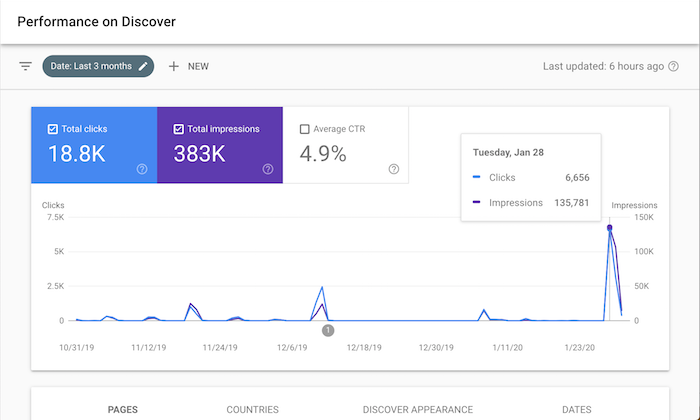
It’s so effective that it drove 18,800 visitors to my site in the last 3 months. Just look at the screenshot above.
So, what is it?
Google Discover
Similar to how you have feeds on Facebook, Instagram, and Twitter, did you know Google has a feed for you.
It’s called Google Discover.
If you mainly use Google on your laptop or desktop computer, chances are you haven’t seen it. But if you have the Google mobile app or the Chrome mobile app, you probably have already seen it.
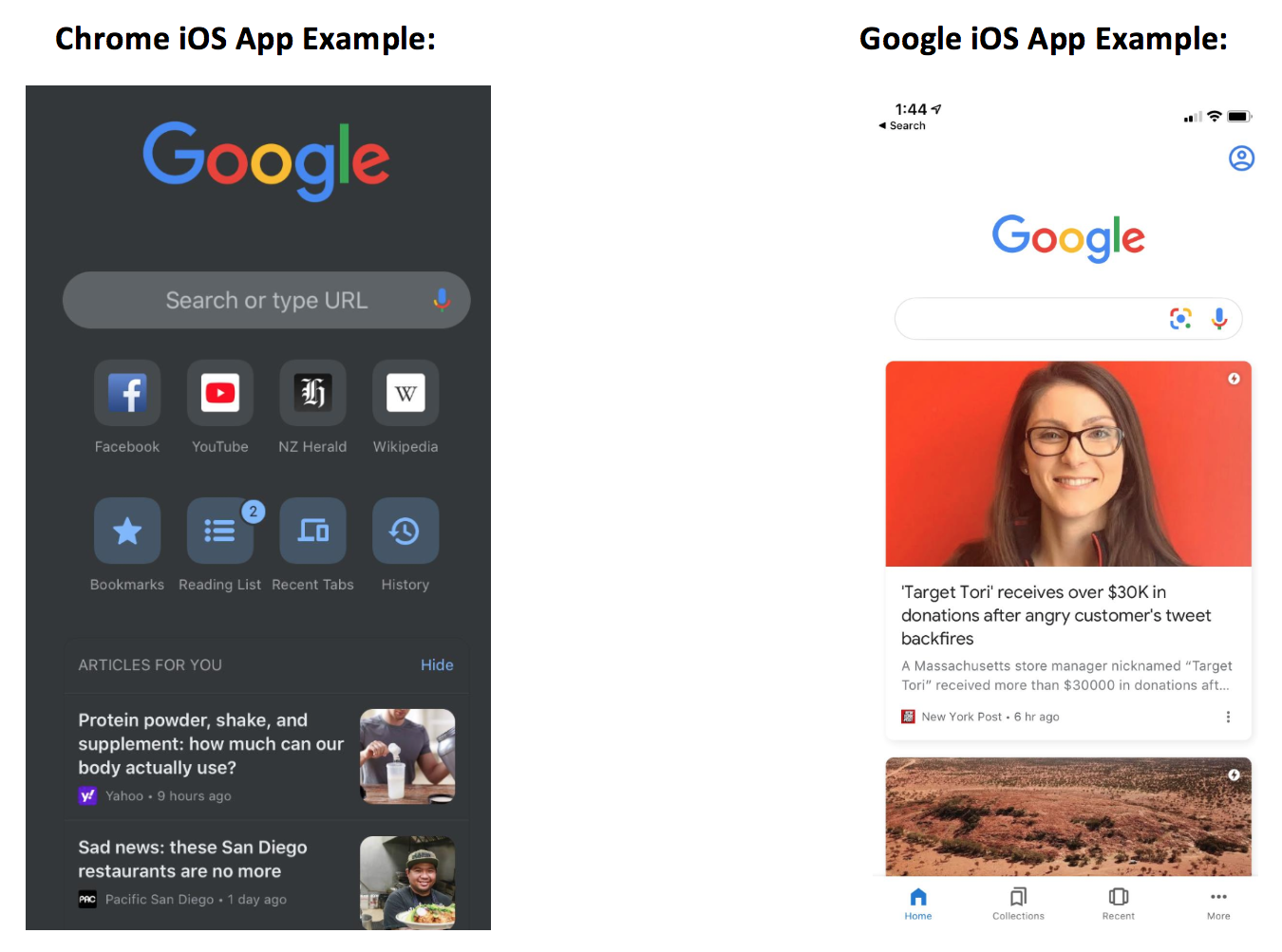
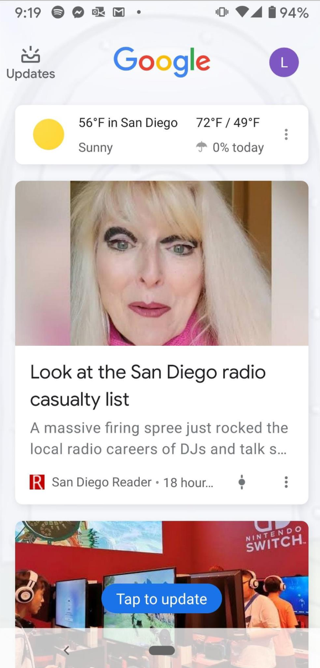
Here’s what it looks like on an iPhone:
This is Google’s version of a social feed.
Here’s how it works… Google Discover results, which appear below the search box on the Google mobile app and Chrome mobile app, show a summary of web pages as cards. These cards are a scrollable list of topics, almost like a social feed, that you can browse on your mobile devices.
Tapping one of these cards from Google search home will send you directly to the page you just clicked on.
And if you are wondering why you are seeing certain stories that others may not be, it’s because the recommendations are based on search history, interactions with Google products, and who you choose to follow directly via Google Discover.
But here is where it’s getting interesting…
Google Discover is everywhere, you just don’t know it
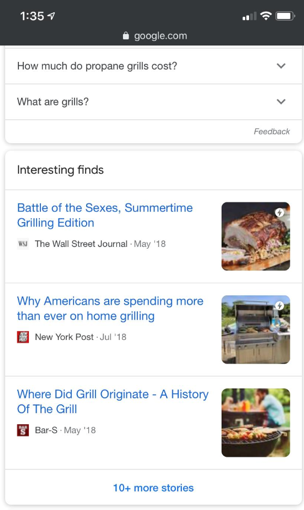
Discover results for some topics also appear within the search engine results under the label “Interesting finds.”
If you click one of these stories, it’ll take you directly to that web page, or, if you click to see “more stories” at the bottom of the Interesting Finds card, it’ll bring you to a new Google Discover user interface where you can follow that topic, follow related topics, and explore related Discover listings.
Now if you have a Pixel phone, you’ve seen Discover a lot, but again you just haven’t realized it.
By simply swiping right on your Pixel phone home screen you get a customizable and personalized feed just like the image above.
Now, you may be wondering, how is this different than just using Google News? Because they have a top stories section which is kind of like a feed, right?
Unlike top stories, Discover doesn’t limit rankings to what’s published most recently.
If Google thinks a user would find earlier content interesting, then Discover might show it. Discover also features videos, sports scores, entertainment updates such a movie, stock prices, event info for things like a music festival, and much more.
Google is positioning Discover as a content hub for all of your interests just like Facebook is doing with their feed.
In other words, this is Google’s version of your Facebook feed.
Similar to following a hashtag on Instagram, you can follow a topic of interest on Discover. Also, similar to Instagram’s Explore Page, you don’t need to follow anything to get content you might like. Discover is aiming to show you content you’d be interested in before you even know you want it.
The key is “before you knew about it.” Just like how Facebook and Instagram do the same thing.
So, why should you care about Google Discover?
Because it can drive you a ton of traffic.
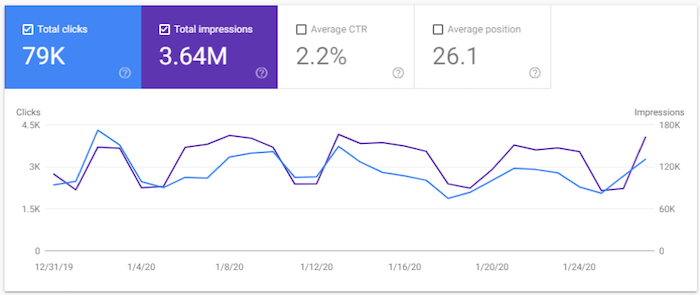
Just check out one of the clients of my ad agency, Neil Patel Digital. Look at their Discover traffic.
They generated 3.64 million impressions in the last 28 days and 79,000 clicks to their site.
That’s a ton of traffic. In addition, all of those impressions help with branding.
Brands are the solution, not the problem. Brands are how you sort out the cesspool.
So, all of those impressions you can generate from Discover are great because they will help put your brand out there. It helps with the concept called the Rule of 7, in which when someone sees or interacts with your brand 7 times, they are much more likely to become a loyal customer.
This can also help with Google’s E-A-T algorithm updates. It is the best way if you want to build up your expertise and credibility as an author. Discover is a simple way to help you get there.
So, how can you get more traffic from Discover?
How to optimize for Google Discover
Luckily, it’s not as complicated as SEO and the results happen much faster. Still not instant, but over time you should see your Discover traffic continually rising.
Here are 3 simple tips that will help:
Be sure to use high-quality images. Images appear with every Discover result, so relevant and high-quality images that accompany your content is important. And just like with your headlines and titles, try to choose images that are more likely to entice clicks. Images that are shocking or evoke curiosity will do the trick.
Content is king, but if you don’t write about the right stuff then you won’t show up. Check which topics Google suggests following inside of Discover to see if those topics align with your website. If it does, consider using their suggested topics as a guide to what people are interested in and write similar content. Of course, you don’t want to copy others, you want to go above and beyond so you can one-up your competition. Use Brian Dean’s skyscraper technique to do this.
Hopefully, when you’re creating your website content, you’re already taking some time to think about maximizing your content. What do I mean by that? Maximizing your content means thinking about your website as an API for your content. So yes, your content lives on your site, but hopefully, you’re creating it keeping in mind how it can be posted or promoted in other areas so you can secure backlinks and attract social engagement across other relevant channels. To do this you need to focus on topics with shareability, topics that are trending, topics with growing interest, and also focus on leveraging clickbait and enticing titles and headlines. Remember that Google Discover is like a social feed. If you’re only trying to make your content work hard for you on your site, you’re not getting enough out of it.
Once you make a deliberate effort to go after Discover traffic, it’s time to measure how you are doing.
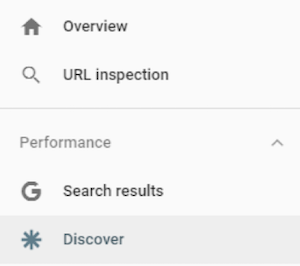
Now, on the left side, you’ll see a navigation menu.
I want you to click on “Discover.”
You’ll now see a report that looks something like this.
Compared to the screenshot I showcased earlier, I barely get any Discover traffic.
Why you may ask?
Do you notice a trend with my chart? Well, I tend to publish content every Tuesday and that’s the day I get Discover traffic.
Similar to any other social network (and unlike traditional SEO), you mainly see traffic as you post new content. It’s not long-term traffic that is consistent, instead, you keep getting quick bursts of traffic.
I only blog once a week, but if I write multiple pieces of content a day, my Discover traffic would skyrocket.
Conclusion
Whether you are a fan of Discover or not, it doesn’t matter. As a marketer, you need to look at it as another channel.
Data has already shown that it is popular and as long as Google keeps pushing it, people will use it.
So why not leverage it to your advantage and harness it to drive traffic and sales for your site?
Plus, you should never rely on traffic from just one channel alone because the moment an algorithm change happens, it can crush your traffic. That’s why you need to take an omnichannel approach and leverage any relevant channel out there.
So, what do you think of Discover? Do you use it on your phone? Have you thought about leveraging it for traffic to your site?
If you want to get traffic from Google, how would you go about it?
Chances are you are either going to leverage SEO or pay for some ads.
But what if there was another way to get traffic from Google? A way that didn’t take as long as SEO and didn’t cost money like paid ads. And no, I’m not talking about Google News… there is actually an easier way.
It’s so effective that it drove 18,800 visitors to my site in the last 3 months. Just look at the screenshot above.
So, what is it?
Google Discover
Similar to how you have feeds on Facebook, Instagram, and Twitter, did you know Google has a feed for you.
It’s called Google Discover.
If you mainly use Google on your laptop or desktop computer, chances are you haven’t seen it. But if you have the Google mobile app or the Chrome mobile app, you probably have already seen it.
Here’s what it looks like on an iPhone:
This is Google’s version of a social feed.
Here’s how it works… Google Discover results, which appear below the search box on the Google mobile app and Chrome mobile app, show a summary of web pages as cards. These cards are a scrollable list of topics, almost like a social feed, that you can browse on your mobile devices.
Tapping one of these cards from Google search home will send you directly to the page you just clicked on.
And if you are wondering why you are seeing certain stories that others may not be, it’s because the recommendations are based on search history, interactions with Google products, and who you choose to follow directly via Google Discover.
But here is where it’s getting interesting…
Google Discover is everywhere, you just don’t know it
Discover results for some topics also appear within the search engine results under the label “Interesting finds.”
If you click one of these stories, it’ll take you directly to that web page, or, if you click to see “more stories” at the bottom of the Interesting Finds card, it’ll bring you to a new Google Discover user interface where you can follow that topic, follow related topics, and explore related Discover listings.
Now if you have a Pixel phone, you’ve seen Discover a lot, but again you just haven’t realized it.
By simply swiping right on your Pixel phone home screen you get a customizable and personalized feed just like the image above.
Now, you may be wondering, how is this different than just using Google News? Because they have a top stories section which is kind of like a feed, right?
Unlike top stories, Discover doesn’t limit rankings to what’s published most recently.
If Google thinks a user would find earlier content interesting, then Discover might show it. Discover also features videos, sports scores, entertainment updates such a movie, stock prices, event info for things like a music festival, and much more.
Google is positioning Discover as a content hub for all of your interests just like Facebook is doing with their feed.
In other words, this is Google’s version of your Facebook feed.
Similar to following a hashtag on Instagram, you can follow a topic of interest on Discover. Also, similar to Instagram’s Explore Page, you don’t need to follow anything to get content you might like. Discover is aiming to show you content you’d be interested in before you even know you want it.
The key is “before you knew about it.” Just like how Facebook and Instagram do the same thing.
So, why should you care about Google Discover?
Because it can drive you a ton of traffic.
Just check out one of the clients of my ad agency, Neil Patel Digital. Look at their Discover traffic.
They generated 3.64 million impressions in the last 28 days and 79,000 clicks to their site.
That’s a ton of traffic. In addition, all of those impressions help with branding.
Brands are the solution, not the problem. Brands are how you sort out the cesspool.
So, all of those impressions you can generate from Discover are great because they will help put your brand out there. It helps with the concept called the Rule of 7, in which when someone sees or interacts with your brand 7 times, they are much more likely to become a loyal customer.
This can also help with Google’s E-A-T algorithm updates. It is the best way if you want to build up your expertise and credibility as an author. Discover is a simple way to help you get there.
So, how can you get more traffic from Discover?
How to optimize for Google Discover
Luckily, it’s not as complicated as SEO and the results happen much faster. Still not instant, but over time you should see your Discover traffic continually rising.
Here are 3 simple tips that will help:
Be sure to use high-quality images. Images appear with every Discover result, so relevant and high-quality images that accompany your content is important. And just like with your headlines and titles, try to choose images that are more likely to entice clicks. Images that are shocking or evoke curiosity will do the trick.
Content is king, but if you don’t write about the right stuff then you won’t show up. Check which topics Google suggests following inside of Discover to see if those topics align with your website. If it does, consider using their suggested topics as a guide to what people are interested in and write similar content. Of course, you don’t want to copy others, you want to go above and beyond so you can one-up your competition. Use Brian Dean’s skyscraper technique to do this.
Hopefully, when you’re creating your website content, you’re already taking some time to think about maximizing your content. What do I mean by that? Maximizing your content means thinking about your website as an API for your content. So yes, your content lives on your site, but hopefully, you’re creating it keeping in mind how it can be posted or promoted in other areas so you can secure backlinks and attract social engagement across other relevant channels. To do this you need to focus on topics with shareability, topics that are trending, topics with growing interest, and also focus on leveraging clickbait and enticing titles and headlines. Remember that Google Discover is like a social feed. If you’re only trying to make your content work hard for you on your site, you’re not getting enough out of it.
Once you make a deliberate effort to go after Discover traffic, it’s time to measure how you are doing.
Now, on the left side, you’ll see a navigation menu.
I want you to click on “Discover.”
You’ll now see a report that looks something like this.
Compared to the screenshot I showcased earlier, I barely get any Discover traffic.
Why you may ask?
Do you notice a trend with my chart? Well, I tend to publish content every Tuesday and that’s the day I get Discover traffic.
Similar to any other social network (and unlike traditional SEO), you mainly see traffic as you post new content. It’s not long-term traffic that is consistent, instead, you keep getting quick bursts of traffic.
I only blog once a week, but if I write multiple pieces of content a day, my Discover traffic would skyrocket.
Conclusion
Whether you are a fan of Discover or not, it doesn’t matter. As a marketer, you need to look at it as another channel.
Data has already shown that it is popular and as long as Google keeps pushing it, people will use it.
So why not leverage it to your advantage and harness it to drive traffic and sales for your site?
Plus, you should never rely on traffic from just one channel alone because the moment an algorithm change happens, it can crush your traffic. That’s why you need to take an omnichannel approach and leverage any relevant channel out there.
So, what do you think of Discover? Do you use it on your phone? Have you thought about leveraging it for traffic to your site?
A UK government advisory body on AI and data ethics has recommended tighter controls on how platform giants can use ad targeting and content personalization.
Concerns about the largely unregulated eyeball-grabbing targeting tactics of online platforms — be it via serving ‘personalized content’ or ‘microtargeted ads’ to individuals or groups of users — include the risk of generating addictive behaviors; the exploitation and/or discrimination of vulnerable groups; the amplification of misinformation; and election interference, to name a few.
In a report published today the Centre for Data Ethics and Innovation (CDEI) sets out a number of recommendations for platforms that use targeting tools to determine what content or ads are shown to users which it argues will help build public trust in digital services, including those delivered by the public sector.
“Most people do not want targeting stopped. But they do want to know that it is being done safely and ethically. And they want more control,” writes chair Roger Taylor in an executive summary.
“Our analysis of the regulatory environment demonstrates significant gaps in their regulatory oversight,” the report goes on. “Our analysis of public attitudes shows greatest concern and interest about the use of online targeting on large platforms.
“Our research demonstrates that online targeting systems used by social media platforms (like Facebook and Twitter), video sharing platforms (like YouTube, Snapchat, and TikTok), and search engines (like Google and Bing) raise the greatest concerns in these areas.”
The advisory body, which was announced by the Conservative-led government in 2017 to help devise policy for regulating the use of AI and data-driven technologies, is calling for online targeting giants to be held to higher standards of accountability over their use of targeting tools.
Current regulations are inadequate to cover online targeting, per its analysis, while it dubs self-regulation and the status quo “unsustainable”.
Respondents to a survey the CDEI conducted were overwhelmingly in favour (61%) of giving an independent regulator oversight of the use of online targeting systems — vs just 17% preferring self-regulation to continue.
The UK government set out a plan to regulate a number of online harms in aWhite Paper published last year — which proposes a duty of care be placed on platforms to protect users from a range of harms, such as age inappropriate content or material that encourages damaging behaviors such as self-harm or eating disorders.
The CDEI suggests this proposed framework could help plug some of the regulatory gaps its report is flagging — “if online targeting is recognised within the independent regulator’s remit” (while warning that would still leave a number of gaps in the regulation of political advertising and advertising).
The report also calls for greater transparency in how online targeting systems operate — “so that society can better understand the impacts of these systems and policy responses can be built on robust evidence”.
Another key recommendation is for Internet users to be given greater control over the way they are targeted so that personalization can better fit their preferences.
“Online targeting has helped to put a handful of global online platform businesses in positions of enormous power to predict and influence behaviour. However, current mechanisms to hold them to account are inadequate,” the CDEI writes. “We have reviewed the powers of the existing regulators and conclude that enforcement of existing legislation and self-regulation cannot be relied on to meet public expectations of greater accountability.”
“There is recognition from industry as well as the public that there are limits to self-regulation and the status quo is unsustainable. Now is the time for regulatory action that takes proportionate steps to increase accountability, transparency and user empowerment,” it adds.
The CDEI is not proposing any specific restrictions itself — but rather advocating for a regulatory regime that “promote[s] responsibility and transparency and safeguard[s] human rights by design”.
It also recommends that a code of practice be applied to platforms and services that use online targeting systems requiring that they adopt “standards of risk management, transparency and protection of people who may be vulnerable, so that they can be held to account for the impact of online targeting systems on users”.
The future online harms regulator should have a statutory duty to protect and respect freedom of expression and privacy, it also suggests, writing that: “Regulation of online targeting should be developed to safeguard freedom of expression and privacy online, and to promote human rights-based international norms.”
The regulator will also need information gathering powers in order to assess compliance with the code, per the recommendations — including the power to require that independent experts are given secure access to platforms’ data to enable further compliance testing of their code.
“Online targeting systems may have a negative effect on mental health, for example as a possible factor in ‘internet addiction’. They could contribute to societal issues including radicalisation and the polarisation of political views. These are issues of significant public concern, where the risks of harm are poorly understood, but the potential impact too great to ignore,” the report warns.
“We recommend that the regulator facilitates independent academic research into issues of significant public interest, and that it has the power to require online platforms to give independent researchers secure access to their data. Without this, the regulator and other policymakers will not be able to develop evidence-based policy and identify best practice.”
Another recommendation is that platforms be required to maintain online advertising archives “to provide transparency for types of personalised advertising that pose particular societal risks” — such as for politics ads; employment and other similar opportunities where there may be a risk of unlawful discrimination; and for age-restricted products.
An ad archive is one of the self-regulatory measures which ad platforms including Facebook have developed and implemented in recent years as scrutiny of their systems has dialled up in the wake of the Cambridge Analytica political ad targeting scandal which was carried out using Facebook’s ad tools and user data.
On “more meaningful control” for users over how they’re targeted, the Centre suggests support for a new market in third party ‘data intermediaries’ — to enable users’ interests to be represented across multiple services, and new third party safety apps.
It is also calling for formal coordination mechanisms between the future online harms regulator and the UK’s data watchdog (the ICO) and Competition and Markets Authority (CMA) — with the report flagging other related work being carried out by the ICO and CMA, including the ICO’s Age Appropriate Design Code; and the CMA’s market study of online platforms and digital advertising.
The latter raised concerns late last year about the market power of tech giants — with the regulator floating a range of potential interventions in its interim report, including asking for views on breaking up platform giants.
Twitter announced today that over the holidays it identified and shut down “a large network of fake accounts,” as well as many others “located in a wide range of countries,” collectively abusing a feature that let them match phone numbers to user accounts.
TechCrunch previously reported this same issue on December 24, which is also the day Twitter says that it “became aware” that the abuse was taking place. Security researcher Ibrahim Balic found that a bug in Twitter’s Android app let him submit millions of phone numbers through an official API, which returned any associated user account.
We recently discovered an issue that allowed bad actors to match a specific phone number with the corresponding accounts on Twitter. We quickly corrected this issue and are sorry this happened. You can learn more about our investigation here: https://t.co/Z6Q4geQ8jo
The feature is intended, if you have enabled it, to let friends who have your number look up your Twitter handle. But obviously submitting millions of numbers goes “beyond its intended use case.”
If you had turned this feature off, you weren’t affected by this bug. Fortunately for users in the EU this was opt-in there. But for the rest of the world it’s opt-out — so if you had a phone number associated with your account, you may have been affected.
Furthermore, the phone numbers include those provided for purposes of two-factor authentication, so those outside the EU may have been vulnerable to this exploit without realizing it.
It seems that after Twitter was alerted to the issue and shut down the original network (presumably Balic’s), its investigators identified many more accounts that were exploiting this flaw, though a representative declined to provide a number or estimate.
“We observed a particularly high volume of requests coming from individual IP addresses located within Iran, Israel, and Malaysia,” wrote the company in a security bulletin. “It is possible that some of these IP addresses may have ties to state-sponsored actors,” the post continued.
This suspicion was justified by the observation of unrestricted access to Twitter from the IPs in Iran, where the platform is blocked from general access — suggesting government involvement. Belic, when contacted by TechCrunch, said that his work was not state-sponsored in any way.
Any account suspected of abusing the feature was suspended, and the API itself has been modified to prevent any further exploitation of this type. I’ve asked the company how many accounts were suspended and will update this post if I hear back.
Twitter has had numerous incidents where it exposed or leaked user data over the last year. In addition to sharing rather too much data with its ad partners, the company admitted it used phone numbers used for two-factor authentication to serve targeted ads.