Wednesday, 6 September 2017

The Beginner's Guide to Structured Data for SEO: A Two-Part Series

Posted by bridget.randolph

Part 1: An overview of structured data for SEO

SEOs have been talking about structured data for a few years now — ever since Google, Bing, Yahoo! and Yandex got together in 2011 to create a standardized list of attributes and entities which they all agreed to support, and which became known as Schema.org. However, there's still a lot of confusion around what structured data is, what it’s for, and how and when to implement structured data for SEO purposes. In fact, a survey carried out last year by Bing found that only 17% of marketers are using (or were planning to use) Schema.org structured data markup.

In this two-part series, you’ll learn the basics of structured data: first we’ll talk about what it is, and how it relates to SEO (Part 1), and then I’ll take you through a simple process for identifying structured data opportunities and implementing structured data on your own site (Part 2).

What is "structured data"?

"Structured data" as a general term simply refers to any data which is organized (i.e., given "structure"). For example, if you have a bunch of scattered Post-It notes with phone messages about meetings, dates, times, people, etc, and you organize these into a table with labeled rows and columns for each type of information, you’re structuring the data.

Example of unstructured data

Post-It 1: “John called, confirming 3pm on Wed at Coffee Shop”

Post-It 2: “Don’t forget your 10am meeting at Mary’s Office this Friday”

Example of structured data

Meeting With

Date

Time

Location

John

Wednesday

3pm

Coffee Shop

Mary

Friday

10am

Office


Structured data can be used in many different ways, such as using Open Graph markup to specify a Facebook title and description, or using SQL to query a relational database. In an SEO context, "structured data" usually refers to implementing some type of markup on a webpage, in order to provide additional detail around the page’s content. This markup improves the search engines’ understanding of that content, which can help with relevancy signals and also enables a site to benefit from enhanced results in SERPs (rich snippets, rich cards, carousels, knowledge boxes, etc). Because this type of markup needs to be parsed and understood consistently by search engines as well as by people, there are standardized implementations (known as formats and/or syntaxes) and classifications of concepts, relationships, and terms (known as vocabularies) which should be used.

There are three syntaxes which search engines will typically support (Microdata, JSON-LD, and microformats) and two common vocabularies which can be used with these syntaxes: Schema.org and Microformats.org. If you’re reading up on this topic, you may also see references to RDFa, which is another syntax.

*This all gets pretty confusing, so if you’re feeling less-than-crystal-clear right now, you might want to check out this great glossary cheat sheet from Aaron Bradley.


When we talk about structured data for SEO, we're usually talking about the particular vocabulary known as "Schema.org." Schema.org is the most commonly used approach to structured data markup for SEO purposes. It isn’t the only one, though. Some websites use the Microformats.org vocabulary, most often for marking up product reviews (h-review markup) or defining a physical location (h-card markup).

In addition to being able to use different vocabularies to mark up your site, you can also implement this markup in different ways using syntaxes. For Schema.org vocabulary, the best ways to add markup to your site are either through using the Microdata format, or JSON-LD. With Microdata markup, your structured data is integrated within the main HTML of the page, whereas JSON-LD uses a Javascript object to insert all of your markup into the head of the page, which is often a cleaner, simpler implementation from a development perspective.

The Microdata approach was originally the recommended one for SEO purposes, but Google’s JSON-LD support has improved in the past few years and now it is their recommended approach when possible. Note, however, that Bing does not currently support JSON-LD (although hopefully this may be changing soon).

How does structured data support SEO?

Google, Bing, and other search engines encourage webmasters to use structured data, and incentivize that usage by providing benefits to websites with structured data correctly implemented.

Some of these benefits include search result enhancements and content-specific features, such as:

  • Rich search results: Includes styling, images, and other visual enhancements
  • Rich cards: A variation on rich search results, similar to rich snippets and designed for mobile users
  • Enriched search results: Includes interactive or immersive features
  • Knowledge Graph: Information about an entity such as a brand
  • Breadcrumbs: Breadcrumbs in your search result
  • Carousels: A collection of multiple rich results in a carousel style
  • Rich results for AMP: To have your AMP (Accelerated Mobile Pages) appear in carousels and with rich results, you’ll need to include structured data

These enhanced search results can also improve your click-through rate (CTR) and drive additional traffic, because they are more visually appealing and provide additional information to searchers. And improved CTR can also indirectly improve your rankings, as a user behavior signal.

Implementing structured data on your site is also a way to prepare for the future of search, as Google in particular continues to move in the direction of hyper-personalization and solving problems and answering questions directly. Tom Anthony gave a presentation about this topic not too long ago, titled Five Emerging Trends in Search.

Common uses for structured data

Part 2 of this series will go into more detail around specific structured data opportunities and how to implement them. However, there are certain common uses for structured data which almost any website or brand can benefit from:

Knowledge Graph

If you have a personal or business brand, you can edit the information which appears on the right-hand side of the SERP for branded searches. Google uses structured data to populate the Knowledge Graph box.

Rich snippets and rich cards

The most commonly used markup allows you to provide additional context for:

  • Articles
  • Recipes
  • Products
  • Star Ratings and Product Reviews
  • Videos

Using this markup allows your site to show up in the SERPs as a rich snippet or rich card:

Google’s rich cards examples for "Recipe"

If your site has several items that would fit the query, you can also get a “host carousel” result like this one for "chicken recipes":

Image source

In addition to these types of content markup, Google is currently experimenting with "action markup," which enables users to take an action directly from the SERP, such as booking an appointment or watching a movie. If this is relevant to your business, you may want to express interest in participating.

AMP (Accelerated Mobile Pages)

If your site uses AMP (Accelerated Mobile Pages), you’ll want to make sure you include structured data markup on both the regular and AMP pages. This will allow your AMP pages to appear in rich results, including the Top Stories carousel and host carousels.

Social cards

Although Open Graph, Twitter cards, and other social-specific markup may not have a big impact from a purely SEO perspective, this markup is visible to search engines and Bing specifically notes that their search engine can understand Open Graph page-level annotations (although at the moment they only use this data to provide visual enhancements for a specific handful of publishers).

If you use any social networks for marketing, or simply want your content to look good when it’s shared on social media, make sure you correctly implement social markup and validate using the various platforms’ respective testing tools:

AdWords

You can include structured data in your AdWords ads, using structured snippet extensions. These allow you to add additional information within your ad copy to help people understand more about your products or services and can also improve click-through rate (CTR) on your ads.

Email marketing

If you have Gmail, you may have gotten a confirmation email for a flight and seen the information box at the top showing your flight details, or seen a similar information box for your last Amazon order. This is possible due to structured data markup for emails. Google Inbox and Gmail support both JSON-LD and Microdata markup for emails about various types of orders, invoices and reservations.

3 common myths about structured data & SEO

Myth #1: Implementing structured data means I will definitely get rich snippets.

Although using structured data markup is necessary to be eligible for rich snippets and rich cards, there is no guarantee that simply adding structured data markup to your site will immediately result in rich snippets or cards. Sometimes it may not show up at all, or may appear inconsistently. This doesn’t necessarily mean you’ve done anything wrong.

Myth #2: Structured data is a ranking signal.

Using structured data correctly can help search engines to better understand what your content is about and may therefore contribute to a stronger relevancy signal. In addition, studies have shown that rich snippets can improve click-through rate (CTR), which can lead to better rankings indirectly. However, the use of structured data markup on its own is not a direct ranking signal.

Myth #3: Google can figure it out without the extra work.

Sometimes it’s tempting to skip extra steps, like implementing structured data, since we know that Google is getting smarter at figuring things out and understanding content without much help. But this is a short-sighted view. Yes, Google and other search engines can understand and figure out some of this stuff on their own, but if you want them to be able to understand a specific thing about your content, you should use the correct markup. Not only will it help in the short term with the things the algorithms aren’t so good at understanding, it also ensures that your site itself is well structured and that your content serves a clear purpose. Also, Google won’t give you certain features without correct implementation, which could be costing you on a large scale over time, especially if you’re in a competitive niche. Apart from anything else, studies have shown that rich snippets can improve CTR by anywhere from 5%–30%.

Additional resources

In Part 2 of this two-part series, we’ll be looking at the practical side of structured data implementation: how to actually identify structured data opportunities for your site, and how to implement and test the markup correctly.

But for now, here are some resources to help you get started:

In the meantime, I’d love to hear from you: Have you implemented structured data markup on your site? Share your results in the comments!


Sign up for The Moz Top 10, a semimonthly mailer updating you on the top ten hottest pieces of SEO news, tips, and rad links uncovered by the Moz team. Think of it as your exclusive digest of stuff you don't have time to hunt down but want to read!


source https://moz.com/blog/structured-data-for-seo-1

Scaling Engagement: 5 Strategies to Connect With More Customers

There’s 24 hours in a day.

With customer engagement as your priority, it can seem like an impossible feat to connect with your audience on a daily basis. Tara Walpert Levy, managing director at Google, writes:

“In the accelerating swirl of chaos, excitement, and yes, sometimes fear, the brands that win will prioritize engagement over exposure. They will flip the traditional approach of using mass reach to connect with the subset of people who matter on its head.”

To scale engagement, your business must focus on executing strategies that boost customer satisfaction while saving your team time.

Let’s think differently about expanding engagement to build quality customer relationships. Here are five ways you can scale up your efforts.

1. Deliver on Brand Promise

We live in a very competitive market. Businesses, large and small, are all competing to garner the attention of their ideal consumer base.

In order to differentiate themselves, companies will develop wild brand promises. They vary from guaranteeing low prices to taglines saying that the customer is always right.

While that may attract new customers, it can become a burden in the long-term. Most companies learn the hard way that a brand promise isn’t a catchy phrase, rather an action a business must live by every single day.

Even big box retailer Walmart had to shelve its nearly two-decade-old slogan, “Always Low Prices.” Now, it’s goal is to help their customers “Save Money. Live Better.”

If you’re attempting to scale your engagement, delivering on your brand promise is one of the best options. Happy customers will become recurring patrons who tell their family and friends.

But delivering on your promise isn’t easy. It involves meeting (and exceeding) your customers’ expectations. You must provide product value along with superb customer support.

For example, you may have to offer free shipping to an irate customer. Or you may need to budget for a customer appreciation sale.

Building a genuine connection with your customers helps your business. Sticking to your promises is worthwhile for boosting engagement.

2. Take Action on Customer Feedback

All human relationships are pretty much built on the same foundation. It centers around how we communicate with each other.

Communication is a major factor in whether a customer continues to shop with your brand. If their needs aren’t met after constant interactions, they may decide your company isn’t worth their time.

To improve how you interact with customers, start by listening to their concerns and answering their questions. For your sales team, this may look like a representative paying attention to the customer’s needs before pitching a product. Your support team may give more specific responses instead of canned answers.

Then, there’s customer feedback. When a customer offers ideas on how to polish your product, be open to their suggestions and willing to take action.

“The direct relationship between customers and support teams holds a rich source of feedback through which customers can be better served. Support teams and representatives can be trained to probe for information while responding to complaints and inquiries,” says Pius Boachie, a marketing consultant and founder of Digitimatic.

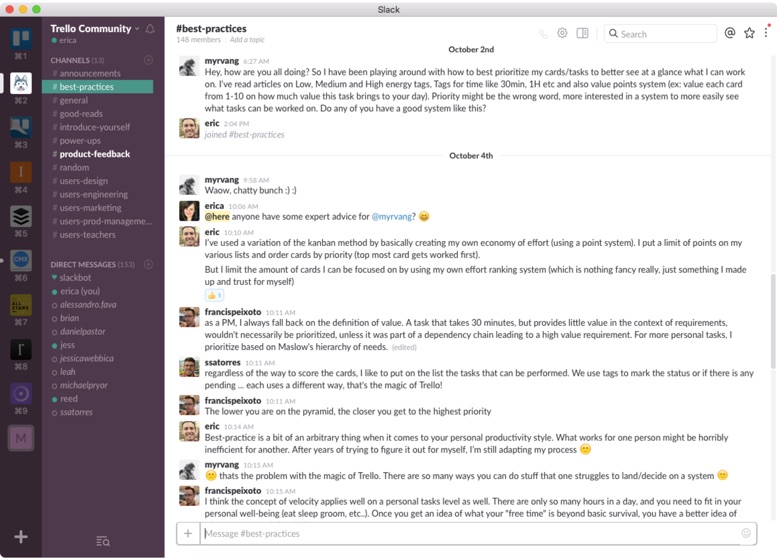
Productivity tool Trello created a Slack community with a channel dedicated to product feedback. It’s a chance for customers to offer their input and get notices about new features.

Implementing feedback is an opportunity to grow your business, while showing customers that you actually listen to their ideas. So do whatever it takes to address customer feedback.

3. Personalize Communications

Several decades ago, businesses controlled communications with their customers. Major companies decided what, when, where, and how to deliver consumer messages. It was a lopsided relationship where businesses had the upper hand.

Now, with advances in technology, the customer is at the center of the conversation. Not only do consumers choose when to connect with brands, but they also control where those interactions take place. For instance, consumers can opt-in to receive your emails and then decide to read it on their own schedules.

For businesses, this means generic messaging isn’t enough to make a connection with a consumer. Your online ad or email will get ignored, and there’s a possibility that you will lose another potential customer.

Email segmentation is an effective strategy to help your team send personalized messages. With Kissmetrics Campaigns, you can deliver emails based on certain subscriber criteria.

Let’s say a subscriber doesn’t purchase after 10 days. You can automatically send a special offer to entice them to come back and purchase.

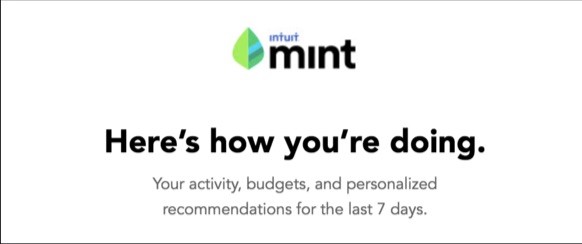
You also may want to send customers specific information as it relates to your product. Mint emails subscribers personalized data from their accounts.

Don’t miss the chance to strengthen the consumer relationship with personalized communications. It’s a necessity to scale your engagement.

4. Give on Social Media

Every business is flocking to social media to tell their stories. Some are buying scammy ads to increase leads and purchasing followers to fake influence.

Here’s the truth: it’s not working. And even if they get a few interested consumers, they probably don’t close the sale because the buyer learns about their deception.

Most businesses approach social media with the goal to broadcast their products and news. However, we know it doesn’t work that way.

Social media is an open forum for people to share ideas and talk about the latest trends in a casual setting. That’s why it’s fertile ground for boosting your engagement levels.

To connect with more customers, educate and entertain them. You want to post lighthearted messages that humanize your brand.

For example, you can host live broadcasts on Facebook or Periscope featuring your customers. Or you could post silly GIFs during special days, like National Pancake Day.

You want to be part of your audience’s community. So, you also must be willing to give and not just take.

In the example below, HubSpot is giving its Facebook fans a chance to win two tickets to a concert. The company earned more than 160 shares, 500 reactions, and 62,000 views on this post.

Are you just broadcasting your message on social media? If so, try giving back to your followers to gain more engagement.

5. Develop an Advocacy Program

You’ll learn quickly that your best customers hold the key to spreading the word about your business. These customers act as advocates on a mission to give your brand praise.

So why not make it official? You can start a pilot advocacy program by recruiting your most loyal customers. It gives the selected few another reason to connect with your team.

Also, research shows that it’s a win-win situation. A report by Standard Charters states:

“Successful online companies make users feel excited enough to share the products with their networks. Referrals from friends are still the most powerful way to gain customers, whether for a tiny startup or a multinational corporation.”

Brand advocacy programs are also incubators to experiment with retention strategies. You can monitor customer behavior to learn what keeps them excited about your brand.

For instance, you may offer your program participants a special coupon to redeem a new product. Their reaction can provide insight on how a subset of your customer base will respond.

Do your research and learn how to start your own advocacy program. It’s your next step to increasing customer engagement.

It’s Time to Scale Up

Engagement without a strategy is misguided action. Instead, your goal is to create a memorable customer experience.

Exceed your audience’s expectations and use their feedback to improve your product. Send personalized messages that speak directly to your customers. Plus, there’s nothing better than starting an advocacy program that expands your relationships.

Connect with your customers. Scale your engagement today.

About the Author: Shayla Price lives at the intersection of digital marketing, technology and social responsibility. Connect with her on Twitter @shaylaprice.


source https://blog.kissmetrics.com/connect-with-more-customers/

Tuesday, 5 September 2017

State of Enterprise SEO 2017: Overworked SEOs Need Direction

Posted by NorthStarInbound

This survey and its analysis was co-authored with North Star Inbound's senior creative strategist, Andrea Pretorian.

In the spring of 2017, North Star Inbound partnered up with seoClarity and BuzzStream to survey the state of enterprise SEO. We had a fair share of anecdotal evidence from our clients, but we wanted a more objective measurement of how SEO teams are assembled, what resources are allocated to them, what methods they use, and how they perform.

We hadn’t seen such data collected, particularly for enterprise SEO. We found this surprising given its significance, evident even in the number of “enterprise SEO tools” and solutions being marketed.

What is enterprise SEO?

There is no single fixed-industry definition of “enterprise” beyond “large business.” For the purposes of this survey, we defined enterprise businesses as being comprised of 500 or more employees. “Small enterprise” means 500–1000 employees, while “large enterprise” means over 1000 employees.

Industry discussion often points to the number of pages as being a potential defining factor for enterprise SEO, but even that is not necessarily a reliable measure.

What was our survey methodology?

We developed the widest enterprise SEO survey to date, made up of 29 questions that delved into every aspect of the enterprise SEO practice. From tools and tactics to content development, keyword strategy, and more, we left no stone unturned. We then picked the brains of 240 SEO specialists across the country. You can check out our complete survey, methodology, and results here.

Team size matters — or does it?

Let’s start by looking at enterprise team size and the resources allocated to them. We focused on companies with an in-house SEO team, and broke them down in terms of small (500–1000 employees) and large enterprise (>1000 employees).

We found that 76% of small enterprise companies have in-house SEO teams of 5 people or less, but were surprised that 68% of large enterprise companies also had teams of this size. We expected a more pronounced shift into larger team sizes paralleling the larger size of their parent company; we did not expect to see roughly the same team size across small and large enterprise companies.

Chart_Q4_170522.png

Interestingly, in larger companies we also see less confidence in the team’s experience in SEO. Of the companies with in-house SEO, only 31.67% of large enterprise teams called themselves “leaders” in the SEO space, which was defined in this survey as part of a team engaged broadly and critically within the business. 40% of small enterprise teams called themselves “leaders.” In terms of viewing themselves more positively (leaders, visionaries) or less (SEO pioneers in their company or else new SEO teams), we did not notice a big difference between small or large enterprise in-house SEO teams.

Large enterprise companies should have more resources at their disposal — HR teams to hire the best talent, reliable onboarding practices in place, access to more sophisticated project management tools, and more experience managing teams — which makes these results surprising. Why are large enterprise companies not more confident about their SEO skills and experience?

Before going too far in making assumptions about their increased resources, we made sure to ask our survey-takers about this. Specifically, we asked for how much budget is allocated to SEO activity per month — not including the cost of employees’ salaries, or the overhead costs of keeping the lights on — since this would result in a figure easier to report consistently across all survey takers.

It turns out that 57% of large enterprise companies had over $10K dedicated strictly to SEO activity each month, in contrast to just 24% of small enterprise companies allocating this much budget. 40% of large enterprise had over $20K dedicated to SEO activity each month, suggesting that SEO is a huge priority for them. And yet, as we saw earlier, they are not sold on their team having reached leader status.

Enterprise SEO managers in large companies value being scalable and repeatable

We asked survey takers to rate the success of their current SEO strategy, per the scale mapped below, and here are the results:

Chart_Q8_170522.png

A smaller percentage of large enterprise SEOs had a clearly positive rating of the current success of their SEO strategy than did small enterprise SEOs. We even see more large enterprise SEOs “on the fence” about their strategy’s performance as opposed to small. This suggests that, from the enterprise SEOs we surveyed, the ones who work for smaller companies tend to be slightly more optimistic about their campaigns’ performance than the larger ones.

What’s notable about the responses to this question is that 18.33% of managers at large enterprise companies would rate themselves as successful — calling themselves “scalable and repeatable.” No one at a small enterprise selected this to describe their strategy. We clearly tapped into an important value for these teams, who use it enough to measure their performance that it's a value they can report on to others as a benchmark of their success.

Anyone seeking to work with large enterprise clients needs to make sure their processes are scalable and repeatable. This also suggests that one way for a growing company to step up its SEO team’s game as it grows is by achieving these results. This would be a good topic for us to address in greater detail in articles, webinars, and other industry communication.

Agencies know best? (Agencies think they know best.)

Regardless of the resources available to them, across the board we see that in-house SEOs do not show as much confidence as agencies. Agencies are far more likely to rate their SEO strategy as successful: 43% of survey takers who worked for agencies rated their strategy as outright successful, as opposed to only 13% of in-house SEOs. That’s huge!

While nobody said their strategy was a total disaster — we clearly keep awesome company — 7% of in-house SEOs expressed frustration with their strategy, as opposed to only 1% of agencies.

Putting our bias as a link building agency aside, we would expect in-house SEO enterprise teams to work like in-house agencies. With the ability to hire top talent and purchase enterprise software solutions to automate and track campaigns, we expect them to have the appropriate tools and resources at their disposal to generate the same results and confidence as any agency.

So why the discrepancy? It’s hard to say for sure. One theory might be that those scalable, repeatable results we found earlier that serve as benchmarks for enterprise are difficult to attain, but the way agencies evolve might serve them better. Agencies tend to develop somewhat organically — expanding their processes over time and focusing on SEO from day one — as opposed to an in-house team in a company, which rarely was there from day one and, more often than not, sprouted up when the company’s growth made it such that marketing became a priority.

One clue for answering this question might come from examining the differences between how agencies and in-house SEO teams responded to the question asking them what they find to be the top two most difficult SEO obstacles they are currently facing.

Agencies have direction, need budget; in-house teams have budget, need direction

If we look at the top three obstacles faced by agencies and in-house teams, both of them place finding SEO talent up there. Both groups also say that demonstrating ROI is an issue, although it’s more of an obstacle for agencies rather than in-house SEO teams.

When we look at the third obstacles, we find the biggest reveal. While agencies find themselves hindered by trying to secure enough budget, in-house SEO teams struggle to develop the right content; this seems in line with the point we made in the previous section comparing agency versus in-house success. Agencies have the processes down, but need to work hard to fit their clients’ budgets. In-house teams have the budget they need, but have trouble lining them up to the exact processes their company needs to grow as desired. The fact that almost half of the in-house SEOs would rank developing the right content as their biggest obstacle — as opposed to just over a quarter of agencies — further supports this, particularly given how important content is to any marketing campaign.

Now, let’s take a step back and dig deeper into that second obstacle we noted: demonstrating ROI.

Everyone seems to be measuring success differently

One question that we asked of survey takers was about the top two technical SEO issues they monitor:

The spread across the different factors were roughly the same across the two different groups. The most notable difference between the two groups was that even more in-house SEO teams looked at page speed, although this was the top factor for both groups. Indexation was the second biggest factor for both groups, followed by duplicate content. There seems to be some general consensus about monitoring technical SEO issues.

But when we asked everyone what their top two factors are when reviewing their rankings, we got these results:

For both agencies and in-house SEO teams, national-level keywords were the top factor, although this was true for almost-three quarters of in-house SEOs and about half of agencies. Interestingly, agencies focused a bit more on geo/local keywords as well as mobile. From when we first opened this data we found this striking, because it suggests a narrative where in-house SEO teams focus on more conservative, “seasoned” methods, while agencies are more likely to stay on the cutting-edge.

Looking at the “Other” responses (free response), we had several write-ins from both subgroups who answered that traffic and leads were important to them. One agency survey-taker brought up a good point: that what they monitor “differs by client.” We would be remiss if we did not mention the importance of vertical-specific and client-specific approaches — even if you are working in-house, and your only client is your company. From this angle, it makes sense that everyone is measuring rankings and SEO differently.

However, we would like to see a bit more clarity within the community on setting these parameters, and we hope that these results will foster that sort of discussion. Please do feel free to reply in the comments:

  • How do you measure ROI on your SEO efforts?
  • How do you show your campaigns’ value?
  • What would you change about how you’re currently measuring the success of your efforts?

So what’s next?

We’d love to hear about your experiences, in-house or agency, and how you’ve been able to demonstrate ROI on your campaigns.

We’re going to repeat this survey again next year, so stay tuned. We hope to survey a larger audience so that we can break down the groups we examine further and analyze response trends among the resulting subgroups. We wanted to do this here in this round of analysis, but were hesitant because of how small the resulting sample size would be.


Sign up for The Moz Top 10, a semimonthly mailer updating you on the top ten hottest pieces of SEO news, tips, and rad links uncovered by the Moz team. Think of it as your exclusive digest of stuff you don't have time to hunt down but want to read!


source https://moz.com/blog/enterprise-seo-2017

Facebook Watch original video tab launches to all U.S. users

 Today Facebook officially opened its new Watch tab of original video content to everyone in the U.S. after a limited rollout a month ago and expansion to some more users last week. Available on Facebook’s native mobile apps, desktop site, and TV apps, Watch lets users subscribe to their favorite series instead of just haphazardly stumbling upon one-off videos in the News Feed. U.S.… Read More

source https://techcrunch.com/2017/09/05/facebook-watch-tab/?ncid=rss

WhatsApp announces free Business app, will charge big enterprises

 WhatsApp is gearing up to finally monetize its messaging app by charging large enterprise businesses for tools to better communicate with customers. WhatsApp will also offer a free app to small-to-medium sized businesses, though it hasn’t outlined the specific functionality of the app. The enterprise solution will allow global companies “to provide customers with useful… Read More

source https://techcrunch.com/2017/09/05/whatsapp-business-app/?ncid=rss

Getting Hired for Design at MailChimp

Underperforming Mobile Pages are Sabotaging Your Revenue. Here’s How to Fix Them.

Your site gets more traffic from mobile devices than desktops.

So… why are your mobile conversions so low?

That’s what matters most after all. Right?

Right.

The typical reason?

Your site sucks. Plain and simple.

It’s hard to use. The organization is a mess. And it’s slow as a snail.

But there’s good news and bad news.

The good news is that the fix is easy. Just build a new site.

The bad news is that you can’t always do that. Or someone won’t always sign off on it.

Here’s why you might want to rethink that.

And what you should do if it’s still a problem.

Why your mobile results aren’t what they should be

Many sites claim to be “mobile-friendly.”

However, that’s not always the case.

The reality is that most sites aren’t actually mobile-friendly. They’re just accessible on mobile devices.

Yes, there’s a difference.

According to Frank Reynolds at Compulse, there are actually three different terms for how sites appear on mobile devices: mobile-responsive, mobile-optimized and mobile-friendly.

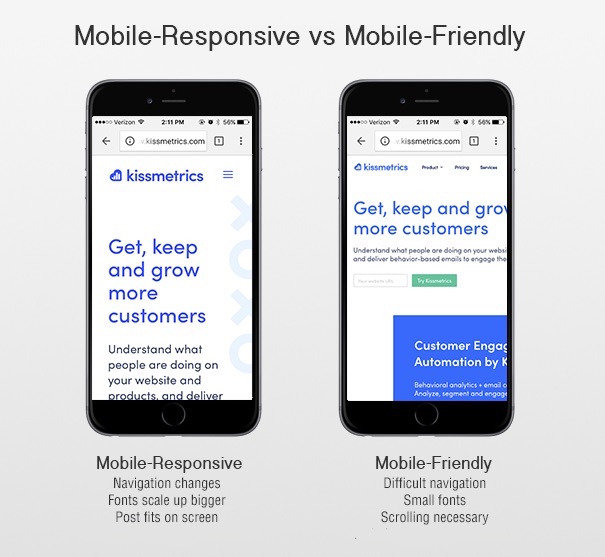
  • Mobile-responsive sites are actually user-friendly. They’re built from the ground-up with mobile transitions and user experience in mind, and they resize and adjust proportions, images and text according to specific devices.
  • Mobile-optimized sites are built as a distinct mobile version of the desktop site. They look and feel more like an app, they’re just not actually designed to be apps. These are also typically built from the ground up.
  • Mobile-friendly sites are simply regular desktop sites that have an accessible version on mobile browsers. They can be designed for a mobile experience, but typically they’re just smaller versions of the larger desktop site. *This is the majority.*

The latter option is, sadly, the option most used by sites looking to add mobile functionality to their desktop site.

The reason? It’s quick and dirty.

And you can throw it on after like a band aid. No need to start over from scratch.

Which translates into “a helluva lot cheaper than building a separate mobile site.”

difference between mobile responsive and mobile friendly

Unfortunately, shrinking down a desktop site’s user experience into a smaller screen isn’t actually helping with mobile-friendliness.

It’s just making it harder for users to do what you want.

To convert. To opt-in. To give you their cash money bling bling make a marketer wanna sing sing.

Here’s why.

When “mobile-friendly” costs you conversions

Mobile-friendliness (or the lack thereof) impacts SEO.

Search engines like Google look for mobile responsiveness when driving traffic to your page.

Soon mobile-first indexing will be a thing.

This means mobile sites will take priority over desktop sites when showing up on Google’s SERPs.

But when Google says they’re looking for mobile-friendly sites, what it really means is that they’re looking mobile-responsive.

You know, that third option from above. The expensive one.

If your website is not mobile-responsive – designed from the ground-up with a mobile experience in mind – you will see a decrease in search traffic.

Lost traffic equals lost conversions. Less people to buy stuff.

And that’s assuming the same rate of people buy stuff between the two. Which ain’t the case, as you’ll see in a second.

Even if your traffic numbers remained steady, not having a mobile-responsive design will sabotage your conversions anyway.

The biggest trouble is that mobile-friendly designs aren’t always aesthetically appealing.

They’re essentially just shrunken versions of a regular site that are more difficult to navigate.

You know, like the creepy dude with a tiny head on Beetlejuice.

via GIPHY

According to Adobe, 38% of mobile users will stop engaging with a website if the content or layout is unattractive. And 65% rank display as the “most important aspect” when it comes to consuming content on mobile.

Bottom line: “Mobile-friendly” designs are killing your conversions.

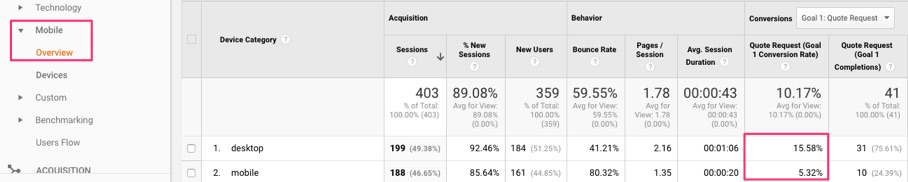
Don’t listen to me. Go peep your own analytics. It’s all right there in front of you.

Three times. That’s the difference in new leads or customers.

Conversely, it means you’re losing out on 3x the leads or sales on mobile that you could be, should be, getting.

How much is an average lead worth to you?

Couple hundred bucks on the low end for B2B or high retention products or expensive average order values.

Three * a couple hundred bucks = lots of missed revenue.

Here’s what you should do about it.

Redesigning your underperforming site with a true mobile mindset

So are you doomed if you haven’t built your site from the ground up to perform well on mobile?

Not necessarily.

The trick is to not take the lazy way out.

Call it what you want. But that’s what it is at the end of the day.

Maybe you can’t rebuild your mobile site from scratch for some reason. You still should. Your reason can’t be better than tens of thousands in lost revenue each month.

But let’s say, for the sake of argument, that your friendly HiPPO won’t sign off.

Start with a simple assessment, then.

For example, begin with the design:

  • How does it look on mobile? Is everything shrunken down and hard to read or is it resized appropriately and scrollable?
  • How well does it respond to mobile touch? (e.g. does it zoom in when pinched, etc.)
  • How easy it is for users to perform the same functions as your desktop site? Can they fill out a form as easily on a smartphone as they can on a computer?

Then let’s take a look at all of the other potential issues. Besides lost revenue. Of which, there are many.

❌ Site speed – How fast is your site? Google’s Developer Programs Tech Lead, Maile Ohye, says thattwo seconds is the threshold for website acceptability. At Google, we aim for under a half-second.” Both Google and site users expect mobile sites to load fast. Yours most likely ain’t that fast.

❌ Pop-ups – Are certain desktop features needed on mobile? Most likely, no. Pop-ups and other flash-based elements can cause mobiles sites to crash, reload, and slow down. All of which will damage conversions. Then there’s the whole “intrusive interstitial penalty.” Google says to make content easier to access, not less.

❌ Finger-friendliness – Can someone tap a form field with their thumb? Mobile should be finger-friendly. Buttons or form fields that are too small will hurt your conversions.

❌ Titles and descriptions – When it comes to mobile SERPS, you have less room to work with, so you want your titles and descriptions to be short, to the point, and keyword optimized.

❌ Vertical scrolling – Can someone use their thumb to read all of a page or do they have to sideswipe to find content?

❌ Top-loaded pages – Is your most important information at the top of each page? The layout of your content may need to be different than your regular site.

❌ Modern code – Are you using HTML5? Outdated languages, like Flash either don’t work or severely limit your mobile experience.

It’s important to be honest here. You can probably spot many of these issues from a mile away already.

If your mobile site isn’t living up to expectations, you need to reconsider whether or not developing an actual mobile-optimized or mobile-responsive site is worth the investment. (Hint: Yes, of course it is.)

But if you (or someone cutting your check) is still on the fence, you can use a few tools to prove your point.

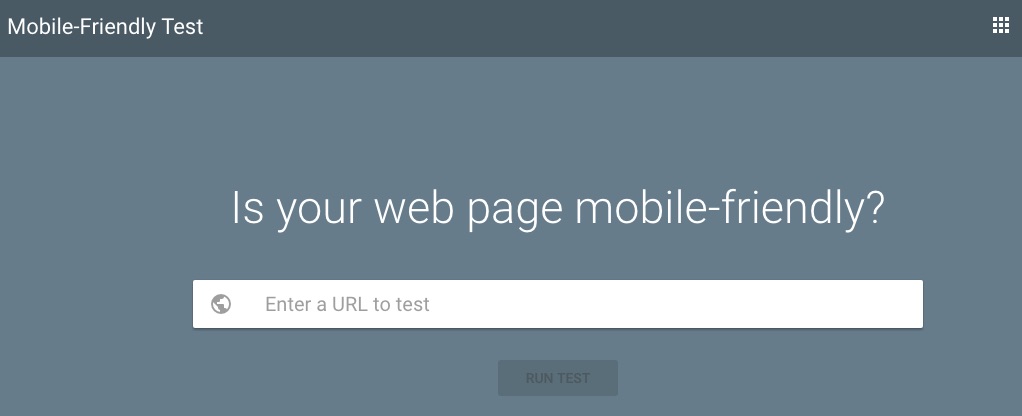
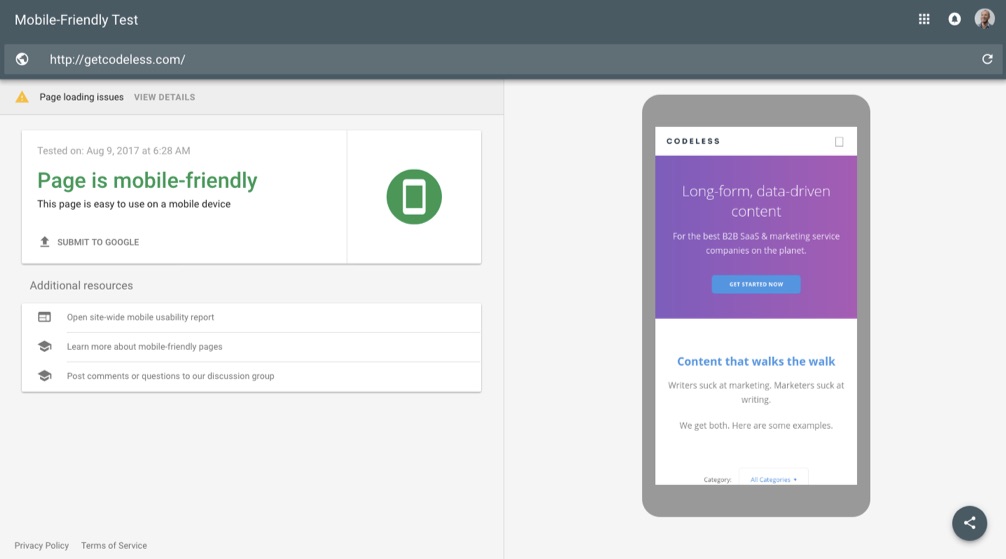
If you want to see how mobile-friendly Google thinks your site is, try using their mobile-friendly site tester.

Simply drop in your URL to get the quick verdict. The thumbs up or down.

Green is good.

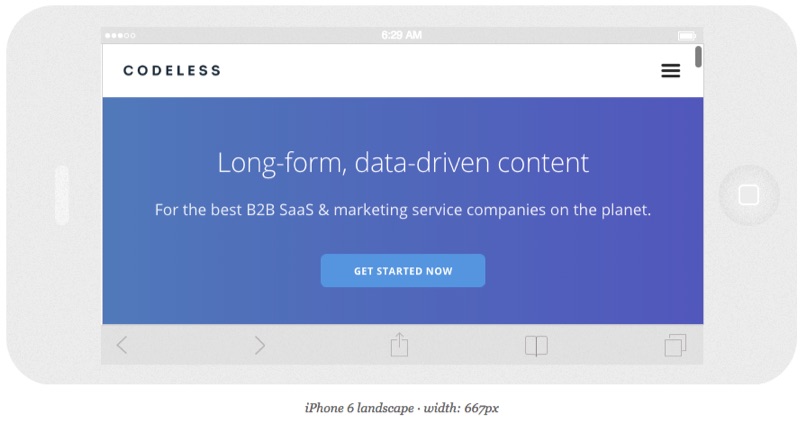
You can also use Responsinator to double check your findings. It will also preview how your site looks on several different devices.

Ideally, you want to see the site stretch wide across the device. You want to see the navigation menu collapse. And you want to see individual sections of your site rearrange on their own.

If those things aren’t happening or you see too much red in the tools above, try these tips below.

5 ways to optimize your existing mobile site

If you’re not sure your site is truly mobile-friendly (read: mobile-responsive), you have a few choices to make.

✅ 1. Create a mobile-optimized site.

The website’s built. Your boss/client just hired their best friend’s mother’s sister’s cousin who took a single HTML course in junior college to rebuild the entire thing.

Long story short: It ain’t changing anytime soon.

You may need to build a new mobile site that works seamlessly with your current site. Not ideal, but better than nothing.

✅ 2. Fix your mobile site’s layout.

If your site was made by selecting a template or theme from third-party website software, you can customize for mobile users.

If you’re on WordPress, for example, you can use a separate design for your mobile theme than for your desktop theme.

This enables you to provide a different user experiences rather than simply making a smaller version of your main design.

Plugins also abound for WordPress. The problem is that these often wreak havoc on your site speed.

Here’s why that’s important.

✅ 3. Optimize your mobile site for speed.

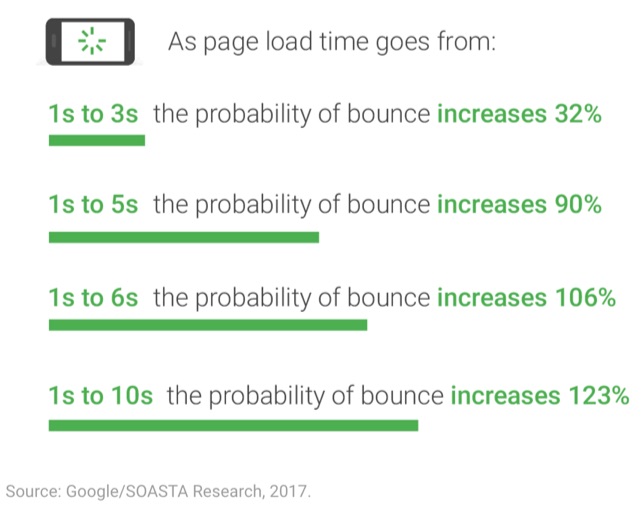
Almost all websites are too slow on mobile devices.

That finding comes from Google directly.

Image Source

Even if you don’t tweak the design or underlying architecture too much (though you really, really should), consider making changes that will make your mobile site faster and more usable.

This can include steps like:

  • Clean up & minify your site code
  • Compress & reduce files
  • Compress & crop images
  • Upgrade your servers & hosting
  • Minimize redirects, even 301s, when possible
  • Load scripts underneath page content

✅ 4. Measure the conversion roadblocks on your site.

You can run tests to see exactly where people are having problems on your website.

There are many, many things that need to happen before someone converts.

You have various micro-conversions. Then you have funnel or checkout steps. You can even run A/B tests. IF you have enough mobile traffic.

A certain percentage of visitors are going to drop off at each.

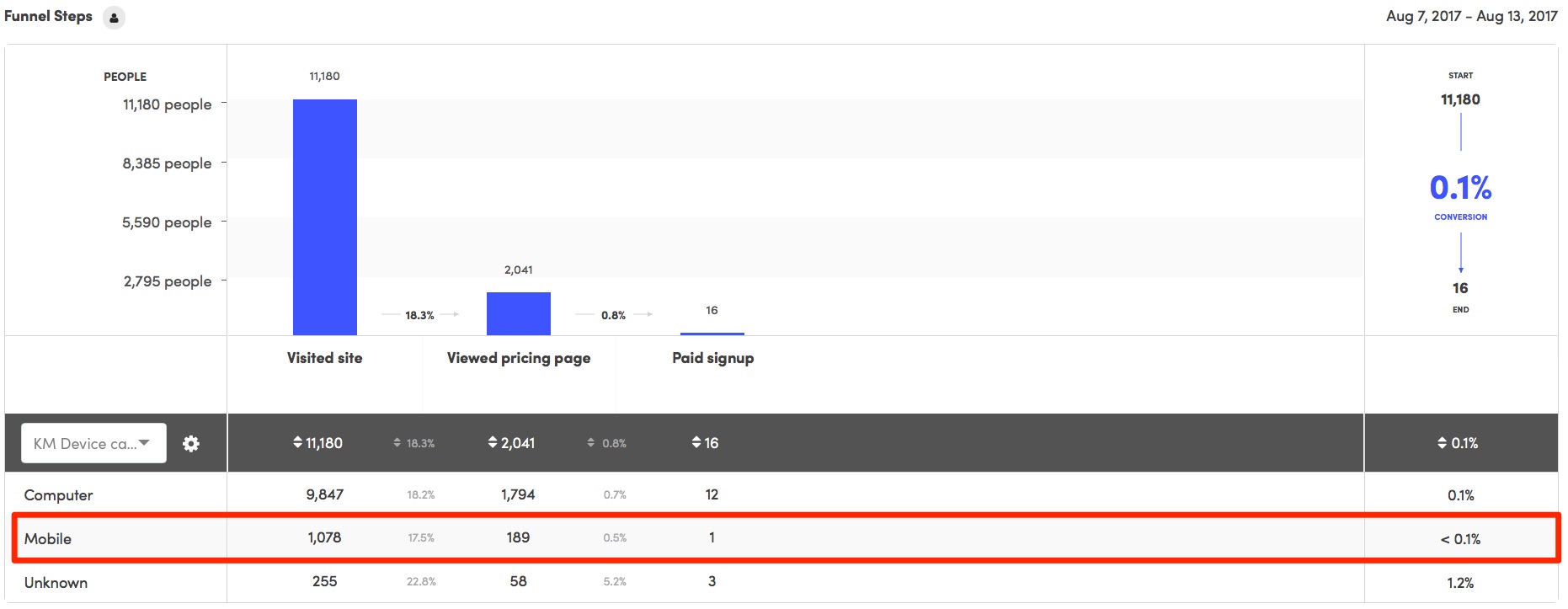
A Funnel Report can also quickly pinpoint these problem areas.

You can create a new funnel and segment the results by device category. So you’ll be able to pinpoint the difference in both conversions and conversion rate.

kissmetrics funnel report segmentation

After the funnel, you’re still not done, of course. This is just one conversion point, for example.

There’s still multiple interactions that need to take place. That means you might need multiple landing pages and/or funnels after the fact before someone converts.

The trouble is that this quickly becomes difficult with most (bad) websites.

My favorite sneaky alternative?

Fire up a new site or tool to augment/replace these problem areas. Like your HubSpots or Unbounces of the world.

BUT, pay for them out of your own pocket or budget.

That keeps them out of the clutches of the “I Tried” department who will otherwise make your life a living hell. And most upper management literally has no idea what’s going on.

If they don’t know what a DNS is, you’re probably good to go.

Hey — we have jobs to do! Our livelihood depends on it.

One time we even spun up a new WordPress site on Godaddy to create a convenient workaround.

Are you honestly willing to let your own success be determined by people that literally have no idea what they’re talking about?

Pay the $99/month out of your own pocket. Slay the results. Get a raise paying you an extra $1,000/month because you just made the company $10,000/month.

If they won’t raise you, I will. #realtalk

It’s mean on the streets.

✅ 5. Simplify your website.

Simple websites almost always convert better.

There’s no need for the fancy stuff. Please don’t use carousel sliders. Or god forbid, parallax.

I can’t find a study on this, but I’m willing to bet that a static HTML site would convert better than most “sophisticated” ones.

It would also load faster and be easier to navigate, too.

Or just pay Squarespace.

You think I’m joking. Kinda. Sorta.

But then at least you know they work across all devices.

Conclusion

You might be able to visit a website from your mobile device.

But that doesn’t truly make it mobile-friendly.

And mobile-friendly makes a difference when you consider what matters most: Traffic, visibility, customer experience, and conversions.

Go verify this right now. The traffic and conversions from mobile vs. desktop should be all you need.

Then run your site through simple tools to diagnose what’s wrong and what needs to be fixed.

You might not be in a position to change your site. The Powers at Be might not sign off.

So get crafty. There’s workarounds if you know where to look.

Redesign pieces of your current site. You can use actual mobile-friendly templates and layouts. Even substitute pieces of your funnel with better tools.

Sometimes it’s better to ask for forgiveness than permission.

Especially when your job and financial well being are on the line.

About the Author: Brad Smith is the founder of Codeless, a B2B content creation company. Frequent contributor to Kissmetrics, Unbounce, WordStream, AdEspresso, Search Engine Journal, Autopilot, and more.