Will Smith is not just a pretty face. Nor is he just a likeable, talented actor.
He’s a businessman and a master marketer. The only Hollywood star that predictably gets over $20 million per flick. Even his movies that didn’t get good reviews, like Hancock and Suicide Squad, grossed over half a billion each worldwide. Wouldn’t you just love the worst of your ventures to make half a bill?
So, what’s the secret to Smith’s success? How has he chosen just the right way to focus his time, attention and resources?
Is it down to luck? An innate knack for making good decisions? Or an unwieldy drive to succeed?
These factors have played their roles, I’m sure. But Will applied a much smarter, more calculated method to propel himself to stardom. One that your company can – and should harness the power of, in order to drastically increase your customer acquisition and retention.
The answer is: analytics.
It’s the skill of observing what your prospects and customers do and have done in the past, using this to predict what they will do, want and need in the future. Then make smart marketing decisions based on this info, to maximize your profits and dominate your market (just like Will Smith).
In short;
Glance back over your shoulder before you plan new things.
This article will reveal how Smith did it, how Amazon is doing it, and how your company should do it.
The Fresh Prince of Analytics
When Will Smith first ventured into the world of Hollywood movies (from within the clutches of Uncle Phil’s tyrannous reign) he and his manager sat down and analyzed the ten highest grossing movies of all time, looking for patterns.
They analyzed what moviegoers (his target customers) did in the past to determine what they would do in the future. So that they could put Will Smith right where the money would be.
At the time, they found that ten out of ten of the top movies had special effects, nine out of ten had aliens and eight out of ten had a love story involved.
Next stop – Independence Day and Men in Black.
In no time at all, Will Smith became a household name.
That’s a simple example of the power of this technique. In marketing today – especially digital marketing – it’s all-important. It really is the key to consistently better decisions.
Let’s look at exactly how effectively using your data to predict your customer actions can boost your revenue and profits.
Three Ways Analytics Impacts Your Bottom Line
1. It Increases Your Leads & Prospects
Analytics allows you to see, repeat and expand on what works best to boost:
a. Your Leads
You can find and qualify leads better to know which ones are most likely to become paying customers. We get this by observing patterns in firmographic data (data from the company your lead works for), demographic data, geographic data, psychographic data and through the analysis of the industry and economy.
In other words; who they work for, who they are, what’s going on behind the lights, where they live, and what’s up in their world. All five areas, will give you clarity on where to find the most and best leads.
b. Your Prospects
Once a lead starts showing active interest they become a prospect. It’s getting hotter. They’ve seen the trail of breadcrumbs and are on their way toward you.
Analytics can tell you how to maximize your prospects from the five data types plus extra information your sales team learns while interacting with your customers.
A 10% increase in leads or prospects is a 10% increase to your bottom line (if your conversion rate remains the same).
2. It Increases Your Conversions
Mastering analytics can help you polish the method, frequency, and quality of interactions with your prospects. Refining each piece, cranking those conversions up and up.
It takes qualifying prospects to a whole new level of detail. By turning all important factors into data (such as the prospect’s level of need for the service, their budget, their level of authority, and much more), your sales people can quickly focus where the focus is needed most.
As the skill and precision of your qualifying, sales and closing techniques increase, so does your revenue.
A 10% increase in sales conversions is a 10% increase to your bottom line.
3. It Increases Your Average Customer Value (Purchase Size & Lifetime Value)
Amazon is the grand master of upselling and cross-selling.
Their ‘frequently bought together’ feature and recommendation system have arguably been one of the key ingredients in their world-dominating success story. Amazon uses data to automatically customize the browsing experience for its customers based on their past purchases, and optimize sales. So in a nutshell, Amazon’s analytics tells them what customers frequently buy together and they simply (and automatically) pass this info onto their customers, to help them out – which their customers absolutely love.
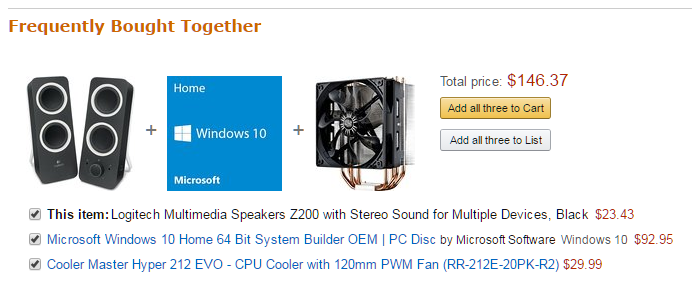
That’s right, good cross-selling is a service, not an imposition! So don’t be shy about it.
And that goes the same for upselling. Almost all customers are interested in at least knowing the options to upgrade.
Think how often you encounter this, from fast food restaurants offering super-sizing to high class airlines offering seat upgrades. If you don’t want the upgrades, that’s fine, but at least you’ll know what’s available and the cost to upgrade.
These successful upsells should give you some food for thought:
Dollar Shave Club
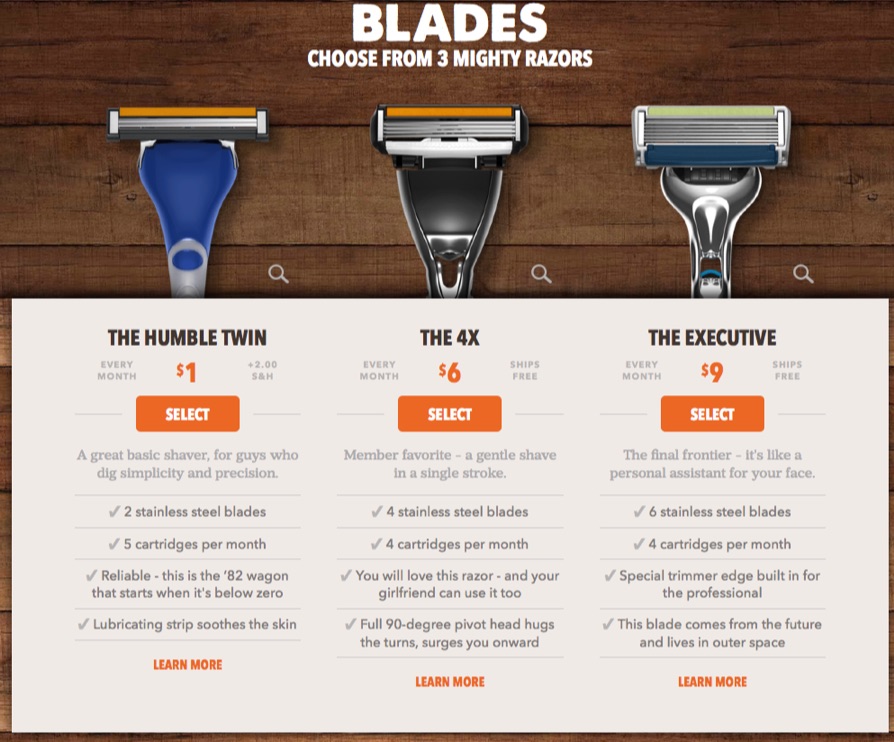
Dollar Shave Club lures its customers in with an incredibly clever name. But of course, they’d prefer you spend a little more than a dollar. And they encourage you to do exactly that, by lining up their “humble” one-dollar razor against some more appealing, more expensive options. Notice how they’ve dropped in some social proof to make this middle option even more enticing (using the words “member favorite”)?
Spotify
Spotify uses a similar, common (and effective) technique. The ‘free’ option here seems pretty bleak next to that juicy ‘recommended’ Premium option, with its colorful design and that long list of ticks. Don’t you agree?

Like Amazon, if you use analytics well, you will know from past customers exactly what extra offers to show your customer, in a way the customer appreciates. These are people already buying from you, which means they like your company already. Of course some of them will be happy to buy a little more. And a little more. And a little more.
Again, a 10% increase in average purchase size is a 10% increase to your bottom line.
Plug that Leak
Two other ways to boost the average value of your customer are to increase how frequently they buy from you and also reduce the number of customers leaving you.
By analyzing your metrics – such as the conversion rates of your cross-sell email campaigns or social media ads – you can understand what methods of communication and marketing are enticing your customers to buy from you more often. So you can expand on this.
It’s an easy stat to boost as, again, these customers already trust and use your service. Customers buying from you five times a year on average, instead of four times a year, is a 25% jump in revenue. Yet without analytics, it’s an area of marketing most people neglect. Make sure you don’t!
And if your bucket has a hole, let’s plug it before pouring in more water.
According to the Harvard Business Review, the cost of acquiring a new customer is five to twenty five times that of holding onto an old one. Yet both have an equal impact on your revenue.
Analytics will help you refine your methods for keeping customers longer (for example, by identifying and getting rid of mistakes that are driving them away – showing you the spinach in your teeth) and bringing back those who have already left.
Once more – a 10% increase in average lifetime value is (yep, you guessed it) a 10% increase to your bottom line.
The Wonderful Power of Cumulative Increases
I love this part. If you hit all three of these figures with a 10% increase, you get a 30% boost to revenue, right?
Wrong!
You get a 33.1% increase.
The initial 10% increase makes your revenue 110% of what it was before. The next 10% increase on that makes it 121% of what it was before. And the next 10% increase makes it 133.1% in total.
That is the power of cumulative growth.
And that’s only a little 10% boost from your analytics. A 20% boost to each is a 72.8% total increase in revenue. A 30% boost to each is a 119.7% total increase. A 40% boost to each is…
Starting to look pretty cool, wouldn’t you say?
See how the little things add up and make your bottom line more buxomly?
Turbocharge your Content Strategy
Apart from the numbers at the top end of the funnel, analytics also make it very easy to improve and streamline your content marketing strategy. You can always know what to say and say it so that people love it.
By plugging into social media and analytics tools, you can quickly see patterns in what content gets liked, clicked, downloaded and shared the most. From ebooks to posts to videos to Tweets. The full shebang.
Always know what’s hot or not with a glance at your dashboard!
Because of this, knowing what to talk about just becomes easy. You become the conversational master of your industry. The heart of the party, not the awkward wallflower in the corner.
And of course, with a better understanding of what your target prospects actually want to read/hear/watch, you can create content which attracts, engages and converts more. And yes, that means faster growth, more leads, more conversions, more sales, more profits, more money, bigger houses, etc.
So, How Exactly Can You Start Making the Most of Analytics?
To put it simply, you need to set up systems that collect data for you – data about your prospects, customers, market trends, methods and sales techniques. Data about everything. You need to arrange this in a way that is simple for you to glance at and see helpful patterns emerge.
When you have this system set up, you can make decisions and then watch the impact on your bottom line. If the impact is good, you can go further in that direction. If it’s not, stop.
It’s that simple.
It’s really all about being able to see the 20% of customers, offers and activities that get you 80% of your results. Then focusing on that 20%.
It’s all about efficiency. If Mr. Pareto were still around, he would love analytics.
Two Tools that Nail It
There’s a lot of noise about analytics tools out there, so let’s keep it simple. Here are two useful tools you can start with. Check them out, test them out, and see what works for you.
Kissmetrics
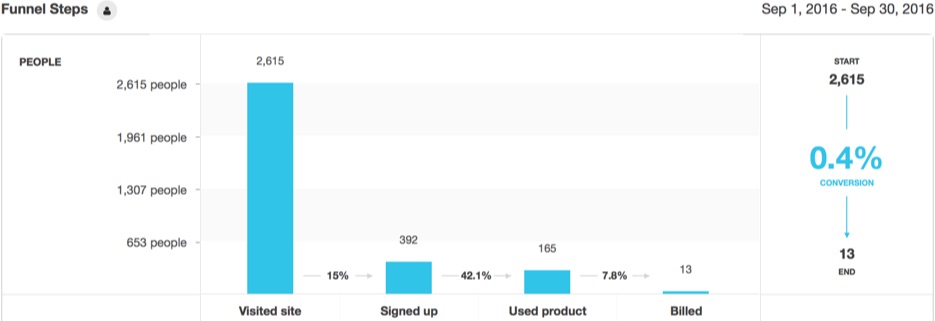
Kissmetrics is a great choice for detailed and easy analytics. It creates profiles for customers across all devices. It tells you about customer behavior, response to product features, etc. It tells you where people drop off in your funnel and how segment behavior changes over time, and more. A tiptop tool to start with.
Google Analytics
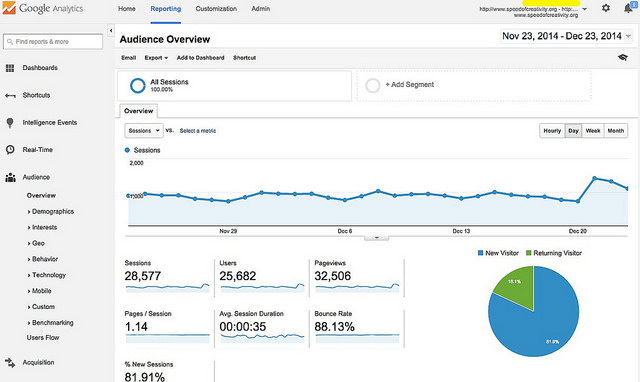
Google Analytics works well as a simpler introduction to analytics. You can start with Goals, an underused feature of Google Analytics. You tell it even very specific actions on your site to track (time-on-page, opt-ins, video plays, add to carts, anything really), the tool tracks it and displays it in Google’s usual easy-to-follow format. That’s the free option, you can also upgrade to Google Analytics 360 for a more comprehensive online-only tracking platform.
This is a Story All About How…
Let your journey of analytics analysis begin. I guarantee it will add a twist to your company story (a good twist, not a Game of Thrones twist).
It really is one of the surest ways to crank up your revenue, your content quality, and understand your customer and business better than your competition. Because when you have a solid system in place you can see patterns with ease that your competitors miss. Day in, day out.
And those three key revenue stats really are worth paying attention to! Making changes and measuring results is easy when you keep track of your leads, prospects and average lifetime values.
It makes you more secure too. You can understand and pinpoint profit problems, quick as an F1 mechanic fixing a Lotus, mid-race.
Don’t let the jargon around this topic put you off. Everyone is just trying to sound clever. Remember, you’re just doing it like Will Smith and Amazon – look to the past, take what works, put it into play, and watch your profits grow.
Good luck!
-Konrad
About the Author: Konrad is the CEO and Content Strategist at The Creative Copywriter, and has a pretty darn creative noggin on his shoulders. His gang of word-slingin’ cowboys know how to compel, convince and convert customers with words. Download his Fluff-Free Guide to Content Strategy here, for free.


source https://blog.kissmetrics.com/analytics-like-will-smith/

 Social media sites have had a pretty interesting year when it comes to approaching filter bubbles and echo chambers and the real world effects that come when they effect something like a national election. Verrit is a fledgling media startup that’s aiming to provide a platform for Hillary supporters to look at infographics with quotes on them about stuff they agree with. Verrit got a…
 About a month ago, Twitter rolled out a new feature that would show you a bunch of random shit in your notifications tab. For example, if a couple of people that you follow liked a tweet, it’d show up in your notifications tab. If someone followed someone else, boom! There it was in your notifications tab. If people you follow start tweeting about the same topic or article… well,…


 Twitter bots – robots that interact with humans – have a long history. The Twitter API is fairly easy to use (I made a bot that plays Zork with a friend two years ago) and there is little protection against creating new accounts automatically. This ease of use used to be great for programmers but now Twitter has a huge bot problem. Bots have expanded beyond the traditional tactics.…
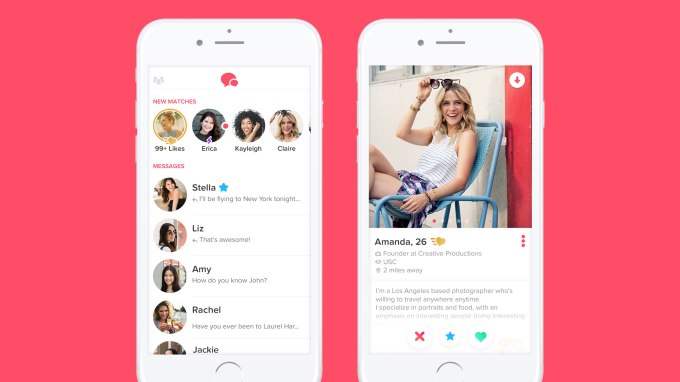 Tinder has hit number 1 in the App Store’s top grossing category for the very first time. Claiming top spot in the App Store likely has to do with the global launch of Tinder Gold, which lets users see who has liked them without swiping at all, among other premium features. Tinder’s initial foray into monetization came in 2015 with the launch of Tinder Plus, which lets users…